---
title: 理解响应式图片:从像素到DPR
date: 2025-07-24
excerpt: 🤖 本文介绍了像素概念及其在网页设计中的应用。首先区分了物理像素和CSS像素,解释了像素密度(PPI)和设备像素比(DPR)的概念,随后探讨了响应式图片的实现方法,包括图片的渲染尺寸与固有尺寸的关系,以及使用srcset属性根据设备DPR或视口宽度提供合适图片资源的技术
tags:
- Web
- Responsive
- Image
- srcset
- LCP
- Browser
- HTML
cover: https://assets.vluv.space/cover/FrontEnd/responsive_image.webp
updated: 2026-05-08 22:10:51
---
## 关于像素
### Pixel
- **Physical Pixel**: 屏幕上一个最小的发光单元
- **CSS Pixel**: 物理测量单位。1 像素等于 1/96 inch
1 inch = 2.54 centimeters,描述屏幕尺寸时,12.9 inch 意思是屏幕对角线长度为 12.9 inch,即 32.766 cm
### Resolution & Pixel Density
- **Resolution** 分辨率: 描述一块屏幕/图片横纵各 Pixel 数量,单位 px(pixel)
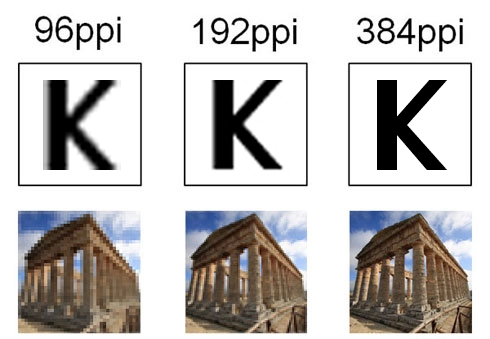
- **Pixel Density** 像素密度:描述显示器清晰度的规则,一般以 PPI 为单位,Pixels Per Inch,即**显示设备上每英寸含有多少个物理像素**
以 iPad 12.9-inch 为例,分辨率为 2048x2732,可以计算出 PPI 为 $\sqrt{2048^2 + 2732^2} / 12.9 \approx 264$
相同尺寸下,通过减少像素之间的距离(也就是更多的物理像素),可以提高显示效果。偶尔也可以在购物网站上看到这个参数——Pixel Pitch,即显示屏上两个相邻像素的之间的距离
### Device Pixel Ratio (DPR)
大多数产品的像素密度是 96 PPI,可以得到:$\text{1 CSS Pixel} = \frac{1}{96} inch = \text{1 Physical Pixel}$
但随着移动端设备的发展,出现了高像素密度的显示屏,设备物理像素不再与 CSS 像素相同,前面提到的 iPad Pro-12.9 Inch 就是一个例子。它的$devicePixelRatio$即为 $ 264 / 96 \approx 2.83$
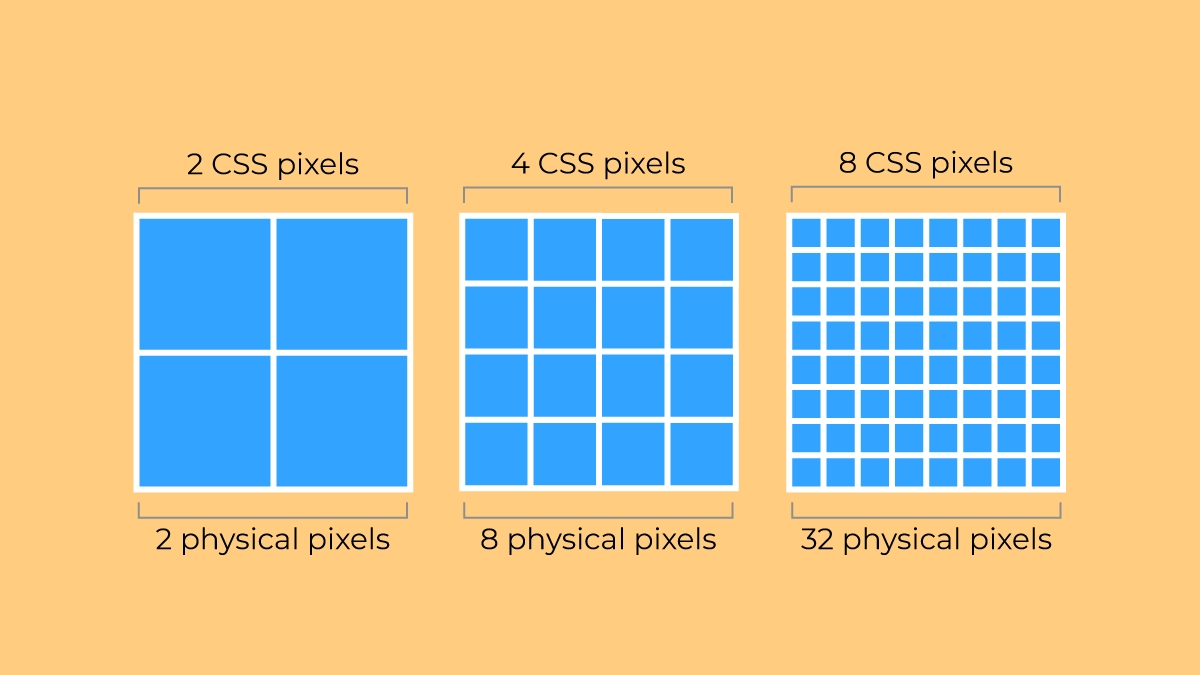
因此引入了**devicePixelRatio**这一概念,它将设备物理像素和 CSS 像素联系起来,如此,在 CSS 里设置像素值时就不用考虑设备的差异了。
[Device Pixel Ratio - Oxyplug](https://www.oxyplug.com/optimization/device-pixel-ratio/#what-is-devicepixelratio)中列举了常见的设备的 DPR:
| Name | Phys. width and height | CSS width and height | Pixel ratio |
| ---------------------------- | ---------------------- | -------------------- | ----------- |
| Apple iPhone 16 Pro Max | 440 x 956 | 1320 x 2868 | 3 |
| Apple iPhone 7, iPhone 8 | 750×1334 | 375×667 | 2 |
| Apple iPhone 6+, 6S+, 7+, 8+ | 1080×1920 | 414×736 | 3 |
| Apple iPod Touch | 640×1136 | 320×568 | 2 |
| Samsung S24 | 1080 x 2340 | 360 x 780 | 3 |
| Samsung Galaxy S8+ | 1440×2960 | 360×740 | 4 |
| Samsung Galaxy S7, S7 edge | 1440×2560 | 360×640 | 4 |
| Motorola Nexus 6 | 1440×2560 | 412×690 | 3.5 |
| Sony Xperia Z3 | 1080×1920 | 360×598 | 3 |
| Xiaomi Redmi Note 8T | 1080×2340 | 393×775 | 2.75 |
| Xiaomi Redmi Note 5, 6 | 1080×2160 | 393×739 | 2.75 |
| Blackberry Leap | 720×1280 | 390×695 | 2 |
你可以在 DevTools 的 console 中打印 `window.devicePixelRatio` 查看当前设备的 DPR:
Your device's pixel ratio is:
## Responsive Image
### Rendered Size & Intrinsic Size
在 DevTools 中可以看到图片的两个重要尺寸:Rendered Size 和 Intrinsic Size
- Rendered Size:表示图片文件的大小,这里以 CSS px 为单位,例如 `879x500`表示图片在浏览器中显示时宽 879 个 CSS px,高 500 个 CSS px
- Intrinsic Size:表示图像文件自身的像素尺寸,单位为图像像素(Image Pixel),例如 `2048x1000`表示图片宽有 2048 个像素,高有 1000 个像素。
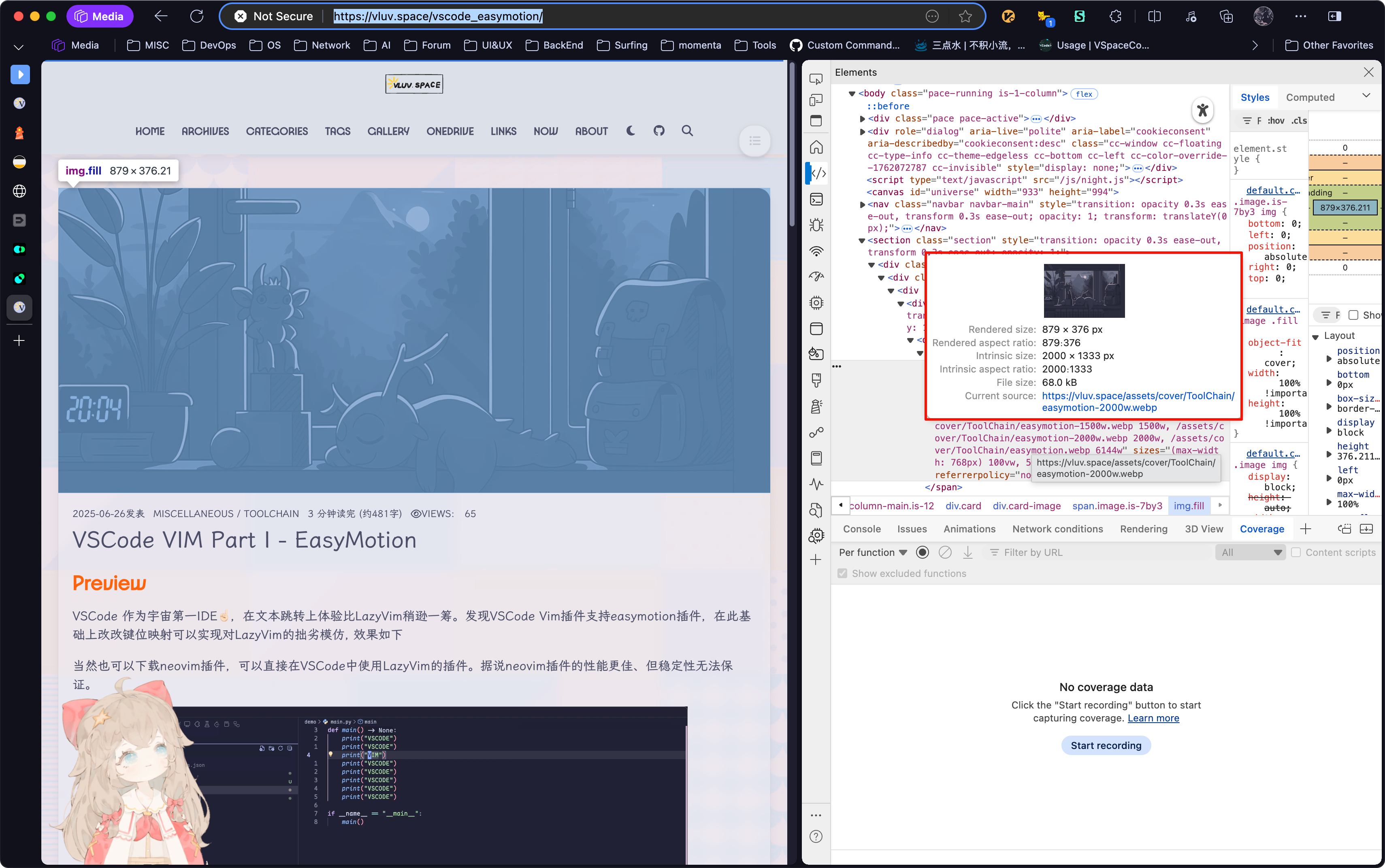
理想情况下,应该有 $\text{Render Size} \times DPR \approx \text{Intrinsic Size}$
- $\text{Rendered Size} \times DPR \gt \text{Intrinsic Size}$
- 浪费带宽,影响 Performance
- $\text{Rendered Size} \times DPR \lt \text{Intrinsic Size}$
- 图片分辨率太小,可能导致模糊或失真
> [!tip]
>
> 对于 Hexo 博客,可以参考[[lcp_optmization#Server Responsive Images]],避免浪费带宽和影响性能。
### Srcset
基于上述像素概念,我们可以使用 `srcset` 属性来为不同设备提供合适分辨率的图片资源。`srcset` 允许我们根据设备的 DPR 或视口宽度来提供不同的图片源。
#### 使用 `x` 描述符(基于 DPR)
这个很简单,直接告诉浏览器在不同的 DPR 下使用哪个图片。
```html
 ```
#### 使用 `w` 描述符(基于视口)
当图片宽度随视口变化时(流式布局),可以使用 `w` 描述符。告诉浏览器每个图片的真实宽度(单位是图像像素),浏览器会根据当前的 DPR、视口大小以及 `sizes` 属性计算出最适合加载的图片资源,从而实现图片的响应式加载。
```html
```
#### 使用 `w` 描述符(基于视口)
当图片宽度随视口变化时(流式布局),可以使用 `w` 描述符。告诉浏览器每个图片的真实宽度(单位是图像像素),浏览器会根据当前的 DPR、视口大小以及 `sizes` 属性计算出最适合加载的图片资源,从而实现图片的响应式加载。
```html
 ```
## Ref
- [Window: devicePixelRatio property - Web APIs | MDN](https://developer.mozilla.org/en-US/docs/Web/API/Window/devicePixelRatio)
- [Responsive Images - A Reference Guide from A to Z | ImageKit.io](https://imagekit.io/responsive-images/#chapter-5---srcset-with-sizes)
- [Responsive Images Done Right: A Guide To And srcset — Smashing Magazine](https://www.smashingmagazine.com/2014/05/responsive-images-done-right-guide-picture-srcset/)
- [HTMLImageElement: srcset property - Web APIs | MDN](https://developer.mozilla.org/en-US/docs/Web/API/HTMLImageElement/srcset)
- [Image Sizing: Intrinsic vs. Rendered Size | DebugBear](https://www.debugbear.com/docs/intrinsic-vs-rendered-size)
- [分不清 HiDPI 和 Retina 显示器?― 认识 4K 时代的像素密度 | 艺卓](https://www.eizo.com.cn/global/library/basics/pixel_density_4k/index.html)
```
## Ref
- [Window: devicePixelRatio property - Web APIs | MDN](https://developer.mozilla.org/en-US/docs/Web/API/Window/devicePixelRatio)
- [Responsive Images - A Reference Guide from A to Z | ImageKit.io](https://imagekit.io/responsive-images/#chapter-5---srcset-with-sizes)
- [Responsive Images Done Right: A Guide To And srcset — Smashing Magazine](https://www.smashingmagazine.com/2014/05/responsive-images-done-right-guide-picture-srcset/)
- [HTMLImageElement: srcset property - Web APIs | MDN](https://developer.mozilla.org/en-US/docs/Web/API/HTMLImageElement/srcset)
- [Image Sizing: Intrinsic vs. Rendered Size | DebugBear](https://www.debugbear.com/docs/intrinsic-vs-rendered-size)
- [分不清 HiDPI 和 Retina 显示器?― 认识 4K 时代的像素密度 | 艺卓](https://www.eizo.com.cn/global/library/basics/pixel_density_4k/index.html)