---
title: Enable Autocompletion for Lua API with Stub Files
date: 2025-11-11
tags:
- Lua
- Sketchybar
- LSP
- VSCode
- Neovim
excerpt: 本文记录如何让IDE支持识别 Sketchybar 模块的类型,适用于 VSCode,Neovim,JetBrains IDEs
---
在 macOS 上使用 **Sketchybar** 进行状态栏自定义时,可以使用 [FelixKratz/SbarLua](https://github.com/FelixKratz/SbarLua) 提供的API与SketchyBar进行交互:
```lua
local wifi = SBAR.add("wifi", "item")
wifi:set({ label = "My Wife" })
```
但该模块由 C 编写,编译后是二进制文件 `sketchybar.so`,[Lua 语言服务器(Lua LS)](https://luals.github.io/) 无法像读取Lua文件那样对其分析,因此无法其提供的API进行补全,类型提示
## Use Stub Files
> A *stub file* is a file containing a skeleton of the public interface of that Python module, including classes, variables, functions – and most importantly, their types.
>
> from Stub files —— mypy 1.18.2 documentation
与Python社区的做法类似:
1. 创建*stub file*
2. 在文件中编写类型定义
3. 配置 Lua LS (VSCode可以自动识别,NeoVim需要手动配置)
### Lua 类型定义文件
在Sketchybar配置目录下创建 `./@types/sketchybar.lua`,添加`@meta`将文件标记为元文件[^1]
注解语法见 [Lua Language Server | Wiki](https://luals.github.io/wiki/annotations/)
```lua @types/sketchybar.lua
---@meta
---@class SketchybarItem
---@field name string
local SketchybarItem = {}
---@param key string
---@param value any
---@return SketchybarItem
function SketchybarItem:set(key, value) end
-- ... 省略其他方法定义 ...
---@class Sketchybar
local Sketchybar = {}
--- Creates a new Sketchybar item.
--- The `name` is the identifier of the item, if no identifier is specified, it is generated automatically
---@overload fun(type: "item"|"space"|"alias", name?: string, properties: table): SketchybarItem
---@overload fun(type: "bracket", name?: string, members: table, properties: table): SketchybarItem
---@overload fun(type: "slider"|"graph", name?: string, width: number, properties: table): SketchybarItem
---@overload fun(type: "event", name: string, notification?: string): SketchybarItem
---@return SketchybarItem
function Sketchybar.add(type, ...) end
return Sketchybar
```
### 配置 Neovim LSP 识别类型库
在 `Sketchybar` 配置目录下创建 `./.luarc.json`,在 `workspace.library` 中添加类型定义文件路径:
```lua
{
"workspace.library": ["${workspaceFolder}/@types"],
}
```
## 效果演示
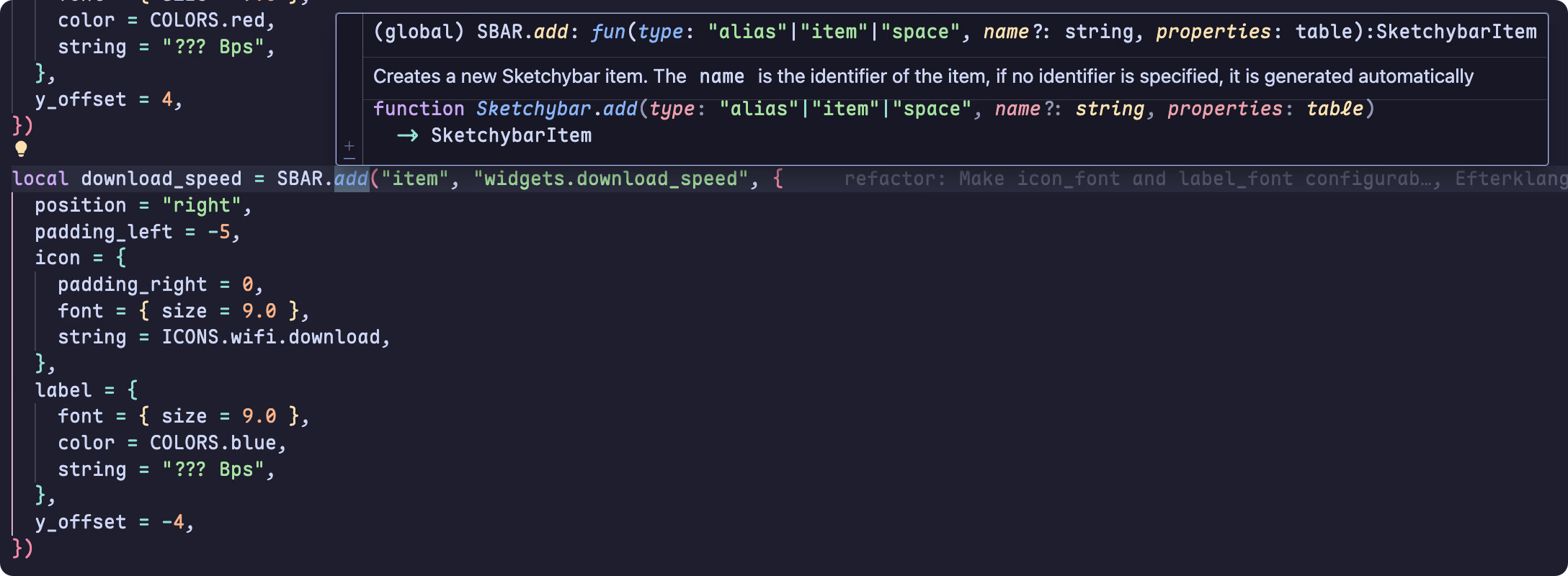
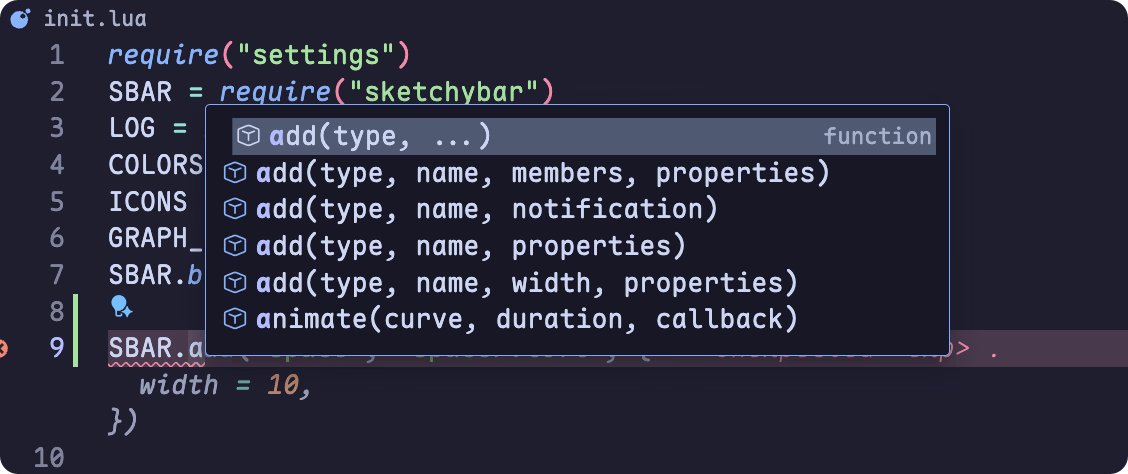
完成上述步骤后,VSCode可以正确的进行代码补全和悬停提示:
[^1]: Marks a file as "meta", meaning it is used for definitions and not for its functional Lua code. It is used internally by the language server for defining the built-in Lua libraries . If you are writing your own definition files, you will probably want to include this annotation in them. [Lua Language Server | Wiki](https://luals.github.io/wiki/annotations/)