Consolidate Your Project Commands With Just
Modern project development often involves multiple languages and frameworks, each requiring different commands and tools for tasks such as building, testing, linting and formatting.
- Build:
go build,vite build… - Test:
go test ./...,bun run test… - Lint & Format:
biome check . --write - …
Just, a general command runner written in Rust 🦀, allows you to consolidate these scattered commands into a configuration file called justfile. These encapsulated tasks are referred to as recipes
Why Use Just
To understand the value of Just, let’s compare it with traditional solutions:
- Manual Typing or Searching History Commands: Frequently typing or using Ctrl + R to search history commands, which is inefficient and error-prone.
- Writing Shell Scripts: Writing entry scripts (e.g.
main.sh) to manage multiple commands, it comes with serveral limitations:- Missing features: To build a user-friendly script, a significant amount of development time is required to implement advanced features like command-line arguments parsing, shell auto-completion (need a lot of work to support a variety of shells such as Nushell which i’m currently using, Zsh, Powershell etc.) and mixing scripts written in different languages (e.g. using Python to batch renaming files).
- Poor reusability: While you can write a script to encapsulate multiple commands, it’s not easy to reuse them across different projects. You need to copy-paste the script or create symlinks, which is maintenance-intensive. Also, most windows users do not have
bashinstalled by default, which makes it even harder to run shell scripts. - Documentation maintenance: Self-made shell scripts usually lack a specific standard, requiring separated documentation to explain how to use it.
To summary, Just addresses at least the following pain points:
- Feature completeness: Just supports all the basic features you may need, including command-line arguments parsing, shell auto-completion, and mixing scripts written in different languages via shebangs.
- Reusability: just is distributed as a single binary, which means you can install it on any machine with a compatible operating system.
- Documentation maintenance: Whether the project is written in Rust or Python, you can run
just --listwhich will automatically list all available tasks, along with comments for each recipe. That is to say, you don’t need to maintain a separate documentation for your tasks.
Basic Usage
To install Just, refer to the Packages page in the Just Programmer’s Manual.# For example, on macOS, you can install it via Homebrew:$ brew install just# On Windows, you can install it via Scoop$ scoop install just
Quick Demo
Consider a project separated into a Vue 3 frontend and a Golang backend. The project structure is as follows:├── client│ ├── package.json│ ├── src│ └── vite.config.js├── justfile├── README.md└── server ├── go.mod ├── go.sum ├── main.go └── scripts
Typically, you launch the frontend server with vite (or bun run dev if use npm scripts [1]) and start the backend server by running go run main.go.# List all available recipesdefault: just --listinit: frontend-init backend-init# Install frontend dependencies[working-directory: 'client']frontend-init: bun install# Start the frontend development server[working-directory: 'client']frontend: bun run dev# Tidy and download Go module dependencies[working-directory: 'server']backend-init: go mod tidy# Start the backend server[working-directory: 'server']backend: go run main.go
Here is a breakdown of the justfile:
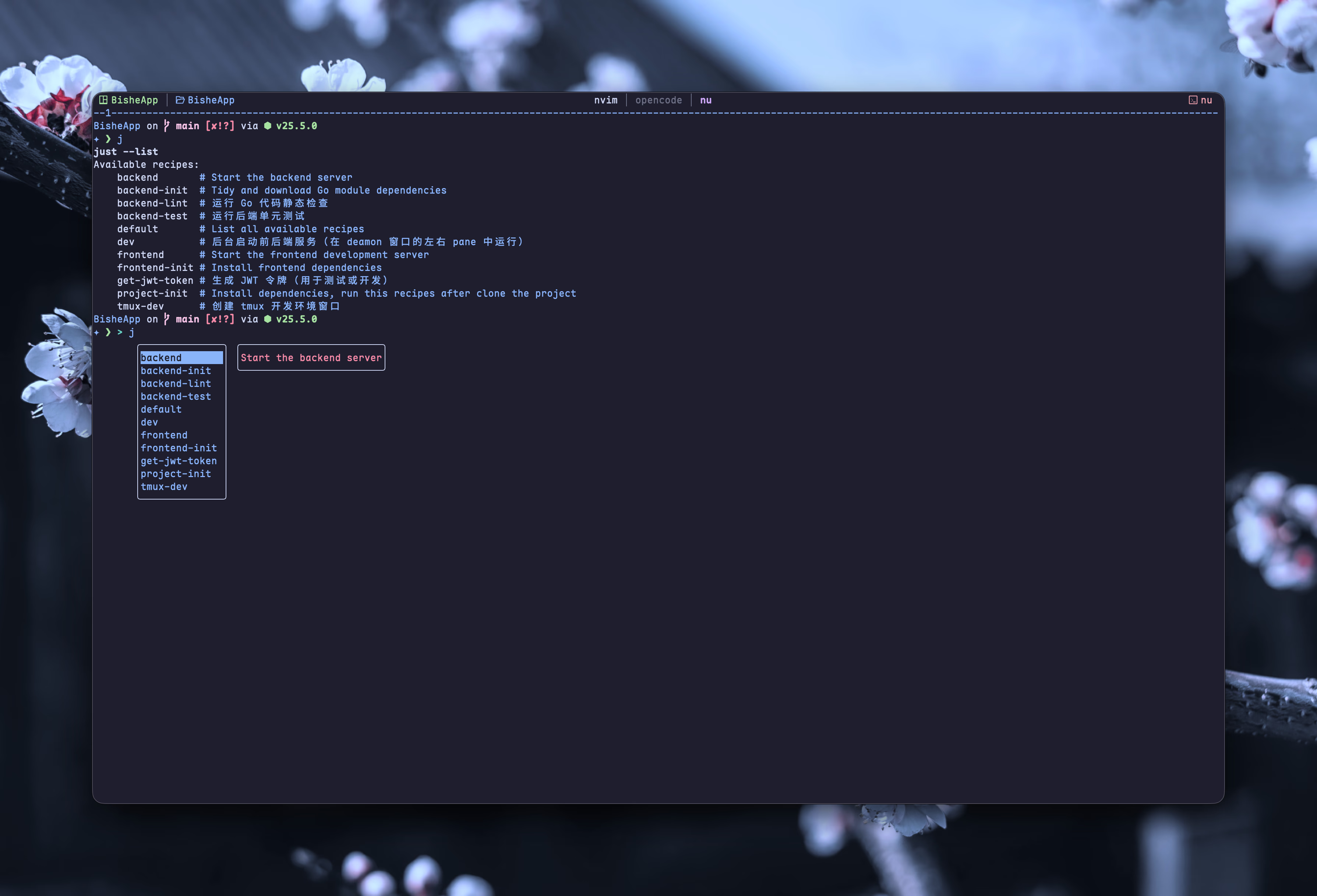
- Recipe Comment: Add comments starting with
#above a recipe. These appear next to the recipe name when you runjust --listor use Tab for autocomplete. - Working Directory: Use the
[working-directory: 'dir']syntax to specify the execution directory. For example,frontendrecipes run inclient, whilebackendrecipes run inserver. - Dependencies: Define dependencies using the
recipe-name: dependencysyntax. (e.g. theinitrecipe depends onfrontend-initandbackend-init, ensuring they run first)$ just initbun installbun install v1.3.8 (b64edcb4)Checked 218 installs across 295 packages (no changes) [37.00ms]go mod tidy - Recipe Name: Define names like
frontend-initorbackend. Run them individually viajust <recipe-name>. Thedefaultrecipe runs automatically if you executejustwithout arguments.
Handling Multi-line Logic in Justfile
A common pitfall in just is that each line in a recipe is executed as a separate shell process. This means variables defined on one line won’t persist to the next.[2]
To write complex logic (like our Nushell script), use a Shebang Recipe. This tells just to treat the entire block as a single script; Or you can escape newlines with slashes
Advanced
Recipe with Parameter
In a justfile, you can define recipes that accept command-line arguments by placing the variable name after the recipe title. To use these arguments inside your recipe, you wrap them in double curly braces: {{argument_name}}.
Also, you can prefixed parameter with a $ it will be exported as environment variables# 1. Parse the URL path using Nushell's structured data engine# 2. Construct the rclone path and execute the deletion[group: 'image']delete-asset $url: #!/usr/bin/env nu let filename = ($env.url | url parse).path; let target = $"bit_s4:vluv-space($filename)"; print $"[INFO] Preparing to delete: ($target)"; rclone deletefile $target print $"[DONE] Task completed"
For detail, read Recipe Parameters - Just Programmer’s Manual
Tips
- Run
just --chooseto fuzzy-find recipes via fzf - Add
[group: 'dependency']above a recipe to set its group; this setting affects how recipes are displayed when runningjust --list - Run any recipe with
just <recipe>or open the Justfile withjust --edit(orjust -e) from any subdirectory —justautomatically searches upward and finds the nearestJustfile
Enhance Workflow with Tmux
Terminal multiplexers like tmux allow you to create new window or split the window into multiple panes via command line interface. If you use kitty or zellij, you can do so with their respective commands.
Here are two recipes I use to set up the development environment:
- tmux-dev: Rename the current window to
daemonand split it into two panes, then create two additional windows—one foropencodeand one fornvim - dev: Start the backend and frontend servers in the two panes of the
daemonwindow - stop-dev: Stop the backend and frontend services
tmux-dev: #!/usr/bin/env bash # Get the current tmux session name SESSION=$(tmux display-message -p '#S') # Create the daemon window with 2 panes tmux rename-window daemon tmux split-window -t $SESSION:daemon -h # Create the nvim window tmux new-window -t $SESSION -n nvim # Create the opencode window tmux new-window -t $SESSION -n opencode# Start backend and frontend services in the background (running in daemon window's left and right panes)dev: #!/usr/bin/env bash SESSION=$(tmux display-message -p '#S') # Start backend in daemon window's left pane tmux send-keys -t $SESSION:daemon.1 'just backend' Enter # Start frontend in daemon window's right pane tmux send-keys -t $SESSION:daemon.2 'just frontend' Enter echo "✓ Backend started in daemon.1" echo "✓ Frontend started in daemon.2"# Kill backend & frontend servicesstop-dev: #!/usr/bin/env nu ps --long | where command == "go run main.go" | first | kill $in.pid ps --long | where command == "bun run dev" | first | kill $in.pidConclusion
Just transforms how you manage project tasks across different languages & frameworks. By centralizing commands in a single justfile with clear documentation & reusable recipes, you reduce friction during development setup & execution.
The same idea is used in package.json scripts and Makefiles, but I choose Just for its simplicity, rich features and comprehensive docs.
Whether you’re working on a simple Golang project or managing complex multi-service architectures, Just provides a lightweight, portable solution that works consistently across macOS, Linux, & Windows. Start with a basic justfile today & gradually expand it as your project grows.
The
"scripts"property of yourpackage.jsonfile supports a number of built-in scripts and their preset life cycle events as well as arbitrary scripts. These all can be executed by runningnpm run <stage>. Pre and post commands with matching names will be run for those as well (e.g.premyscript,myscript,postmyscript). Scripts from dependencies can be run withnpm explore <pkg> -- npm run <stage>. docs.npmjs.com/cli/v11/using-npm/scripts ↩︎
Consolidate Your Project Commands With Just