---
title: Web Authentication & Authorization
date: 2024-10-17
excerpt: "From cookies to JWT: how the web works around HTTP's statelessness, and the trade-offs each step inherits."
tags:
- Web
- Authentication
- Authorization
lang: en
i18n:
cn: /web_auth
translation: 2
updated: 2026-05-25 19:05:12
---
HTTP is stateless: every request arrives at the server in isolation, and the server has no memory of who showed up a second ago. But almost everything useful on the web *is* stateful: login, shopping carts, user preferences. Every web authentication scheme is, at its core, answering the same question:
> How can the client carry "who am I" along with every request, and how can the server believe it?
Different schemes make different choices about *where the identity lives*, *how it travels*, and *how the server verifies it*. Out of those choices come Cookie, Session, and Token. This post walks through them in the order they appeared, and points out the trade-offs each step adds.
## A few terms used throughout
- **Authentication** confirms "who you are." Username + password, SMS codes, fingerprints all belong here.
- **Authorization** decides "what you can do" given that you've already been authenticated. It's usually driven by roles or permission groups.
- **Credentials** are the proof of identity a user presents, things like passwords, API keys, access tokens.
- **Single Sign-On (SSO)** lets a user log in once and access a set of mutually trusted applications. For instance, logging into a central NetEase account also unlocks its sub-sites without another login.
Cookie, Session, and Token are *tools* used in authentication flows. They are not authentication itself.
## Cookie: a vehicle for information
Cookies are often mistaken for "a login mechanism." They are not. A cookie is a **key-value storage carrier** between the browser and the server. The browser stores it locally and automatically attaches it to subsequent requests for the same domain.
The workflow is short:
1. The server adds a `Set-Cookie` header to a response, planting some K-V data in the browser.
2. The browser stores it.
3. On the next request to the same domain, the browser automatically sends those K-Vs back in the `Cookie` header.
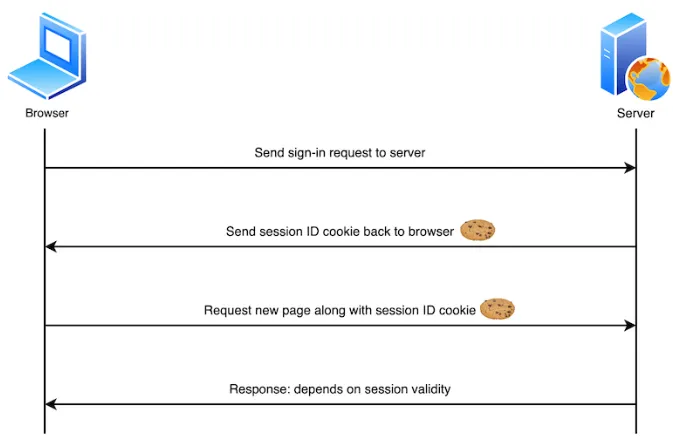
Each cookie carries a set of attributes that govern its visibility and lifetime:
| Attribute | Purpose |
| ----------------- | --------------------------------------------------------------------------------------------- |
| `Name` / `Value` | The identifier and its value. `Name` is fixed after creation; binary `Value` needs BASE64. |
| `Domain` / `Path` | Which URLs can access it. `Domain=.example.com` makes it visible to all subdomains. |
| `Max-Age` | Expiry in seconds. `0` deletes immediately; absent or negative means session-only. |
| `Secure` | Sent only over HTTPS. |
| `HttpOnly` | Inaccessible to JavaScript, which blocks XSS exfiltration. |
| `SameSite` | Controls whether cookies travel with cross-site requests; helpful against CSRF. |
Cookies are used for many things: session maintenance, remembering preferences, ad tracking, carrying auth tokens with requests. The cookie itself is just a transport-and-storage channel; "security" depends on what you put in it.
Cookies have a long history but a small budget (~4KB each), and they ride along with every request. Modern browsers offer storage primitives better suited to other jobs:
| Mechanism | Rough capacity | Persistence | Auto-sent with requests |
| ----------------- | ---------------- | ------------------------------------ | ----------------------- |
| Cookie | ~4KB per cookie | Determined by `Max-Age` | Yes |
| Local Storage | ~5–10MB per origin | Persists until explicitly cleared | No |
| Session Storage | ~5–10MB per origin | Cleared when the tab closes | No |
| IndexedDB | Typically several GB | Persists until explicitly cleared | No |
Rule of thumb: small identity/session data that needs to ride with the request goes in cookies; larger frontend-only data goes in Local Storage or IndexedDB.
CORS (Cross-Origin Resource Sharing) blocks cookies from being shared across origins by default: a cookie set by `example.com` cannot be read by `otherdomain.com`.
Sharing across subdomains requires setting `Domain` to the parent domain. Across genuinely different origins, the server has to set `Access-Control-Allow-Credentials: true` and the cookie needs `SameSite=None` (which also forces `Secure`). Each of these flags loosens a restriction, so they must be paired with other defenses.
## Session: the server remembers you
With cookies as the transport, the next question is *where the state lives*. The most intuitive answer is to keep it on the server and hand the client only a **pointer**. That is Session.
The flow:
1. After successful login, the server creates a Session record (in memory, a file, or a database) and gives it a unique `Session ID`.
2. The server writes the Session ID into the browser using `Set-Cookie`. The Java Servlet spec names this cookie [JSESSIONID](https://christopher-neve.com/what-is-a-jsessionid-in-java/).
3. Each subsequent request brings the cookie back automatically; the server looks up the Session and restores the user's identity.
4. Sessions have a lifetime, either a fixed TTL or a sliding window. Expired sessions are destroyed.
```mermaid
sequenceDiagram
participant Browser as browser
participant WebServer as webserver
participant Database as database
Note over Browser: Login flow
Browser->>WebServer: POST /login (name:gjx,pwd:admin)
activate WebServer
Note over WebServer,Database: Verify credentials
WebServer->>Database: SELECT * FROM users WHERE name='gjx'
activate Database
Database-->>WebServer: User data (id:001, name:gjx, password_hash)
deactivate Database
Note over WebServer: Verify password
WebServer->>WebServer: Verify password hash
Note over WebServer,Database: Create session
WebServer->>Database: INSERT INTO sessions (session_id, user_id, created_at) VALUES ('qwe0asd', 001, NOW())
activate Database
Database-->>WebServer: Session created successfully
deactivate Database
WebServer->>Browser: Response (Set-Cookie:SESSION_ID=qwe0asd)
deactivate WebServer
Note over Browser,WebServer: Session established
Browser->>WebServer: GET /dashboard (Cookie:SESSION_ID=qwe0asd)
activate WebServer
Note over WebServer,Database: Validate session
WebServer->>Database: SELECT user_id FROM sessions WHERE session_id='qwe0asd' AND expired_at > NOW()
activate Database
Database-->>WebServer: Valid session (user_id: 001)
deactivate Database
WebServer->>Browser: Return dashboard page
deactivate WebServer
Note over Browser: User reaches the dashboard
```
This works beautifully on a single machine: the server owns the state and can mutate, expire, or attach anything to it at will. The trouble begins in two scenarios.
**Clients with cookies disabled.** Some embedded clients have no cookie support, or users turn them off. Fallbacks include URL rewriting (e.g. `?sid=xxx`) or hidden form fields. Both are more fragile than cookies, because URLs leak into logs, the Referer header, and clipboards.
**Horizontal scaling.** Once you go from one server to many, the question "which machine has this user's session?" becomes real. There are three classic answers, each with its own bill:
- **Sticky sessions**: the load balancer pins each user to the same server. Simple, but if a server dies, every session it held is gone.
- **Session replication**: every server keeps a full copy of all sessions and they sync with each other. No single point of failure, but the sync cost grows worse than linearly with the number of nodes.
- **Shared session store**: sessions live in something like Redis, accessible to every server. The most common choice, but it introduces a new critical dependency.
The third option is the most common in production, and it's also where Token starts to look attractive. If every request has to hit a shared store anyway, why not let the client carry the state itself?
## Token: an independent client-side credential
Session embeds the credential in the browser's cookie mechanism so it rides along with every request automatically. Token takes the other path: pull the credential out into a standalone string, and have the client put it into an HTTP header **explicitly** on every request.
Once the credential leaves the cookie machinery behind, authentication is no longer constrained by browser rules. Mobile apps, third-party integrations, cross-origin calls, CLI tools, anything that speaks HTTP can carry a token directly.
A token is usually sent in `Authorization: Bearer `. It can also go in the request body or a cookie, but putting it in a cookie reintroduces CSRF risk (see below).
### Opaque tokens vs. self-contained tokens
"Token" is a broader category than people often realize, and internally it splits into two quite different designs:
- **Opaque token**: just a random meaningless string. When the server issues it, it also records a mapping between the string and the user info in its own storage. When the client sends it back, the server uses the string as a key to look up the user info from the backend (in-memory, Redis, database). From the server's point of view this is almost identical to Session: state still lives on the server; only the transport changed from cookie to an explicit HTTP header. OAuth 2.0's default-issued access tokens and traditional API keys fall into this category.
- **Self-contained token**: the user info is encoded directly into the token, with a signature protecting its integrity. The server no longer looks anything up; it verifies the signature and decodes the payload to read the user info. This is what truly flips the direction of storage: state moves from the server into the token itself, and the server can become stateless, free from the shared-storage bottleneck that limited horizontal scaling. **JWT** is the most popular implementation here.
Lining these up with Session makes the picture clearer:
| Type | What the client holds | Server lookup needed? | Typical use case |
| -------------------------- | --------------------- | --------------------- | ---------------------------- |
| Session | Session ID | Yes | Traditional monolithic webapp |
| Opaque token | Random string | Yes | OAuth, API key |
| Self-contained token (JWT) | Encoded JWT string | No, just verify sig | Microservices, SPA, mobile |
Session and opaque tokens are surprisingly close at the server level. The difference is mostly about *how the token travels* (automatic cookie vs. explicit header) and *who issues and manages it*. The real new capability, "stateless servers", comes from self-contained tokens like JWT.
The flow below shows JWT specifically:
```mermaid
sequenceDiagram
participant Browser as browser
participant WebServer as webserver
participant Database as database
Note over Browser: Login flow (JWT)
Browser->>WebServer: POST /login (name:gjx,pwd:admin)
activate WebServer
Note over WebServer,Database: Verify credentials
WebServer->>Database: SELECT * FROM users WHERE name='gjx'
activate Database
Database-->>WebServer: User data (id:001, name:gjx, password_hash)
deactivate Database
Note over WebServer: Verify password
WebServer->>WebServer: Verify password hash
Note over WebServer: Generate JWT
WebServer->>WebServer: Sign JWT (user_id=001, exp=...)
WebServer->>Browser: Response (JWT Token)
deactivate WebServer
Note over Browser,WebServer: Client stores JWT (localStorage or cookie)
Browser->>WebServer: GET /dashboard (Authorization: Bearer )
activate WebServer
Note over WebServer: Verify JWT
WebServer->>WebServer: Verify JWT signature & expiration
alt Token valid
Note over WebServer: Decode user info from JWT
WebServer->>Browser: Return dashboard page
else Token invalid/expired
WebServer->>Browser: 401 Unauthorized
end
deactivate WebServer
Note over Browser: User reaches protected resource
```
Notice that the second request does not touch the database; verification happens entirely in the CPU. That is the most substantial difference between JWT and Session.
### Access token and refresh token
Once a token is issued, the server cannot easily revoke it unilaterally. That's the price of statelessness. Industry practice usually pairs two tokens:
- **Access token**: short-lived (minutes to hours), sent with every business request. Even if stolen, the attacker's window is small.
- **Refresh token**: long-lived, used only against the auth service to mint new access tokens. It does not participate in business requests, so it can sit in a safer spot (HttpOnly cookie, or only transmitted on trusted endpoints).
This preserves stateless scalability while keeping "leak risk × time" within reason.
## JWT: the canonical self-contained token
As noted above, **JWT (JSON Web Token)** is the most common self-contained token format. A JWT looks like three base64url-encoded segments joined by dots:
```text
xxxxx.yyyyy.zzzzz
│ │ │
header payload signature
```
**Header** declares the token type and signing algorithm:
```json
{
"alg": "HS256",
"typ": "JWT"
}
```
**Payload** carries "claims", a mix of standard and custom fields:
```json
{
"sub": "1234567890",
"name": "John Doe",
"admin": true,
"exp": 1735689600
}
```
The common standard claims:
| Field | Meaning |
| ----- | ------------------------------------------------------ |
| `iss` | Issuer |
| `sub` | Subject (the user) |
| `aud` | Audience (the intended recipient) |
| `exp` | Expiration timestamp |
| `nbf` | Not Before timestamp |
| `iat` | Issued At timestamp |
| `jti` | JWT ID; useful for one-time tokens or denylist entries |
**Signature** is computed by the server with a secret over `header.payload`, and is used to detect tampering:
```text
HMACSHA256(
base64UrlEncode(header) + "." + base64UrlEncode(payload),
secret
)
```
> [!WARNING]
>
> `secret` is the signing key, never to be exposed to the client. When verifying, the server recomputes the signature with the same key (or public key) and compares it to the one in the token.
One point that needs emphasis: **JWT is signed, not encrypted**. The payload is base64url-encoded, not enciphered; anyone holding the token can decode and read it. So:
- Do not put sensitive data like passwords or phone numbers in the payload.
- If you must store sensitive fields, encrypt the contents yourself before placing them in.
### Pros
- **Stateless verification**: any service holding the key can verify independently, without consulting a central session store.
- **Cross-domain, cross-service**: a natural fit for microservices and multi-platform architectures.
- **Compact**: base64url encoding keeps the size small enough to live comfortably in HTTP headers.
### Cons
- **Hard to revoke**. Once issued, it is hard to recall, which is the cost of being stateless. Common compromises are short-lived access tokens with refresh tokens; if you truly need instant revocation, you end up maintaining a denylist on the server (which drags state back, edging toward an opaque-token design).
- **Payload is readable**. Not a flaw, by design, but easy for implementers to misuse.
- **Key management responsibility shifts forward**. A leaked signing key means anyone can forge tokens for any user, so it must be treated as seriously as a database password.
## CSRF and XSS: where you put the token matters
People often claim "JWT is more secure than Session" or vice versa. In reality, security **depends on where the token lives and how it is sent**, not on the format of the token itself.
| Storage location | XSS risk | CSRF risk |
| ------------------------- | ----------------------------------- | -------------------------------------------------- |
| Cookie (HttpOnly) | Low (JS cannot read it) | High (browser auto-attaches, exploitable cross-site) |
| Cookie (HttpOnly+SameSite)| Low | Low |
| LocalStorage | High (any injected script can read) | Low (browser does not auto-attach) |
| `Authorization` header | Medium (depends on how it's held) | Low |
Notes:
- **XSS** (Cross Site Scripting): an attacker injects a script into your page to read your token. `HttpOnly` cookies block scripts from reading them; a JWT in LocalStorage has no defense.
- **CSRF** (Cross Site Request Forgery): an attacker tricks the user's browser into making a request to a trusted site; the browser attaches the cookie automatically, so the request looks legitimate. Putting the token in the `Authorization` header avoids this because the browser does not automatically add custom headers to cross-site requests. `SameSite=Lax/Strict` also blocks the exploit from the cookie side.
So "JWT prevents CSRF" only holds when the JWT is sent in the `Authorization` header. Stuff it into a cookie and the CSRF risk comes back.
## How to choose
- **Monolithic app, manageable traffic**: Session-Cookie is simple and reliable. You don't need JWT just because it's trendy.
- **Microservices / cross-origin / mobile**: a token is almost mandatory. Whether you pick opaque or JWT comes down to whether you're willing to trade revocability for stateless verification.
- **Tokens must be revocable on demand**: either use short access tokens with refresh tokens, or accept maintaining a denylist on the server (at which point an opaque token or a Session is often a more direct fit).
- **SSO**: an auth center issues tokens or session IDs and sub-sites trust them. The actual implementation (OIDC, SAML, or in-house) depends on your ecosystem.
Tech choices are rarely about "which is better" and more about "which constraints match your situation." Once you've thought through where the state lives, where it can scale, and what its attack surface is, the decision tends to make itself.
## Ref
- [HTTP cookie — Wikipedia](https://en.wikipedia.org/wiki/HTTP_cookie)
- [Using HTTP cookies — MDN](https://developer.mozilla.org/en-US/docs/Web/HTTP/Cookies)
- [Cookies vs. LocalStorage: Storing Session Data and Beyond](https://supertokens.com/blog/cookies-vs-localstorage-for-sessions-everything-you-need-to-know)
- [What is a JSESSIONID in Java](https://christopher-neve.com/what-is-a-jsessionid-in-java/)
- [jwt.io — Introduction to JSON Web Tokens](https://jwt.io/introduction)
- [JSON Web Token Tutorial — Ruan Yifeng (zh)](https://www.ruanyifeng.com/blog/2018/07/json_web_token-tutorial.html)
- [JavaGuide — Session-Cookie across multiple servers (zh)](https://javaguide.cn/system-design/security/basis-of-authority-certification.html)
- [Frontend Security Series II: How to Prevent CSRF (Meituan, zh)](https://tech.meituan.com/2018/10/11/fe-security-csrf.html)