
Install
This mainly uses the Custom UI Style extension, which injects custom CSS into VS Code.
The CSS I wrote uses some non-built-in fonts, which need to be installed manually, including SF Pro (San Francisco) and Maple Mono NF CN.
- Font: SF Pro, Maple Mono NF CN
- Extension: custom-ui-style
Download the CSS file, open the VS Code settings file (Ctrl+Shift+P, then enter Preference: Open User Settings (JSON)), and add the following:{ "custom-ui-style.external.imports": [ // Method1: Local file, replace the path "file:///Users/gjx/Projects/dotfiles/application/vscode/custom.css" // Method2: Remote file, directly reference the CSS file from my GitHub repository { "type": "css", "url": "https://raw.githubusercontent.com/Efterklang/dotfiles/refs/heads/main/application/vscode/custom.css", } ],}
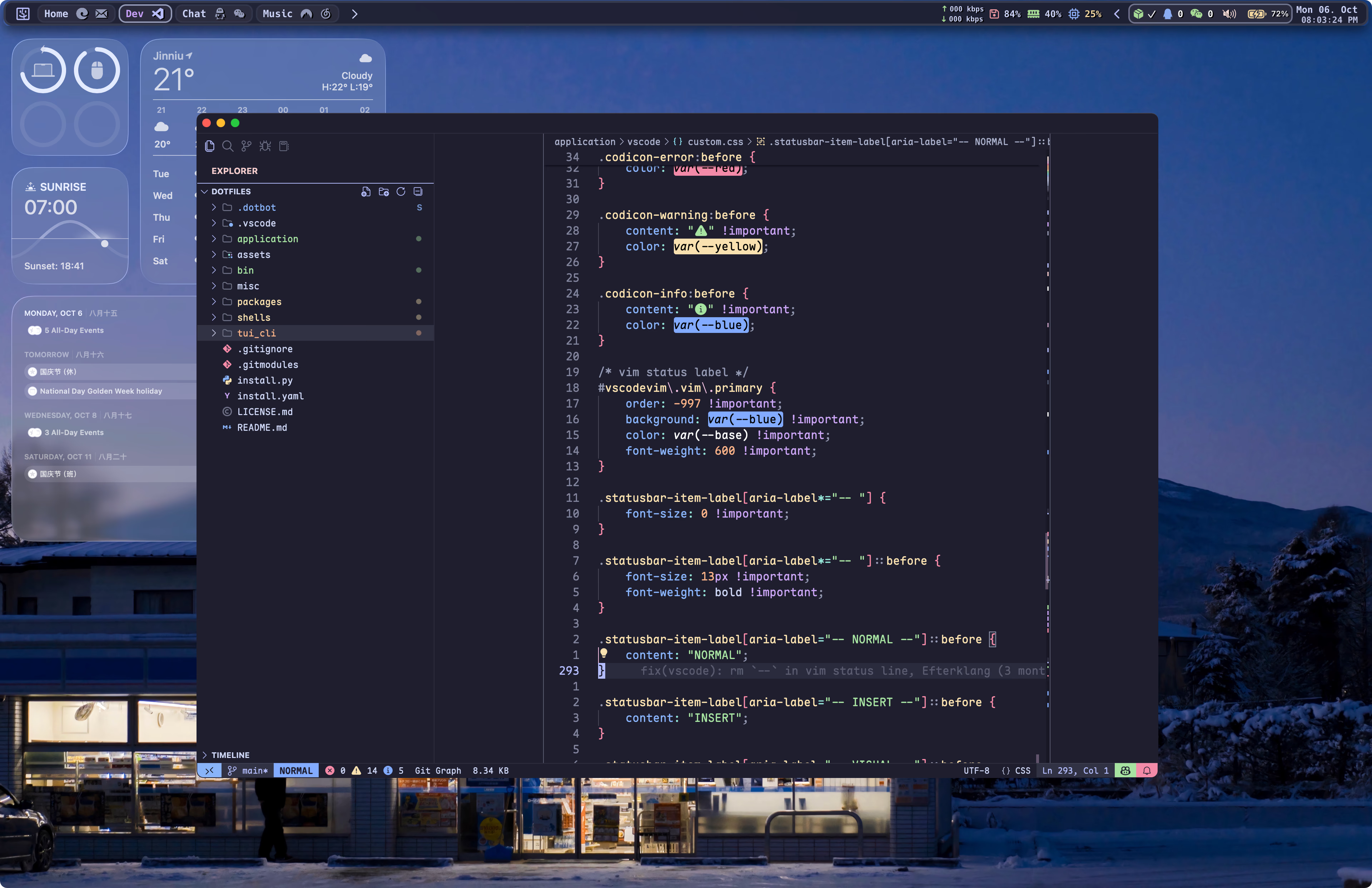
Preview
Customization Tutorial
Developer Tools
VS Code is an Electron app and includes Chromium DevTools, which is very helpful for debugging CSS. You can open it by running Developer: Toggle Developer Tools from the Command Palette.
Items
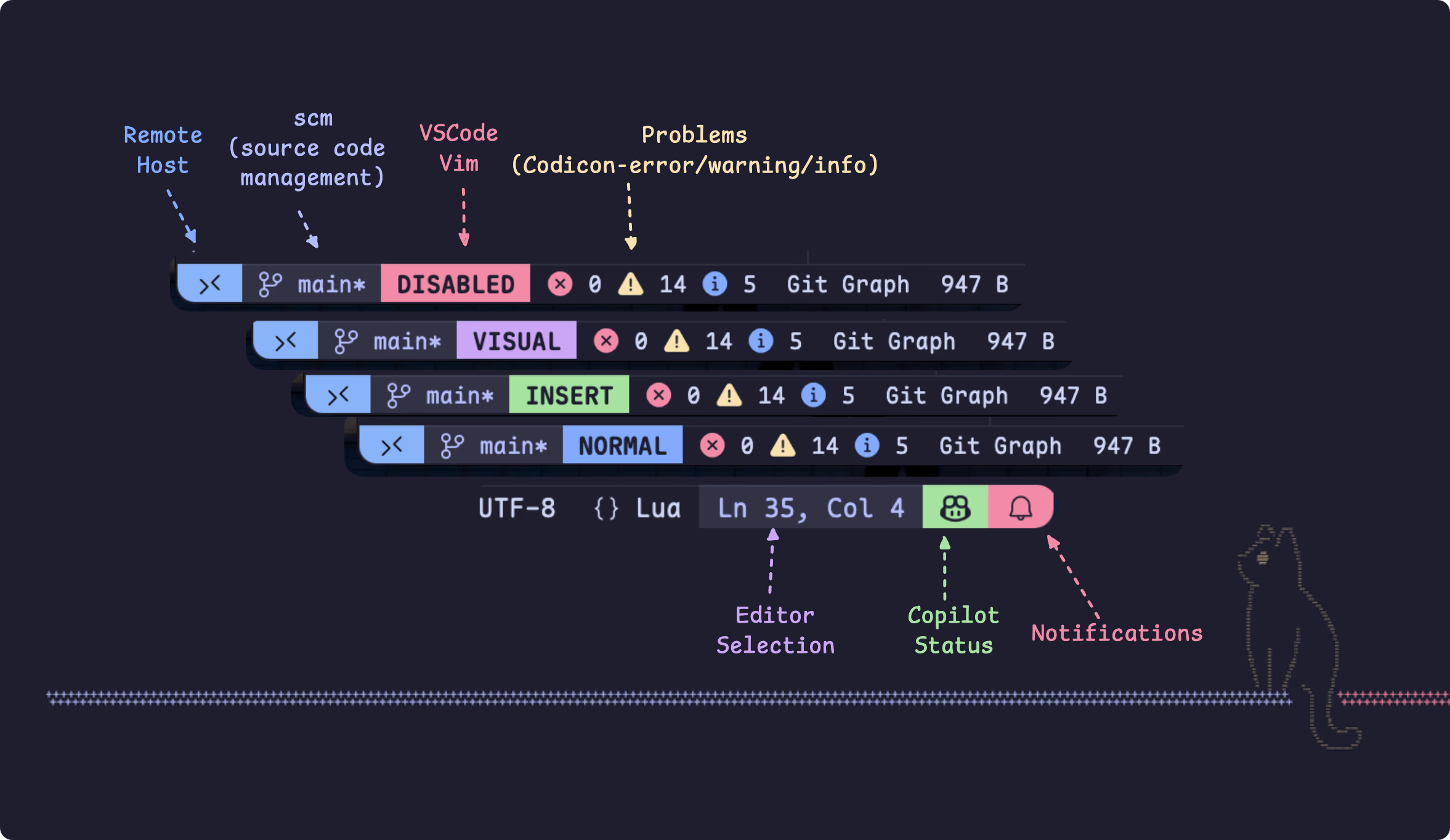
In the CSS, I mainly adjusted the following status bar items.
Left side
Remote Host: shows the currently connected remote host.SCM: shows current version control status, such as the git branch.Vim Mode: after installing VSCodeVim, this component shows the current Vim mode, includingNORMAL/INSERT/VISUAL, etc.Problems: shows the number of problems in the current file/project, includingError/Warning/Info, etc.
Right side
Editor Selection: shows the current cursor line and column.Copilot Status: shows Copilot status.Notifications: shows the current notification count.
The display order of the components above can be controlled with the order property:
- For components on the left side of the status bar, smaller
ordervalues appear farther left. - For components on the right side of the status bar, smaller
ordervalues appear farther right.
/* Left side of the status bar */#status\.host { order: -999 !important;}#status\.scm\.0,#status\.scm\.1 { order: -998 !important;}/* Right side of the status bar */div#chat\.statusBarEntry { /* copilot */ order: -998 !important;}#status\.notifications { order: -999 !important;}Font
Set the status bar font to Maple Mono NF CN.:root { --font-status-bar: "Maple Mono NF CN"; /* [!code ++] */}.statusbar { font-family: var(--font-status-bar) !important;}
VSCodeVim
There are two main changes:
- Use variables such as
var(--vscode-button-foreground)to customize component colors. - Remove separators from Vim Mode, for example replacing
-- INSERT --withINSERT.
#vscodevim\.vim\.primary { order: -997 !important; background: var(--vscode-terminal-ansiBrightBlue) !important; font-weight: 600 !important; color: var(--vscode-button-foreground);}.statusbar-item-label[aria-label*="-- "] { font-size: 0 !important;}.statusbar-item-label[aria-label*="-- "]::before { font-size: 13px !important; font-weight: bold !important;}.statusbar-item-label[aria-label="-- NORMAL --"]::before { content: "NORMAL";}.statusbar-item-label[aria-label="-- INSERT --"]::before { content: "INSERT";}.statusbar-item-label[aria-label="-- VISUAL --"]::before,.statusbar-item-label[aria-label="-- VISUAL LINE --"]::before,.statusbar-item-label[aria-label="-- VISUAL BLOCK --"]::before { content: "VISUAL";}.statusbar-item-label[aria-label="-- VIM: DISABLED --"]::before { content: "DISABLED";}#vscodevim\.vim\.primary[aria-label="-- INSERT --"] { background: var(--green) !important;}#vscodevim\.vim\.primary[aria-label="-- VISUAL --"],#vscodevim\.vim\.primary[aria-label="-- VISUAL BLOCK --"],#vscodevim\.vim\.primary[aria-label="-- VISUAL LINE --"] { background: var(--mauve) !important;}#vscodevim\.vim\.primary[aria-label="-- VIM: DISABLED --"] { background: var(--red) !important;}#vscodevim\.vim\.showcmd[aria-label="<ExtensionDisable>"] { display: none !important;}Error/Warning Icons
The original Problems icons were rather plain, so I replaced their colors and icons.
To display these icons correctly, install the SF Pro font.
.codicon-error:before,.codicon-warning:before,.codicon-info:before { font-family: "SF Pro" !important; font-size: 13px; vertical-align: text-top !important;}.codicon-error:before { content: "" !important; color: var(--vscode-problemsErrorIcon-foreground);}.codicon-warning:before { content: "" !important; color: var(--vscode-problemsWarningIcon-foreground);}.codicon-info:before { content: "" !important; color: var(--vscode-problemsInfoIcon-foreground);}MISC
For other components, such as Remote Host, Editor Selection, and Copilot Status, the changes are mainly color adjustments:#status\.notifications { background: var(--vscode-terminal-ansiRed) !important; color: var(--vscode-button-foreground); order: -999 !important; margin-right: 0 !important; padding-right: 2px !important;}/* Other components... */