---
title: "Tmux Floating Panes: Temporary Tasks Without Context Switching"
date: 2025-10-07
excerpt: Tmux Popup Display/Menu & Floax Plugin
tags:
- Tmux
- Terminal
- TUI
- Catppuccin
- Productivity
- Workflow
- Ricing
cover: https://assets.vluv.space/cover/tmux_floating_pane.avif
lang: en
i18n:
cn: /tmux_floating_pane
translation: 2
updated: 2026-05-23 00:30:59
---
I've been trying out different terminal emulators lately, including:
- Windows Terminal
- ~~Wezterm~~: Slow cold start, dropped
- iTerm2
- Kitty
- Ghostty
Every terminal switch means re-learning and re-configuring a whole set of keybindings, which is tedious. So I use a terminal multiplexer like Zellij or Tmux to handle pane and tab management instead.
Zellij is quite full-featured and easy to configure, but it's incompatible with Yazi's image preview[^1], so I dropped it after a while.
### Why Popup?
The core idea of a popup/floating pane is a **temporary, lightweight, focused** interaction point.
Common short-lived terminal tasks — looking up a man page, scanning log output, making a git commit — traditionally require one of two approaches:
1. Open a new fixed pane/window → close it after the task → return to your workspace
2. Suspend the current task → run the temporary task → resume what you were doing
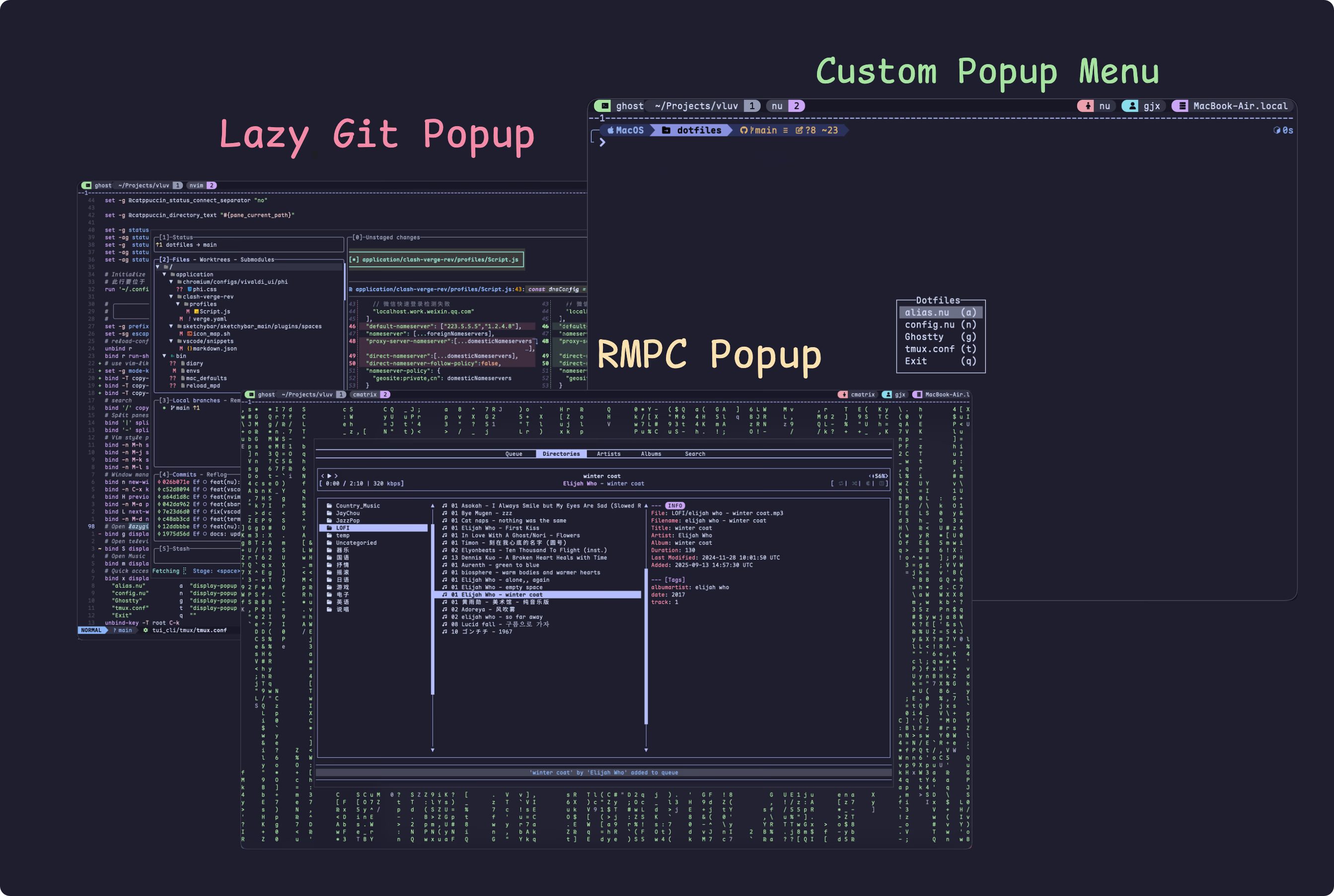
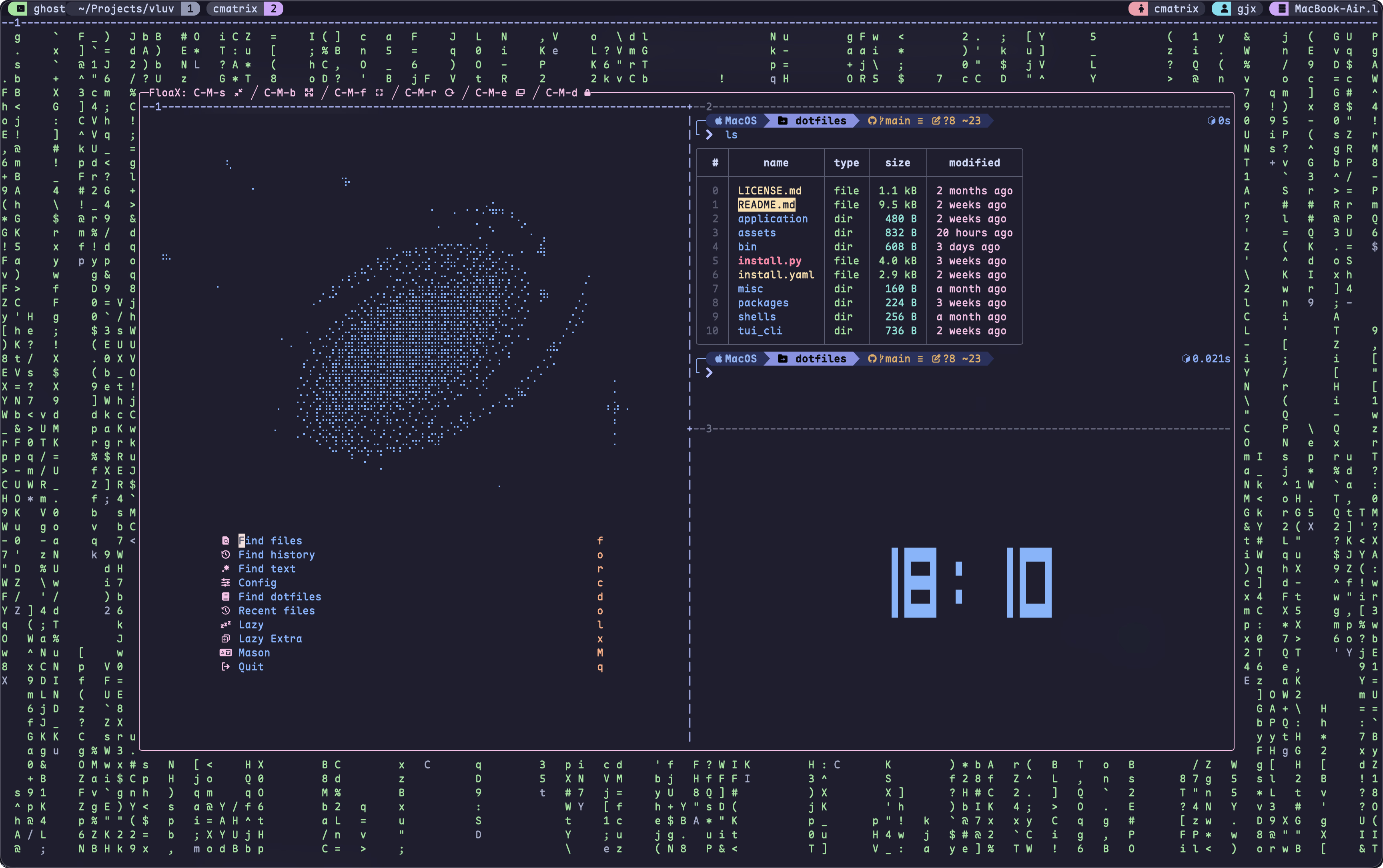
Both work, but they interrupt your workflow and hurt efficiency. The popup model offers a better solution: summon and dismiss a floating pane with a single keybind, without leaving your main workspace. Browser Company introduced the same feature in their Arc browser.
## Configs
### Built-in Popup
Tmux v3.2+ introduced the `display-popup`[^2] command. You can bind it to a key with `bind`, e.g. `bind g display-popup "lazygit"` — pressing `prefix + g` opens lazygit in a popup.
I made a few tweaks for a better experience:
- Use `-d "#{pane_current_path}"` to make the popup's working directory match the current pane
- For example, opening lazygit from `~/projects` means lazygit also starts in `~/projects` — no need to navigate to the repo inside lazygit
- Use `-w 80% -h 80%` to set the popup to 80% of the current pane's dimensions, making better use of screen space
- Use `-E` to auto-close the popup when the shell command finishes
My most-used popup keybinds:
- `prefix + g`: Open lazygit
- `prefix + S`: Open the [[television]] tmux_sessions channel (for switching between tmux sessions)
- `prefix + m`: Open rmpc (an MPD client)
```shell tmux.conf
# Open lazygit popup
bind g display-popup -d "#{pane_current_path}" -w 80% -h 80% -E "lazygit"
# Open television session channel
bind S display-popup -E "tv tmux_sessions"
# Open Music
bind m display-popup -w 80% -h 80% -E "rmpc"
```
Additionally, `display-menu`[^3] can create a menu. Example config:
```shell
# Quick access to dotfiles (terminal reloaded)
bind x display-menu -T "#[align=centre]Dotfiles" -x C -y C \
"alias.nu" a "display-popup -w 80% -h 80% -E 'nvim ~/.config/nushell/aliases/alias.nu'" \
"config.nu" n "display-popup -w 80% -h 80% -E 'nvim ~/.config/nushell/config.nu" \
"Ghostty" g "display-popup -w 80% -h 80% -E 'nvim ~/.config/ghostty"\
"tmux.conf" t "display-popup -w 80% -h 80% -E 'nvim ~/.config/tmux/tmux.conf'" \
"Exit" q ""
```
### Floax
Tmux's built-in popup is decent, but has some drawbacks:
- Zellij supports `Toggle Floating Pane` — press `Alt + f` to open/close a floating pane, while Tmux's popup is not toggleable
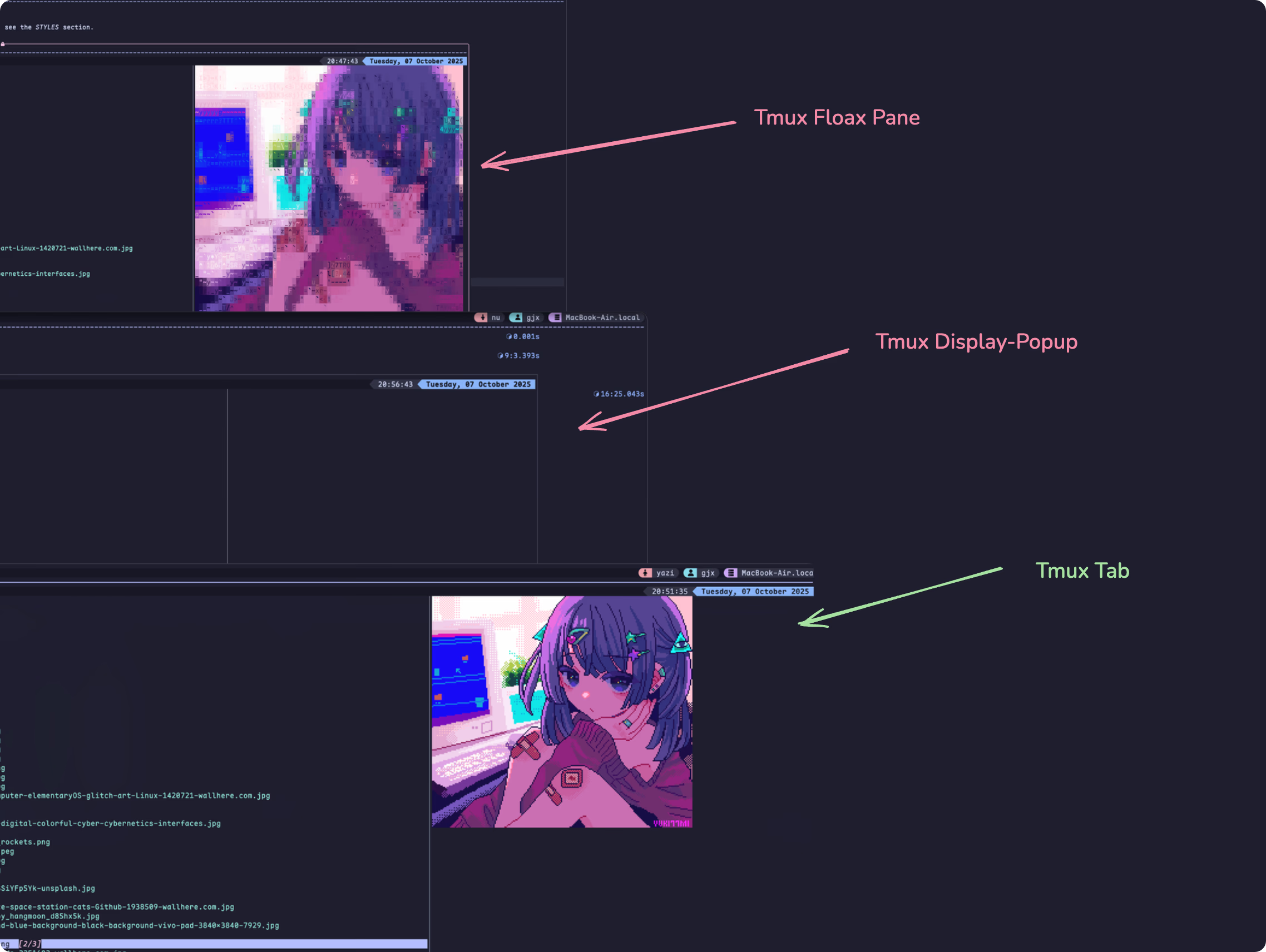
- Tmux popup doesn't support `allow-passthrough`, so image preview in programs like Yazi won't work
Floax is a Tmux plugin that partially addresses these pain points. Install it via tpm (Tmux Plugin Manager). Reference config:
```shell tmux.conf
set -g @plugin 'omerxx/tmux-floax'
set -g @floax-width '80%'
set -g @floax-height '80%'
set -g @floax-border-color 'magenta'
set -g @floax-text-color 'blue'
# Keybind for toggling the floating pane; -n means no prefix needed, just press Alt + f
set -g @floax-bind '-n M-f'
set -g @floax-change-path 'false'
```
Image preview in this plugin has some weird rendering issues though 🤦♂️, see the screenshot below:
## Reference
For complete config, see: [Efterklang/dotfiles: window & unix dotfiles](https://github.com/Efterklang/dotfiles)
[^1]: See [Image Preview | Yazi](https://yazi-rs.github.io/docs/image-preview/#zellij). Überzug++ can be installed as a workaround, but I experienced blurry images when using it.
[^2]: Display a popup running shell-command on target-client. A popup is a rectangular box drawn over the top of any panes. Panes are not updated while a popup is present. From [tmux(1) - Linux manual page](https://man7.org/linux/man-pages/man1/tmux.1.html)
[^3]: Display a menu on target-client. target-pane gives the target for any commands run from the menu. From [tmux(1) - Linux manual page](https://man7.org/linux/man-pages/man1/tmux.1.html)