Continuing from the previous post. When I first configured Nushell completions, I maintained an allowlist in external_completer: use fish_completer when Fish has better completions, and otherwise use carapace_completer. The core logic looked roughly like this:match $spans.0 { nu | tv | bun | git | rclone => $fish_completer _ => $carapace_completer} | do $in $spans
This configuration works. But the selection logic is written into Nushell config, so other shells cannot reuse it. Moving that logic into Carapace as the middle layer means I no longer have to maintain the same dispatch rules in every shell.
Of course, I probably will not use another shell again anyway, so this does feel a bit like tinkering for tinkering’s sake 😇
Starting with brew services 🍺
Recently I switched from Clash Verge Rev to a bare mihomo core, so I often use brew services start mihomo to start the service.
Carapace does not yet support service-name completions for the brew services subcommand. To my pleasant surprise, Fish can complete it:
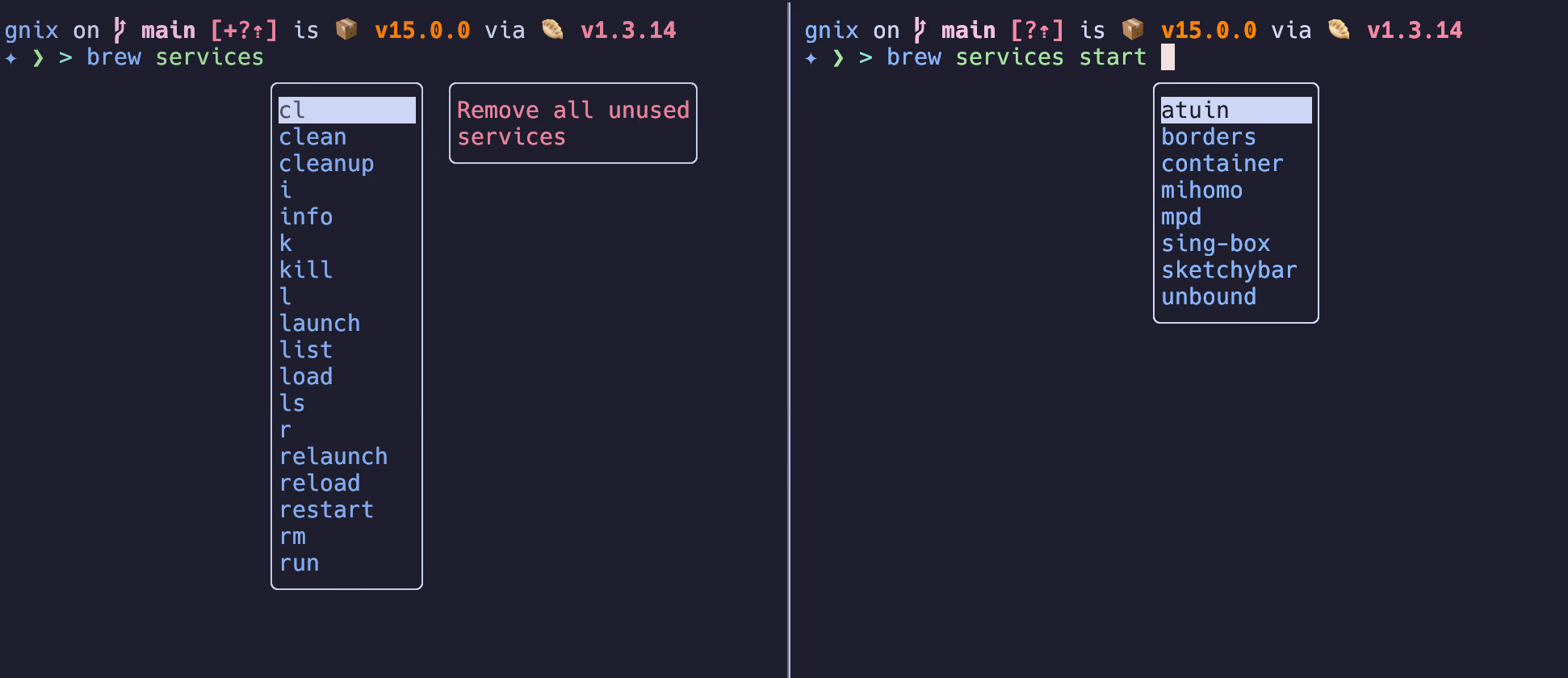
Following the earlier approach, I only need to forward brew completions to fish_completer, like this:match $spans.0 { nu | tv | bun | git | rclone | brew => $fish_completer _ => $carapace_completer} | do $in $spans
This fixes the immediate issue, but the completion strategy is still scattered inside Nushell. Below is the Carapace approach.
Carapace’s Selection Order 🔢
Carapace now divides completers into different groups. On macOS, when a command has multiple completion sources, the default priority is roughly:
usersystemdarwinbsdunixcommonbridge
This explains why simply enabling the Fish bridge, meaning setting the CARAPACE_BRIDGES=fish environment variable, does not necessarily solve the brew problem. For example, run carapace brew nushell brew se | jq to inspect completions for brew se, and you will find only the search subcommand. services is missing.[ { "value": "search ", "display": "search", "description": "Perform a substring search of cask tokens and formula names for <text>", "style": { "fg": "blue" } }]
The reason is that brew already has a built-in Carapace completer, which belongs to common. A Fish bridge discovered through CARAPACE_BRIDGES belongs to bridge. By default, common takes precedence over bridge.
You can use carapace --list brew to see the actual order:{ "brew": [ { "name": "brew", "description": "The missing package manager for macOS", "group": "common", "package": "github.com/carapace-sh/carapace-bin/completers_release/common/brew_completer/cmd", "url": "https://brew.sh/" }, { "name": "brew", "description": "The missing package manager for macOS", "group": "bridge", "variant": "fish" } ]}
For this, you can use carapace choices to adjust the priority of completion sources for a command. In the code below, move Fish completions to the front, then run carapace brew nushell brew se | jq . again. Besides search, you will now see completion entries for services and setup-ruby:$ carapace --choice brew/fish@bridge$ carapace brew nushell brew se | jq .[ { "value": "search ", "display": "search", "description": "Perform a substring search of cask tokens and formula names for text" }, { "value": "services ", "display": "services", "description": "Integrates Homebrew formulae with macOS's launchctl manager" }, { "value": "setup-ruby ", "display": "setup-ruby", "description": "Installs and configures Homebrew's Ruby" }]
Another Solution: Override brew with a user spec 👥
From the priority list above, user group is the highest-priority completion source. So it is natural to define brew in the user group and make it use Fish completions.
Carapace automatically loads specs under the configuration directory.
I set XDG_CONFIG_HOME = ~/.config, so I created brew.yaml in ~/.config/carapace/specs:# yaml-language-server: $schema=https://carapace.sh/schemas/command.jsonname: brewdescription: The missing package manager for macOSparsing: disabledcompletion: positionalany: ["$carapace.bridge.Fish([brew])"]
Note that name: brew must match the file name brew.yaml.
After that, open a new shell and run carapace brew nushell brew se | jq. You will see the same output as in the previous section: the completion results include all three subcommands.
Cleaning Up Nushell Completion Config 🫧
With the work above done, Nushell no longer needs to maintain an allowlist of “which commands should use Fish.” Keep only alias expansion logic, then hand everything to Carapace:let carapace_completer = {|spans: list<string>| CARAPACE_LENIENT=1 carapace $spans.0 nushell ...$spans | from json}let external_completer = {|spans| let expanded_alias = scope aliases | where name == $spans.0 | get -o 0.expansion let spans = if $expanded_alias != null { $spans | skip 1 | prepend ($expanded_alias | split row ' ' | take 1) } else { $spans } match $spans.0 { _ => $carapace_completer } | do $in $spans}$env.config.completions = { case_sensitive: false quick: true # set this to false to prevent auto-selecting completions when only one remains partial: true # set this to false to prevent partial filling of the prompt algorithm: "prefix" # prefix or fuzzy external: { enable: true completer: $external_completer } use_ls_colors: true}