---
title: NuShell FFMpeg Utils
date: 2025-09-05
excerpt: Batch-compressing media files with Nushell to free up OneDrive space.
tags:
- Terminal
- Shell
- ffmpeg
- Workflow
- Nushell
- Onedrive
- Performance
cover: https://assets.vluv.space/nu_ffmpeg.webp
updated: 2026-05-23 15:36:36
lang: en
i18n:
cn: /nu_ffmpeg
translation: 2
---
## Intro
I regularly transcode `h264` videos stored in OneDrive to `vp9/av1/hevc` formats. Under ideal conditions this can save about 50% in file size (not rigorously measured — just from memory). The workflow generally involves three tasks:
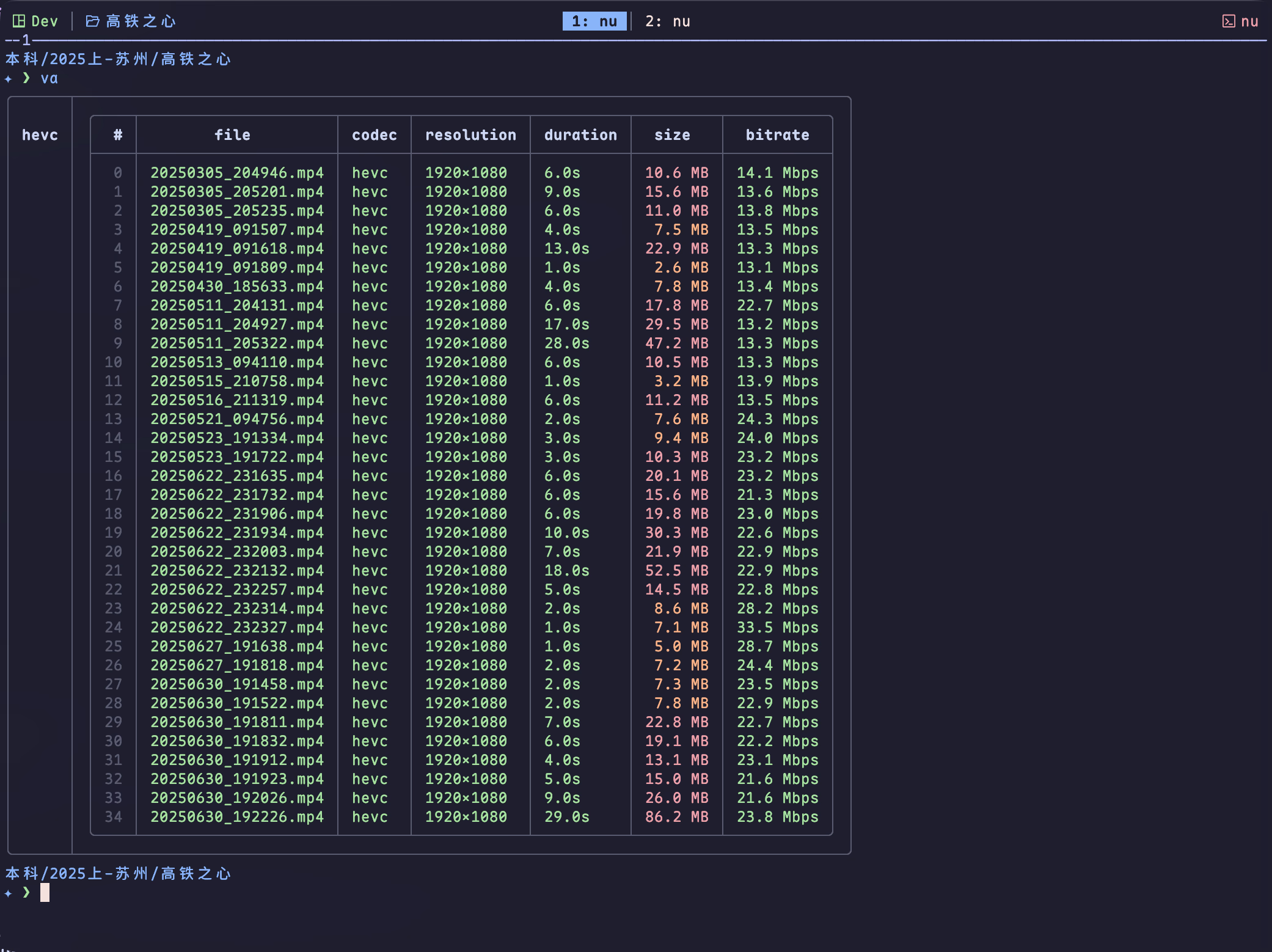
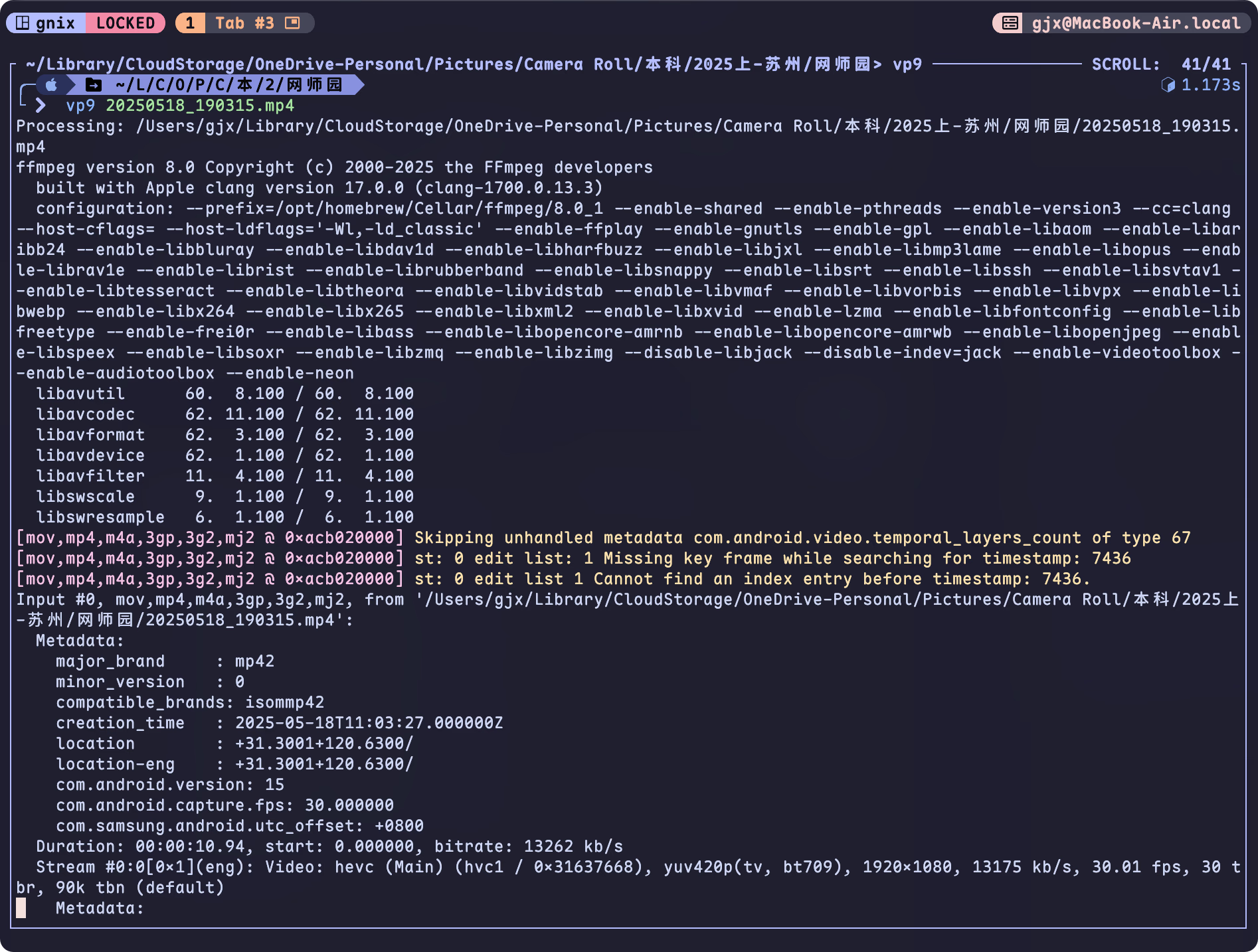
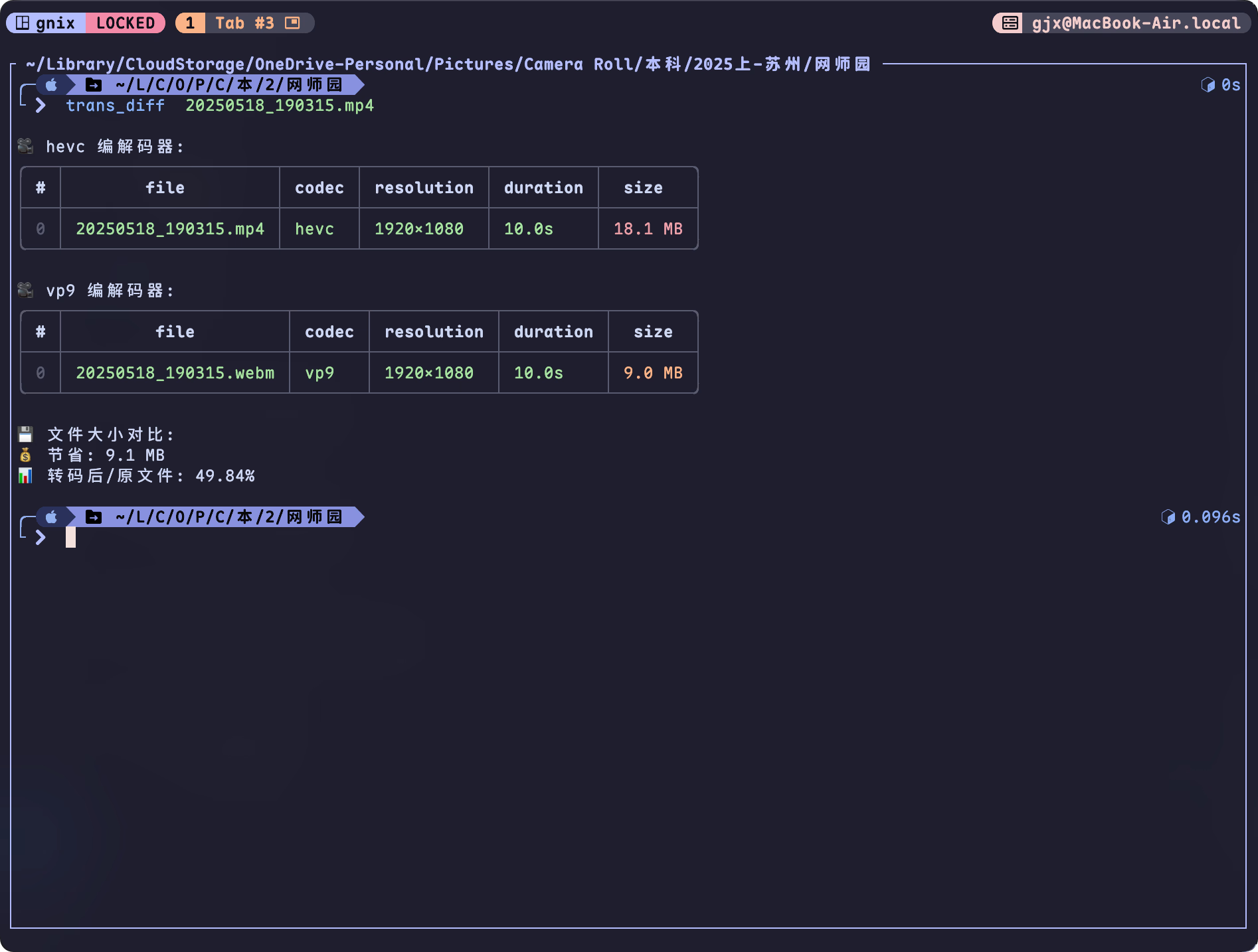
Manual batch operations are tedious, so I wrote some Nushell functions that leverage its parallel execution (`par-each`) feature to process videos in bulk. Since transcoding is time-consuming, I just run `{shell} caffeinate -i nu --config $nu.config-path -c "vp9 ./"` before going to sleep — by the time I wake up, the videos are usually done.
### Quick Installation
Download `ffmpeg.nu`[^1], then add `source /path/to/ffmpeg.nu` to your `config.nu`.
```nu
cd $nu.default-config-dir
wget -O ./ffmpeg.nu https://raw.githubusercontent.com/Efterklang/dotfiles/refs/heads/main/shells/nushell/aliases/alias.nu
echo 'source ./ffmpeg.nu' | save --append $nu.config-path
```
## Required Knowledge
### Nushell Features
- [Operators | Nushell#spread-operator](https://www.nushell.sh/book/operators.html#spread-operator) — handles variadic arguments, allowing functions to accept multiple input paths
- [Closure | Nushell](https://www.nushell.sh/lang-guide/chapters/types/basic_types/closure.html#closure) — similar to anonymous functions in other languages, can be passed as arguments to `each` or `par-each`
- [each and par-each | Nushell](https://www.nushell.sh/lang-guide/chapters/filters/each-par-each.html) — iterate over data; `par-each` supports parallel execution, making full use of multi-core CPUs
### FFMPEG
- `ffprobe` — retrieves media file metadata (codec, resolution, duration, etc.); typically bundled with `ffmpeg`
- [ffmpeg](https://ffmpeg.org) — a powerful audio/video processing tool supporting transcoding, format conversion, and more. A single command like `{shell} ffmpeg -i input.mp4 -vcodec vp9 output.mp4` transcodes a video to VP9. ffmpeg supports fine-grained parameter tuning (video quality, etc.), but that's beyond the scope here.
### MISC
- Container formats (mp4, webm, etc.)
- Encoding & Decoding
- Software Encoding & Software Decoding: relies on the CPU; widely compatible but slower
- Hardware Encoding & Hardware Decoding: leverages GPU for faster processing (requires hardware support)
Choosing between Software and Hardware Encoding depends on personal trade-offs. Based on online resources, Hardware Encoding is faster but produces slightly lower quality. To maintain quality, you may need to adjust parameters like `crf` and `q:v`.
Run `{shell} ffmpeg -hwaccels` to see which hardware acceleration methods your PC supports. Also check these links for vendor-specific hardware encoding support:
- Nvidia (including latest products): [Video Encode and Decode GPU Support Matrix | NVIDIA Developer](https://developer.nvidia.com/video-encode-and-decode-gpu-support-matrix-new)
- Intel, Nvidia, AMD (as of June 8, 2023): [三大显卡厂商(Intel NVIDIA AMD)产品对硬件解码编码支持程度列表 - 重庆 Debug - 博客园](https://www.cnblogs.com/hyb1/p/17466965.html)
- Apple Silicon: M3 chip hardware-accelerated decoding support; HEVC compression is decent. For ffmpeg parameters, see [macos - Optimally using hevc_videotoolbox and ffmpeg on OSX - Stack Overflow](https://stackoverflow.com/questions/64924728/optimally-using-hevc-videotoolbox-and-ffmpeg-on-osx)
```shell
$ ffmpeg -hide_banner -encoders | grep videotoolbox
V....D h264_videotoolbox VideoToolbox H.264 Encoder (codec h264)
V....D hevc_videotoolbox VideoToolbox H.265 Encoder (codec hevc)
V....D prores_videotoolbox VideoToolbox ProRes Encoder (codec prores
```
## Use Cases
Before processing media files, you need to locate the target files first. I wrote a private helper function that uses the spread operator `...` to accept multiple paths (files or directories) and filters for `.mp4` or `.webm` formats:
```nu
def _find_media_paths [...paths: string] {
let ext_pattern = '\.(mp4|mov|webm)$'
# If no paths specified, default to current directory
let files = if ($paths | is-empty) {
ls . | where name =~ $ext_pattern
} else { # If paths specified, iterate and find files under those paths
$paths | each {|p|
let expanded = ($p | path expand)
ls $expanded | where name =~ $ext_pattern
} | flatten
}
return $files
}
```
### Analyzing Video Codec Distribution
My cloud storage contains videos encoded in `vp9`, `av1`, and `h264`. The `vcodec-analysis` function gathers codec, resolution, and other metadata for a batch of videos.
The code uses `par-each` to call `ffprobe` in parallel and groups results by codec. In informal testing on 32 videos, `each` took 1.839s while `par-each` took 0.439s.
```nu
def _format_duration [seconds: string] {
let sec = ($seconds | into int)
let hours = ($sec / 3600 | into int) # Calculate hours
let minutes = (($sec mod 3600) / 60 | into int) # Calculate minutes
let seconds = ($sec mod 60) # Calculate remaining seconds
mut result = []
# Only add non-zero values to result
if $hours > 0 { $result = ($result | append $'($hours)h') }
if $minutes > 0 { $result = ($result | append $'($minutes)m') }
if $seconds > 0 { $result = ($result | append $'($seconds | math round -p 2)s') }
$result | str join ' ' # Join parts with space
}
def _format_bitrate [bitrate: int] {
# Convert bitrate to appropriate unit
if $bitrate >= 1000000 {
let mbps = ($bitrate / 1000000.0 | math round -p 1)
$'($mbps) Mbps'
} else if $bitrate >= 1000 {
let kbps = ($bitrate / 1000.0 | math round -p 1)
$'($kbps) kbps'
} else {
$'($bitrate) bps'
}
}
def _get_video_info [file: string] {
# Use ffprobe to get video stream and format info
let ffprobe_output = (ffprobe -v error -select_streams v:0
-show_entries stream=codec_name,width,height,bit_rate:format=duration,bit_rate
-of json $file | from json)
let stream = ($ffprobe_output.streams | first) # Get first video stream
let format = ($ffprobe_output.format) # Get format info
# Format duration, show N/A on failure
let duration = try {
_format_duration $format.duration
} catch {
"N/A"
}
# Format bitrate, prefer stream bitrate over format bitrate
let bitrate = try {
let rate = if ($stream.bit_rate | is-not-empty) {
$stream.bit_rate | into int
} else if ($format.bit_rate | is-not-empty) {
$format.bit_rate | into int
} else {
null
}
if ($rate | is-not-empty) {
_format_bitrate $rate
} else {
"N/A"
}
} catch {
"N/A"
}
# Return video info structure
return {
codec: ($stream.codec_name)
width: ($stream.width)
height: ($stream.height)
duration: $duration
bitrate: $bitrate
}
}
def vcodec-analysis [...paths: string] {
let files = (_find_media_paths ...$paths)
# Execute _get_video_info in parallel
$files | par-each {|file|
let video_info = (_get_video_info $file.name)
{
file: ($file.name | path basename)
codec: $video_info.codec
resolution: $'($video_info.width)x($video_info.height)'
duration: $video_info.duration
size: $file.size
bitrate: $video_info.bitrate
}
}
| group-by codec # Group by codec type
}
alias va = vcodec-analysis
```
```nu
# View metadata for av1-encoded videos in current directory
va | select av1
╭──────┬────────────────────────────────────────────────────────────╮
│ │ ╭───┬────────┬───────┬────────────┬───────────┬──────────╮ │
│ vp9 │ │ # │ file │ codec │ resolution │ duration │ size │ │
│ │ ├───┼────────┼───────┼────────────┼───────────┼──────────┤ │
│ │ │ 0 │ 1.webm │ vp9 │ 1920x1080 │ 29m 13.0s │ 280.9 MB │ │
│ │ │ 1 │ 2.webm │ vp9 │ 1920x1080 │ 29m 41.0s │ 257.9 MB │ │
│ │ │ 2 │ 3.webm │ vp9 │ 1920x1080 │ 29m 49.0s │ 219.4 MB │ │
│ │ ╰───┴────────┴───────┴────────────┴───────────┴──────────╯ │
│ │ ╭───┬────────┬───────┬────────────┬───────────┬──────────╮ │
│ h264 │ │ # │ file │ codec │ resolution │ duration │ size │ │
│ │ ├───┼────────┼───────┼────────────┼───────────┼──────────┤ │
│ │ │ 0 │ 11.mp4 │ h264 │ 1920x1080 │ 29m 42.0s │ 786.5 MB │ │
│ │ ╰───┴────────┴───────┴────────────┴───────────┴──────────╯ │
╰──────┴────────────────────────────────────────────────────────────╯
# View video metadata for test.mp4
$ va ./test.mp4
╭──────┬────────────────────────────────────────────────────────────╮
│ │ ╭───┬────────┬───────┬────────────┬───────────┬──────────╮ │
│ h264 │ │ # │ file │ codec │ resolution │ duration │ size │ │
│ │ ├───┼────────┼───────┼────────────┼───────────┼──────────┤ │
│ │ │ 0 │ 11.mp4 │ h264 │ 1920x1080 │ 29m 42.0s │ 786.5 MB │ │
│ │ ╰───┴────────┴───────┴────────────┴───────────┴──────────╯ │
╰──────┴────────────────────────────────────────────────────────────╯
# Export to JSON format; also supports to md/csv/html etc.
$ va | to json
{
"vp9": [
{
"file": "1.webm",
"codec": "vp9",
"resolution": "1920x1080",
"duration": "29m 13.0s",
"size": 280957470
},
{
"file": "2.webm",
"codec": "vp9",
"resolution": "1920x1080",
"duration": "29m 41.0s",
"size": 257923553
},
{
"file": "3.webm",
"codec": "vp9",
"resolution": "1920x1080",
"duration": "29m 49.0s",
"size": 219479954
}
],
"h264": [
{
"file": "11.mp4",
"codec": "h264",
"resolution": "1920x1080",
"duration": "29m 42.0s",
"size": 786576948
}
]
}
```
### Batch Transcoding
The `vp9`, `hevc`, and `av1` functions batch-transcode videos to VP9, HEVC (H.265), or AV1 respectively. Video transcoding is time-consuming, so `par-each` is used for parallel processing to maximize multi-core CPU utilization. Transcoded files are saved to `~/Downloads/ffmpeg_out`, with `webm` as the default container format. Note that HEVC requires `mp4` as the container format.
| Target Codec | Encoding Method |
| ------------ | ------------------------ |
| vp9 | libvpx-vp9 |
| hevc | hevc_videotoolbox(MacOS) |
| av1 | libsvtav1 |
> [!NOTE]
>
> - `vp9-night` uses macOS's `caffeinate` to prevent the computer from sleeping. Software encoding is CPU-intensive and can affect daily use — running it overnight avoids that.
> - `{shell} ps --long | where name has "ffmpeg"` checks running `ffmpeg` tasks.
```nu
def transcode [input_file: string codec: string ext: string = "webm"] {
let output_dir = $nu.home-path | path join "Downloads/ffmpeg_out"
mkdir $output_dir
let base = ($input_file | path parse | get stem) # Get filename without extension
let output_file = ($output_dir | path join $"($base).($ext)") # Construct output file path
# Set codec-specific parameters
# -c:v/vcodec video codec; -q:v/crf video quality; -b:v video bitrate
# -c:a audio codec
let codec_args = if $codec == "hevc_videotoolbox" {
["-c:v" $codec "-q:v" "70" "-b:v" "6M" "-tag:v" "hvc1" "-c:a" "copy"]
} else {
["-vcodec" $codec]
}
# Execute transcoding
ffmpeg -i $input_file ...$codec_args $output_file
}
def vp9 [...input_file: string] {
let input_files = (_find_media_paths ...$input_file)
$input_files | par-each {|file|
print $"Processing: ($file.name)";
transcode $file.name "libvpx-vp9";
}
}
def hevc [...input_file: string] {
let input_files = (_find_media_paths ...$input_file)
# On Mac, use hevc_videotoolbox
let encoder = if $nu.os-info.name == "macos" {
"hevc_videotoolbox"
} else {
"libx265"
}
$input_files | par-each {|file|
print $"Processing: ($file.name)";
transcode $file.name $encoder "mp4";
}
}
# AV1 has better compression ratio, but in my experience AV1 encoding is slower than VP9
def av1 [...input_file: string] {
let input_files = (_find_media_paths ...$input_file)
$input_files | par-each {|file|
print $"Processing: ($file.name)";
transcode $file.name "libsvtav1";
}
}
# Transcode videos before sleep; on macOS use caffeinate to prevent sleep
alias vp9-night = caffeinate -i nu --config $nu.config-path -c "vp9 ./"
alias hevc-night = caffeinate -i nu --config $nu.config-path -c "hevc ./"
```

### Comparing File Size Before and After Transcoding
This feature is just for fun — compare file sizes before and after encoding. Occasionally you'll see h264-to-vp9 transcoding result in a larger file, though I've only encountered that twice.
```nu
def trans_diff [input_file: string] {
let output_file = $"~/Downloads/ffmpeg_out/($input_file | path parse | get stem).webm"
# Check if output file exists
let output_path = ($output_file | path expand)
if not ($output_path | path exists) {
print $"❌ Output file not found: ($output_path)"
return
}
# Get file sizes
let input_size = (ls $input_file | get size | first)
let output_size = (ls $output_path | get size | first)
let saved_size = ($input_size - $output_size)
let size_ratio = (($output_size / $input_size) * 100 | math round -p 2)
# Display analysis results
let analysis_result = (va $input_file $output_path)
# Expand and display details for each codec group
$analysis_result | transpose codec data | each { |row|
print $"\n🎥 ($row.codec) codec:"
print ($row.data)
}
# Print size savings info
print $"\n💾 File size comparison:"
print $"💰 Saved: ($saved_size)"
print $"📊 Transcoded/Original: ($size_ratio)%\n"
}
alias td = trans_diff
```

[^1]: Download file from [Efterklang/dotfiles](https://github.com/Efterklang/dotfiles/blob/main/shells/nushell/aliases/ffmpeg.nu)