---
title: Enable Autocompletion for Lua API with Stub Files
date: 2025-11-11
tags:
- Lua
- Sketchybar
- LSP
- VSCode
- Neovim
excerpt: Configure IDEs to recognize Sketchybar module types for Lua autocompletion in VS Code, Neovim, and JetBrains IDEs.
updated: 2026-07-08 07:37:20
lang: en
i18n:
cn: /lua_stub
translation: 2
---
When customizing the status bar on macOS with **Sketchybar**, you can use the API provided by [FelixKratz/SbarLua](https://github.com/FelixKratz/SbarLua) to interact with SketchyBar:
```lua
local wifi = SBAR.add("wifi", "item")
wifi:set({ label = "My Wife" })
```
But this module is written in C, and after compilation it becomes the binary file `sketchybar.so`. The [Lua Language Server (Lua LS)](https://luals.github.io/) cannot analyze it the way it analyzes Lua files, so it cannot provide autocompletion or type hints for its APIs.
## Use Stub Files
> A *stub file* is a file containing a skeleton of the public interface of that Python module, including classes, variables, functions – and most importantly, their types.
>
> from Stub files —— mypy 1.18.2 documentation
Similar to the Python community's approach:
1. Create a *stub file*.
2. Write type definitions in the file.
3. Configure Lua LS. VS Code can detect it automatically; Neovim needs manual configuration.
### Lua Type Definition File
Create `./@types/sketchybar.lua` under the Sketchybar configuration directory, and add `@meta` to mark the file as a meta file[^1].
See [Lua Language Server | Wiki](https://luals.github.io/wiki/annotations/) for the annotation syntax.
```lua @types/sketchybar.lua
---@meta
---@class SketchybarItem
---@field name string
local SketchybarItem = {}
---@param key string
---@param value any
---@return SketchybarItem
function SketchybarItem:set(key, value) end
-- ... other method definitions omitted ...
---@class Sketchybar
local Sketchybar = {}
--- Creates a new Sketchybar item.
--- The `name` is the identifier of the item, if no identifier is specified, it is generated automatically
---@overload fun(type: "item"|"space"|"alias", name?: string, properties: table): SketchybarItem
---@overload fun(type: "bracket", name?: string, members: table, properties: table): SketchybarItem
---@overload fun(type: "slider"|"graph", name?: string, width: number, properties: table): SketchybarItem
---@overload fun(type: "event", name: string, notification?: string): SketchybarItem
---@return SketchybarItem
function Sketchybar.add(type, ...) end
return Sketchybar
```
### Configure Neovim LSP to Recognize the Type Library
Create `./.luarc.json` under the `Sketchybar` configuration directory, and add the type definition path to `workspace.library`:
```lua
{
"workspace.library": ["${workspaceFolder}/@types"],
}
```
## Result
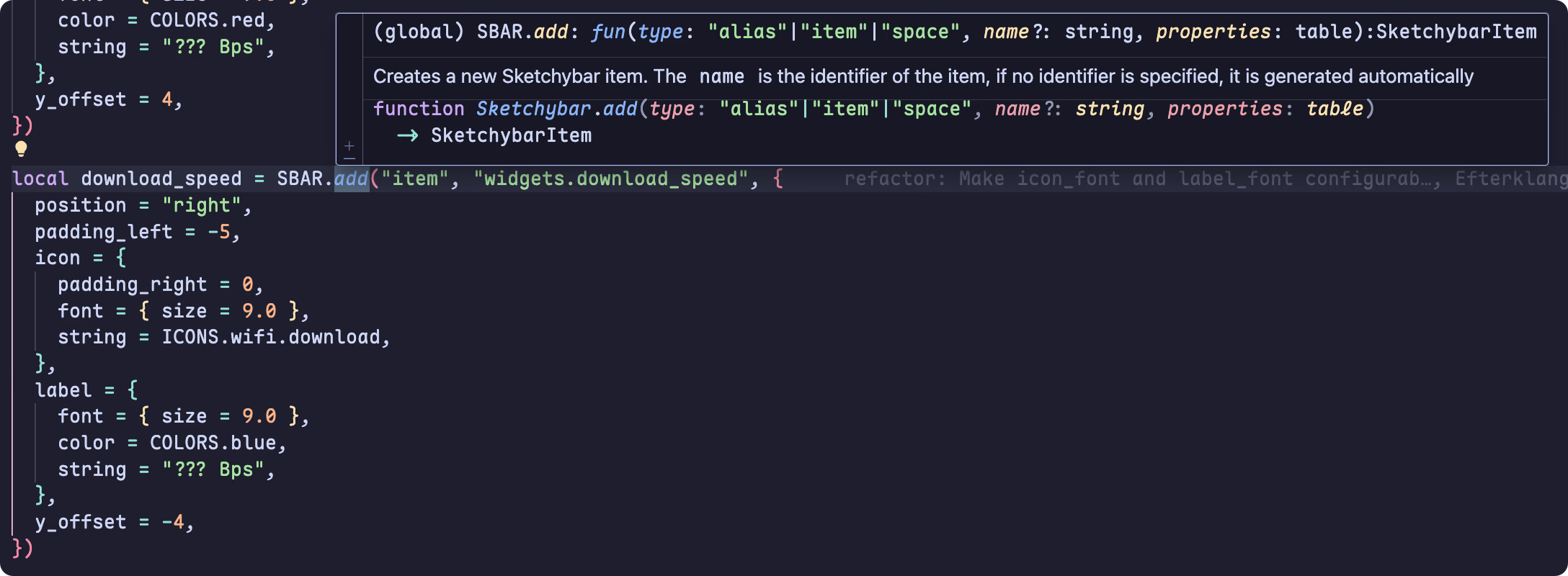
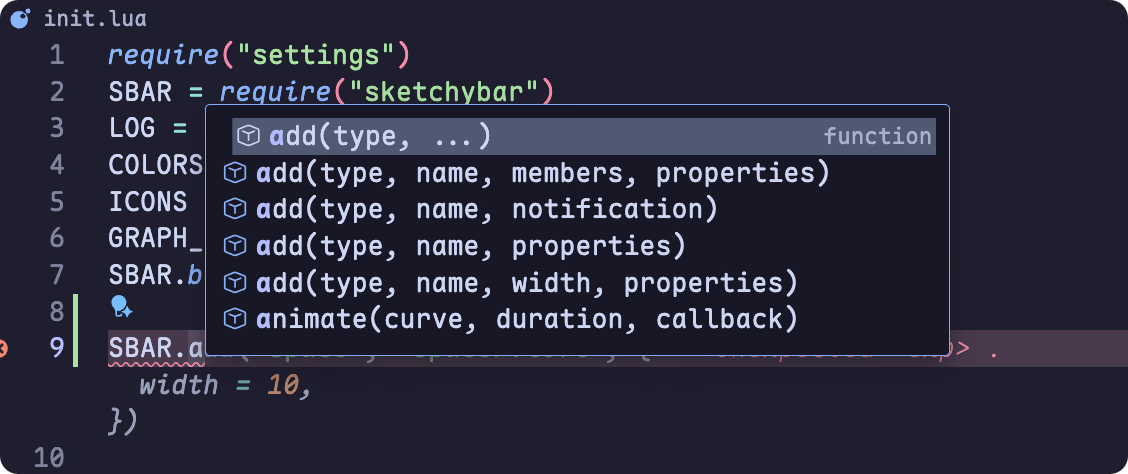
After the steps above, VS Code can correctly provide code completion and hover hints:
[^1]: Marks a file as "meta", meaning it is used for definitions and not for its functional Lua code. It is used internally by the language server for defining the built-in Lua libraries . If you are writing your own definition files, you will probably want to include this annotation in them. [Lua Language Server | Wiki](https://luals.github.io/wiki/annotations/)