

I/O Overview
I/O stands for Input/Output, and its core goal is exchanging and controlling data. At its essence, an I/O operation involves two stages:
I/O Stages
Kernel Space and User Space are two important memory regions in an operating system.
- Kernel space is where the core operating system code runs. It has higher privileges and can access hardware resources directly
- User space is where applications run. It has lower privileges and cannot access hardware directly; privileged operations usually go through system calls
┌─────────────────────────────────────────────────────────┐│ User Space 0x0000000000000000 - 0x00007FFFFFFFFFFF ││ ┌─────────────┐ ┌─────────────┐ ┌─────────────┐ ││ │ Stack Buffer│ │ Heap Buffer │ │ mmap Buffer │ ││ └─────────────┘ └─────────────┘ └─────────────┘ │└─────────────────────────────────────────────────────────┘┌─────────────────────────────────────────────────────────┐│ Kernel Space 0xFFFF800000000000 - 0xFFFFFFFFFFFFFFFF ││ ┌─────────────┐ ┌─────────────┐ ┌─────────────┐ ││ │Socket Buffer│ │ Page Cache │ │ DMA Buffer │ ││ └─────────────┘ └─────────────┘ └─────────────┘ │└─────────────────────────────────────────────────────────┘- Data preparation stage: wait for data to arrive and land in the kernel buffer
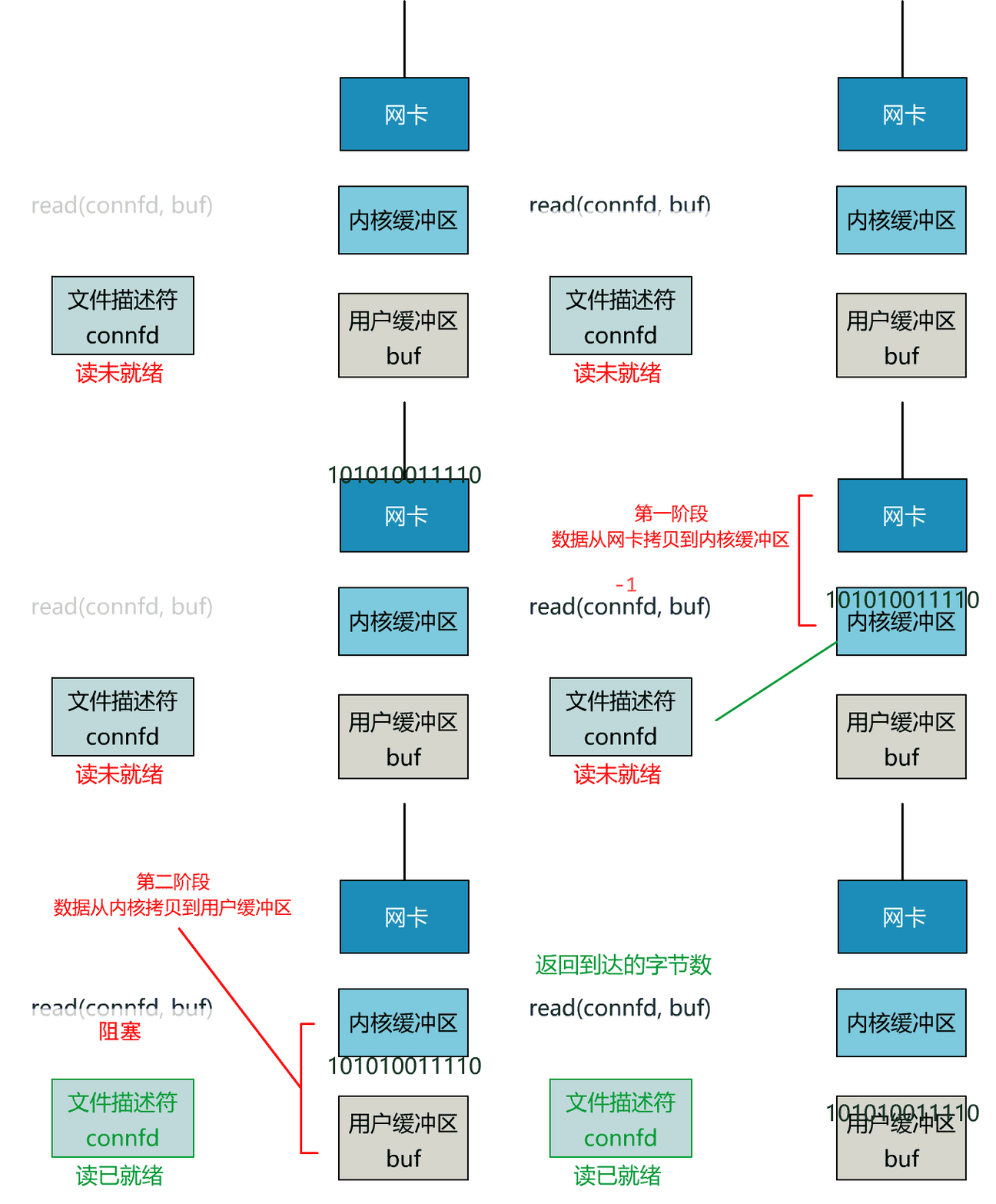
- For network I/O, this typically means waiting for network packets to reach the NIC, pass through the kernel protocol stack, and be placed into the socket receive buffer; only then is this stage complete
- Data copy stage: copy the data from the kernel buffer to the user buffer. In this stage the data crosses from kernel mode into user mode, where the application can process it further
The flow of each stage in a single I/O operation is shown below:
I/O Models
Based on how these two stages are handled, I/O operations can be divided into the following models. The first four are synchronous I/O models; the last one is an asynchronous I/O model.I/O Model Data Preparation Stage Data Copy Stage Blocking I/O Blocking wait Synchronous copy Non-Blocking I/O Non-blocking polling Synchronous copy I/O Multiplexing Blocking wait on many sources Synchronous copy Signal-Driven I/O Asynchronous notification Synchronous copy Asynchronous I/O Asynchronous wait Asynchronous copy
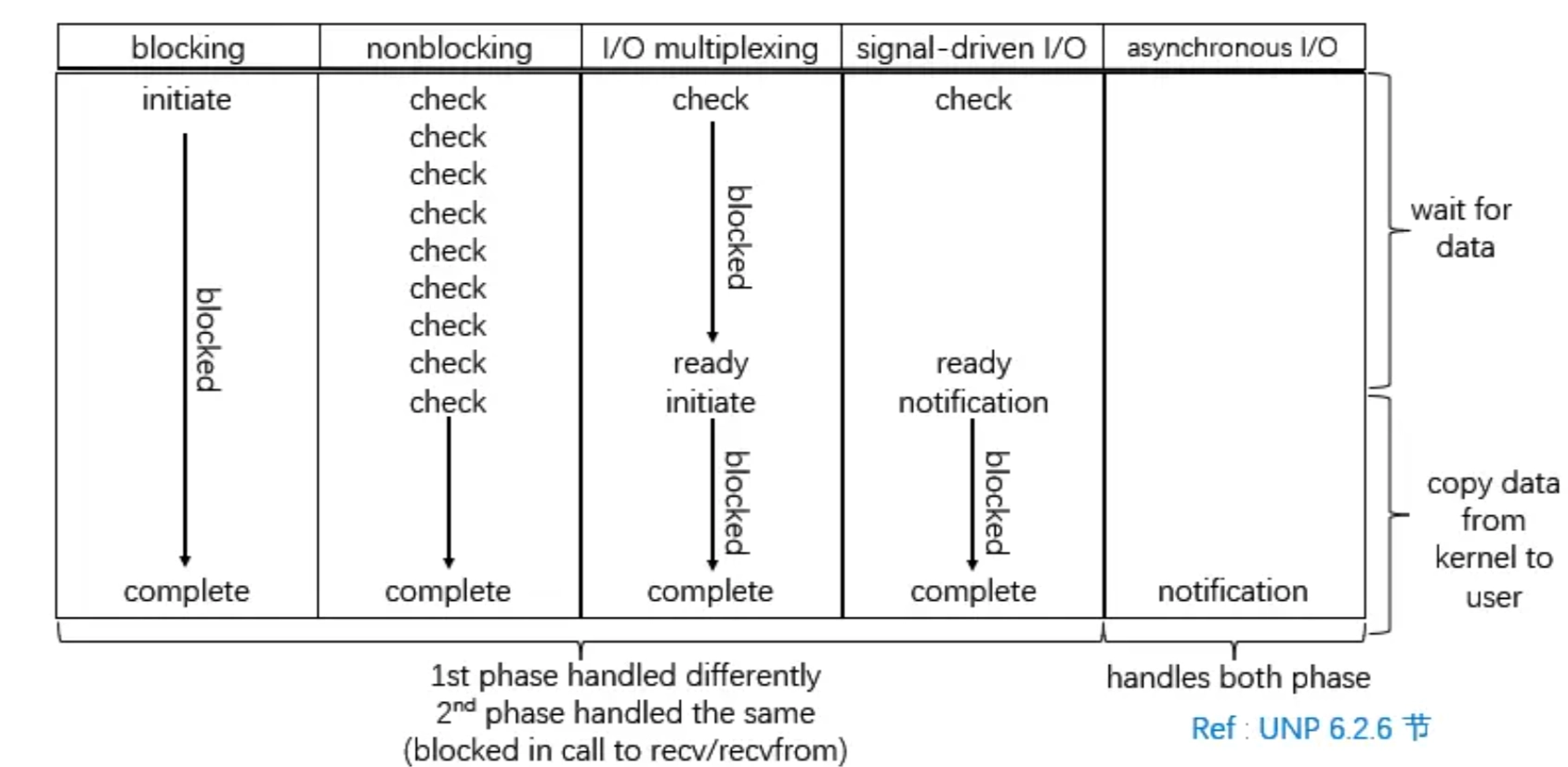
Blocking I/O
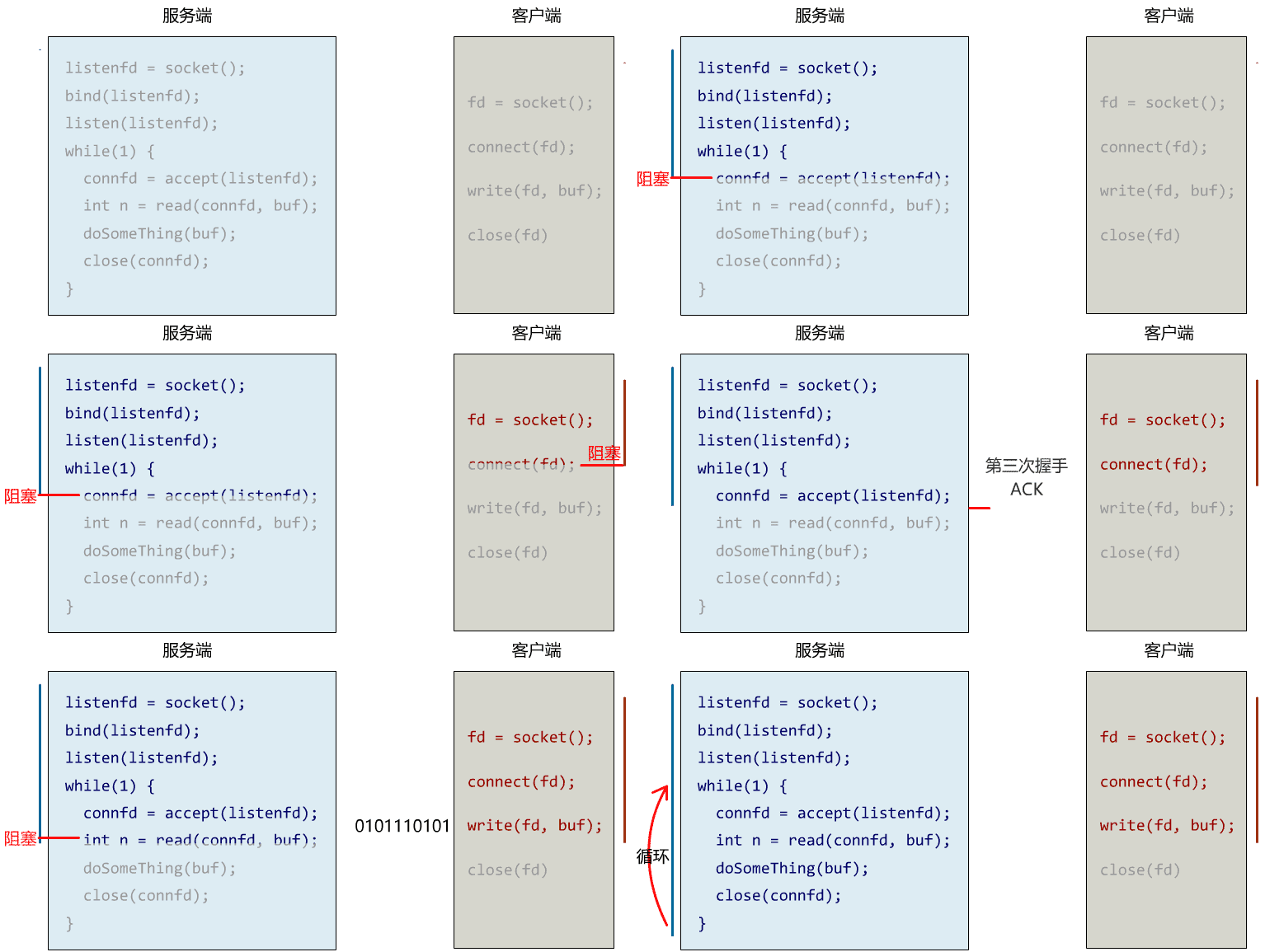
Blocking I/O is the most basic type. When receiving data with this model, the program keeps waiting until data arrives. From the OS’s point of view, if the data is not ready, the calling thread/process enters the blocked state.
States Of Process & Thread: ProcessvsThread & ProcessvsThread
Single-Threaded Blocking
For the blocking I/O model, here is the simplest possible network server: a single thread handling all connections.#include <sys/socket.h>#include <netinet/in.h>#include <stdio.h>#include <unistd.h>void single_thread_server() { int server_fd = socket(AF_INET, SOCK_STREAM, 0); struct sockaddr_in address; address.sin_family = AF_INET; address.sin_addr.s_addr = INADDR_ANY; address.sin_port = htons(8080); bind(server_fd, (struct sockaddr*)&address, sizeof(address)); listen(server_fd, 3); while (1) { int client_fd = accept(server_fd, NULL, NULL); // Block waiting for a connection char buffer[1024]; while (1) { int bytes = recv(client_fd, buffer, 1024, 0); // Blocking read if (bytes <= 0) break; send(client_fd, buffer, bytes, 0); // Echo the data back close(client_fd); // Only after the current client disconnects can the next one be served } }}
Multi-Threaded Blocking Model
To improve concurrency, we can use multiple threads: whenever a new client connects, spawn a new thread to handle that connection.
Here is a Java example demonstrating this model. In the code, the main function creates a fixed-size thread pool and then waits for client connections. Each time a new client connects, the main thread hands the connection to a thread in the pool. Each thread blocks waiting for the client to send data and echoes back whatever it receives.import java.io.*;import java.net.*;import java.util.concurrent.*;public class BioServer { public static void main(String[] args) throws IOException { ExecutorService executor = Executors.newFixedThreadPool(100); // Fixed-size thread pool ServerSocket serverSocket = new ServerSocket(8088); // Listen on port 8088 while (!Thread.currentThread().isInterrupted()) { Socket clientSocket = serverSocket.accept(); // Block waiting for a client connection executor.submit(new ConnectionHandler(clientSocket)); // Hand the connection to the thread pool } executor.shutdown(); serverSocket.close(); }}class ConnectionHandler implements Runnable { private final Socket socket; public ConnectionHandler(Socket socket) { this.socket = socket; } public void run() { try ( BufferedReader in = new BufferedReader( new InputStreamReader(socket.getInputStream())); BufferedWriter out = new BufferedWriter( new OutputStreamWriter(socket.getOutputStream())); ) { String line; while ((line = in.readLine()) != null) { // Blocking read System.out.println("Received: " + line); out.write("Echo: " + line); out.newLine(); out.flush(); } } catch (IOException e) { System.err.println("Connection error: " + e.getMessage()); } finally { try { socket.close(); // Close the connection } catch (IOException ignore) {} } }}
The strength of this model is its simple programming model, easy to understand and debug. With a small number of connections it is a reasonable choice.
Its limitation is just as obvious: threads are expensive resources, and with many connections the system can run out of them. The C10K problem arose under exactly this model.
The Meituan tech team also analyzed this model’s limitations in Java NIO 浅析:
Multi-threading today usually goes through a thread pool, which keeps thread creation and recycling relatively cheap. When the number of active connections is not particularly high (under 1000 per machine), this model works fairly well: each connection focuses on its own I/O, the programming model stays simple, and you don’t have to worry much about overload or rate limiting. The thread pool itself acts as a natural funnel, buffering connections or requests the system can’t handle right away.
Still, the most fundamental problem with this model (the BIO model) is its heavy dependence on threads. Threads are “expensive” resources, mainly in these ways:
- Creating and destroying threads is costly. On an operating system like Linux, a thread is essentially a process, and creation and destruction are heavyweight system functions.
- Threads themselves consume a lot of memory. A Java thread stack is usually allocated at least 512K to 1M; with over a thousand threads in a system, half of the JVM’s memory could be eaten up.
- Thread switching is expensive. When the OS switches threads, it must save the thread’s context and then execute system calls. With too many threads, the time spent switching can even exceed the time spent running them, which typically shows up as high system load and very high CPU sy usage (over 20%), leaving the system nearly unusable.
- It tends to produce a sawtooth-shaped system load. Because system load is measured by active thread count against CPU cores, once the thread count is high and the external network is unstable, a flood of request results can return at the same time, waking up a large number of blocked threads and putting excessive load pressure on the system.
So, when facing hundreds of thousands or even millions of connections, the traditional BIO model is powerless. With the rise of mobile apps and the popularity of online games, millions of long-lived connections are increasingly common, and a more efficient I/O processing model becomes a necessity.
Non-Blocking I/O
Non-blocking I/O allows an application to return immediately after issuing an I/O operation instead of blocking because the data isn’t ready yet. This frees the user process to do other things. The simplest example is polling: the application can periodically check whether the data is ready.
Sticking with network I/O as the example: sockets on Windows/Linux are blocking by default, and an application can switch a socket to non-blocking with the fcntl/ioctl functions.// If fd already has other flags set, first fetch the current flags with fcntl,// then OR in the O_NONBLOCK flagint safe_set_nonblocking(int fd) { int flags = fcntl(fd, F_GETFL, 0); return fcntl(fd, F_SETFL, flags | O_NONBLOCK);}
When a socket function is called and the operation cannot complete immediately, the system call returns an error right away with errno set to EWOULDBLOCK, meaning “would block”. The blocking trigger conditions are listed in the table below.Category Functions Blocking Trigger Condition (TCP/UDP) Read operations read readv recv recvfrom recvmsgTCP: not enough data in the receive buffer
UDP: receive buffer empty (UDP must read whole datagrams)Write operations write writev send sendto sendmsgTCP: not enough space in the send buffer
UDP: the datagram may simply be dropped, depending on the implementationAccepting connections acceptNo new connection has arrived (listening socket blocks) Initiating connections connectTCP: three-way handshake not yet complete
Some implementations define the error code as EAGAIN. For historical reasons, the POSIX standard permits both error codes, and on most systems they are equivalent; check the <sys/errno.h> header for details.
The connect function is slightly special. Each time it is called to initiate a TCP connection, the [[Ch5-2TransportLayer#three-way handshake|TCP three-way handshake]] blocks the calling process for at least one RTT. If the connection cannot complete immediately (which it usually can’t), errno is set to EINPROGRESS, meaning “the connection is still in progress”.
The code below is the simplest polling model. Looking at this naive implementation as a whole, the user process is still stuck in the while loop, immediately moving on to the next check whenever it finds it can’t read/write.while (1) { ssize_t n = recv(fd, buf, sizeof(buf), MSG_DONTWAIT); if (n > 0) { // Process the received data } else if (n == -1 && errno == EWOULDBLOCK) { // Other work can be done here, for example: // 1. Heartbeat check: with no data to read, send heartbeat packets and // trigger reconnects/resource cleanup according to business logic check_heartbeat(); // 2. Update logs update_log(); sleep(1); // Wait a bit before retrying }}
In blocking I/O, we improved concurrency by dedicating one thread per socket to block on read/write, and its drawback was explained above: with millions of connections, that many threads would exhaust system resources. With non-blocking I/O, a single thread can handle multiple client connections at once:#define MAX_CLIENTS 100 // Multiplex at most 100 client connectionsint server_fd;// Holds client connection file descriptors, initialized to -1 meaning no client at that slotint client_fd_set[MAX_CLIENTS];void multiplexing_server() { while (1) { for (int i = 0; i < MAX_CLIENTS; i++) { if (client_fd_set[i] == -1) continue; // Skip slots with no client connection ssize_t bytes_read = recv(client_fd_set[i], buf, sizeof(buf), MSG_DONTWAIT); if (bytes_read > 0) { // Process the received data process_data(buf, bytes_read); } else if (bytes_read == -1 && errno == EWOULDBLOCK) { // No data to read; do other work here, e.g. heartbeat checks, log updates } else if (bytes_read == 0) { // Client disconnected, clean up resources close(client_fd_set[i]); } } }}
Servers today generally run on multi-core processors. The CPU-bound work inside process_data above can be submitted to a thread pool, making full use of the parallelism of multiple cores.
I/O Multiplexing
I/O multiplexing lets a single thread/process monitor state changes on multiple file descriptors at once. This way, an application can handle many connections in one thread without creating a separate thread per connection.
The while loop in the code above also achieves something resembling multiplexing, but each recv call inside the loop is a context switch from user mode to kernel mode. A better approach is to move the polling from user space into kernel space, so that a single system call can monitor state changes across multiple file descriptors, fundamentally reducing the switching overhead between user mode and kernel mode.
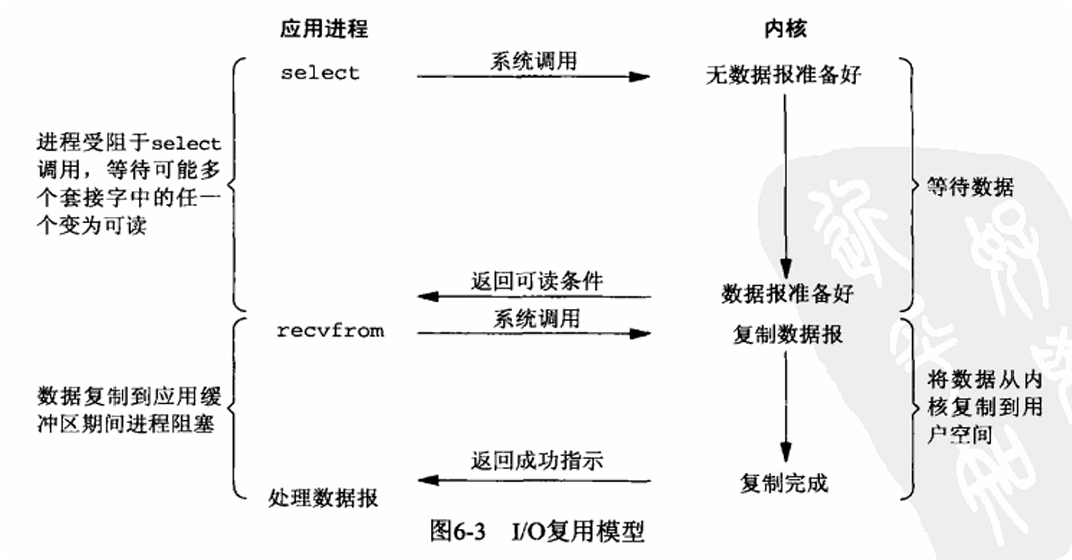
Taking Linux as an example, the kernel provides three functions: select, poll, and epoll (epoll being Linux-specific). A set of file descriptors is first registered with the kernel, which then monitors their state changes. When one of them becomes readable or writable, the kernel notifies the application, and the application can retrieve all ready file descriptors with a single system call, avoiding frequent context switches. See [[IO 多路复用]] for details.
Signal-Driven I/O
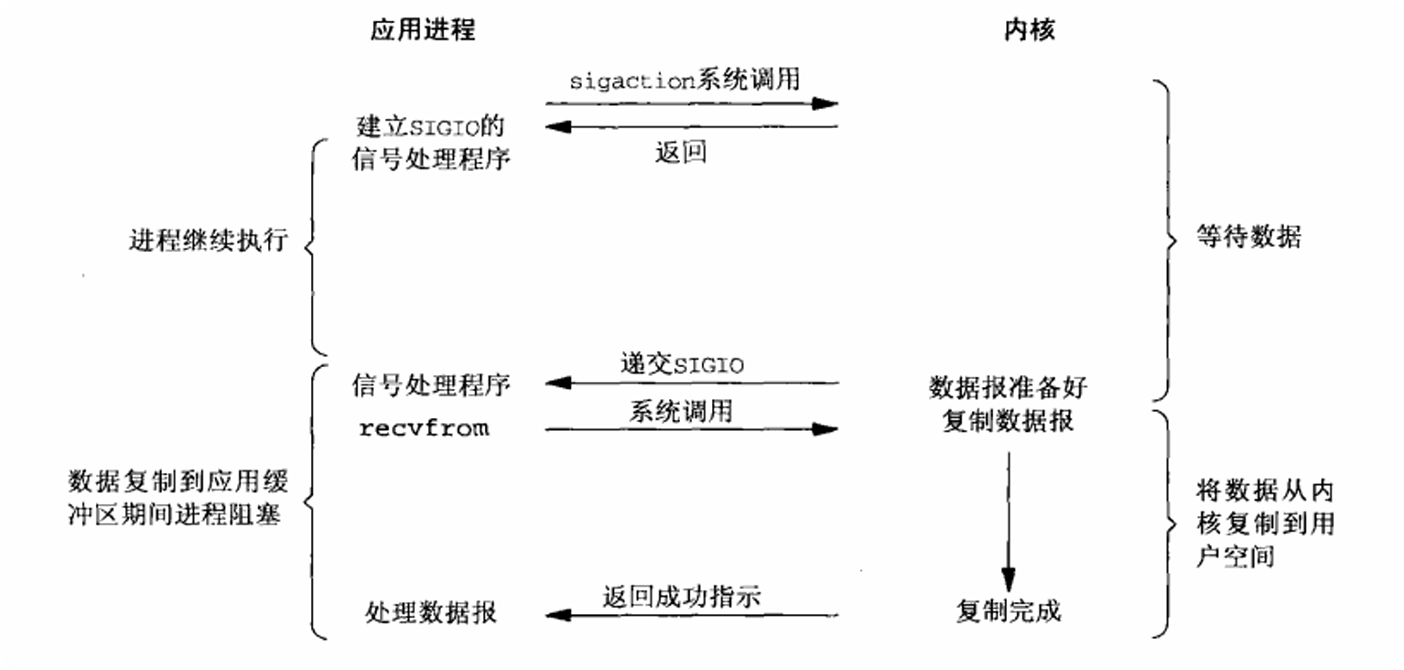
Signal-driven I/O registers a signal-handling callback when the process starts, and the process carries on executing. When data arrives, the target process is notified to perform the I/O operation (signal handler).
Asynchronous I/O
In technical discussions, the word “asynchronous” is often used for two different levels of concepts, which easily causes confusion:
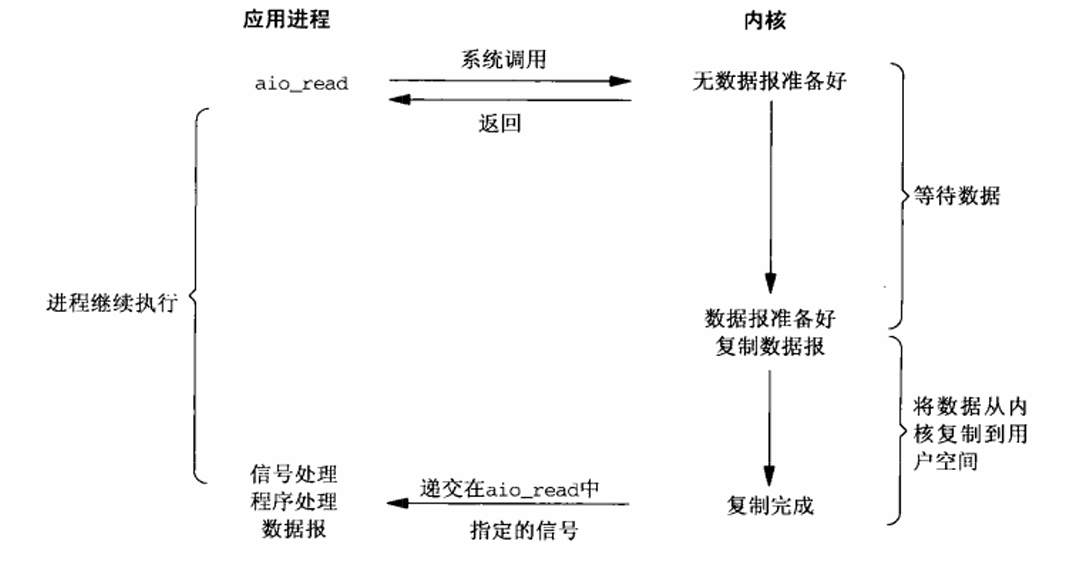
- The operating-system-level I/O model: for example, the AIO described in this post. In this model, the entire process from data preparation to data copy is done by the kernel; the application only issues the request and waits for the kernel’s completion signal.
- The application-level programming model: the framework exposes an asynchronous API, but the operating system interfaces it calls underneath are synchronous non-blocking.
Asynchronous I/O resembles the signal-driven I/O above. The difference is that signal-driven I/O uses a signal to notify the registered handler when the data arrives, whereas asynchronous I/O sends the signal to the registered handler only after the data copy has completed.
References
- 你管这破玩意叫 IO 多路复用?
- 怎样理解阻塞非阻塞与同步异步的区别? - 学刑法的程序员的回答 - 知乎
- Java NIO 浅析 - 美团技术团队
- UNIX Network Programming - W. Richard Stevens