---
title: "Understanding HTTPS: Encryption, Certificates, and TLS"
date: 2025-07-26
excerpt: How HTTPS secures web traffic, covering symmetric and asymmetric encryption, digital signatures, CA certificates and chain validation, and the TLS handshake.
tags: [Web, Network, Internet, HTTPS, Security, TCP]
cover: https://assets.vluv.space/cover/FrontEnd/https.webp
updated: 2026-07-08 21:17:39
lang: en
i18n:
cn: /https_protocol
translation: 2
---
## Introduction: Why Do We Need HTTPS?
HTTP itself transmits everything in plaintext, which means anyone can easily intercept and read the traffic along the way. For example, an Internet Service Provider (ISP) or another intermediary could inject ads into web pages without the site owner's approval.
HTTPS was created precisely to solve these security problems. It uses encryption to guarantee the confidentiality and integrity of data in transit. On one hand, it prevents pages from being maliciously tampered with; on the other, it protects users when they transmit sensitive data, such as logging into a bank account, checking email, or visiting a health insurance provider.
```wikitext
Without Encryption
This is a string of text that is completely readable
With Encryption
ITM0IRyiEhVpa6VnKyExMiEgNveroyWBPlgGyfkflYjDaaFf/Kn3bo3OfghBPDWo6AfSHlNtL8N7ITEwIXc1gU5X73xMsJormzzXlwOyrCs+9XCPk63Y+z0=
```
Below, we start from basic encryption concepts and work our way up to how HTTPS keeps data safe.
## Encryption Basics
Depending on whether encryption and decryption use the same key, encryption techniques fall into two categories: **symmetric encryption** and **asymmetric encryption**.
### Symmetric Encryption
Symmetric encryption is the most intuitive approach, like fitting a safe with a single key that both locks and unlocks it. Symmetric encryption generally performs well in speed, efficiency, and resource consumption; its main problem lies in key distribution and management.
- Alice and Bob share the same key $k$.
- Alice encrypts message $x$ with key $k$ and sends the encrypted result $k(x)$ to Bob.
- Bob decrypts the message with the same key $k$, recovering the original message $x$.
### Asymmetric Encryption
Asymmetric encryption is also known as [public-key cryptography](https://en.wikipedia.org/wiki/Public-key_cryptography). A web server generates a pair of mathematically related keys. Ciphertext produced by encrypting plaintext with the public key can only be decrypted with the corresponding private key. The public key is public, while the private key must be kept secret.
- Alice and Bob have never met and have no reliable communication channel, but Alice needs to send Bob a message over the insecure internet.
- Alice writes her message; at this point it is called the plaintext $x$.
- Bob generates a key pair, using one as the public key $c$ and the other as the private key $d$.
- Bob can send the public key $c$ to Alice by any means; it doesn't matter even if an eavesdropper, Charlie, intercepts $c$ along the way.
- Alice encrypts the plaintext $x$ with the public key $c$, producing the ciphertext $c(x)$.
- Alice can likewise send the ciphertext $c(x)$ to Bob by any means; even if Charlie intercepts it, he cannot decrypt it.
- Upon receiving the ciphertext, Bob decrypts it with his private key $d$, that is $d(c(x))$, recovering the plaintext $x$ that Alice wrote.
- Since Charlie does not have Bob's private key $d$, he cannot decrypt the ciphertext, and thus cannot learn the plaintext $x$.
- If Alice loses her own original text $x$, then without Bob's private key $d$ she is in the same position as Charlie: unable to recover the original from the public key $c$ and the ciphertext $c(x)$.
> [!danger] Man-in-the-Middle (MITM) Attack
>
> 1. If, while Bob is sending the public key $c$ to Alice, Charlie replaces it with his own public key $c_{charlie}$.
> 2. Alice will then encrypt her data with Charlie's public key, transmitting the ciphertext $c_{charlie}(x)$. Charlie can decrypt it with his own private key $d_{charlie}$, computing $d_{charlie}(c_{charlie}(x))$, and steal the plaintext $x$.
Because asymmetric encryption is computationally expensive, it is usually combined with symmetric encryption: asymmetric encryption securely delivers a symmetric key, and then both parties use that symmetric key for efficient data encryption and decryption. Besides asymmetric encryption, key exchange can also be done by other methods, such as [Diffie–Hellman key exchange](https://en.wikipedia.org/wiki/Diffie%E2%80%93Hellman_key_exchange), which lets both parties derive a shared key that only they can compute by exchanging some public information.
## Digital Signatures and Certificates
> [!tldr] TL;DR
>
> **Q:** Sending the public key directly is insecure
> **A:** Introduce a **Certificate Authority (CA)**; the client obtains a trustworthy public key from the certificate
>
> ---
>
> **Q:** What if the certificate itself gets tampered with?
> **A:** Digital signatures guarantee the certificate's integrity and trustworthiness.
>
> - The certificate is hashed (an irreversible operation) to produce a digest; the digest is encrypted with the CA's private key, and the result is the digital signature
> - The client decrypts the digital signature with the CA's public key to get the plaintext digest, hashes the certificate contents in the same way, and compares the two digests
>
> ---
>
> **Q:** Then how do we obtain the CA's public key securely?
> **A:** The operating system/client ships with a built-in list of CA public keys, or receives them through browser/OS updates.
>
> ---
>
> **Q:** There are many CAs; can all their public keys be stored on the client?
> **A:** Trust can be established through a **Certificate Chain**; see [[#Certificate Chain Validation]] below
### Digital Signatures
In the real world, we prove identity with ID cards, signatures, fingerprints, and so on. In the digital world, digital signatures play a similar role. Their key properties include:
1. **Unforgeable**: only the signer can produce the signature.
2. **Authentic**: anyone can verify the signature's validity with the public key.
3. **Not Reusable**: a signature cannot be reused for another message.
4. **Unalterable**: the signed message content cannot be tampered with.
5. **Non-repudiation**: the signer cannot deny having signed.
```python
from cryptography.hazmat.primitives import hashes
from cryptography.hazmat.primitives.asymmetric import dsa
# Sender class, responsible for signing messages
class Sender:
def __init__(self):
self.private_key = dsa.generate_private_key(key_size=2048)
self.public_key = self.private_key.public_key()
def sign_message(self, message: str) -> bytes:
# Compute the hash of the message
hasher = hashes.Hash(hashes.SHA256())
hasher.update(message.encode('utf-8'))
digest = hasher.finalize()
# Generate the digital signature with the private key
signature = self.private_key.sign(digest, hashes.SHA256())
return signature
def get_public_key(self):
# Return the public key for the receiver to verify with
return self.public_key
# Receiver class, responsible for verifying message signatures
class Receiver:
def __init__(self, public_key):
self.public_key = public_key
def verify_signature(self, message: str, signature: bytes):
# Compute the hash of the message
hasher = hashes.Hash(hashes.SHA256())
hasher.update(message.encode('utf-8'))
digest = hasher.finalize()
try:
# Verify the signature with the sender's public key
self.public_key.verify(signature, digest, hashes.SHA256())
print("Signature verified")
except Exception as e:
print(f"Signature verification failed: {e}")
# Simulate message sending and signature verification
sender = Sender()
receiver = Receiver(sender.get_public_key())
message = "I am Nailong (Official)"
# The sender signs the message
signature = sender.sign_message(message)
# The receiver verifies the signature
print("Receiver starts verifying the signature...")
receiver.verify_signature(message, signature)
```
### Digital Certificates
A Certificate Authority (CA), acting as a trusted third party, has one core duty: verify a website's identity and issue it a digital certificate, thereby solving the problem of trustworthy public key distribution.
#### Certificate Application and Issuance
The website owner generates a [Certificate Signing Request (CSR)](https://en.wikipedia.org/wiki/Certificate_signing_request). A CSR file typically contains the public key of the certificate to be issued, identifying information such as the domain name, and a digital signature that guarantees its authenticity and integrity.
The CSR is first sent to a Registration Authority (RA) for initial review. Once verified, the RA forwards the CSR to the CA. The CA signs the CSR with its own private key, ultimately generating and issuing the digital certificate to the applicant.
 #### Certificate Chain Validation
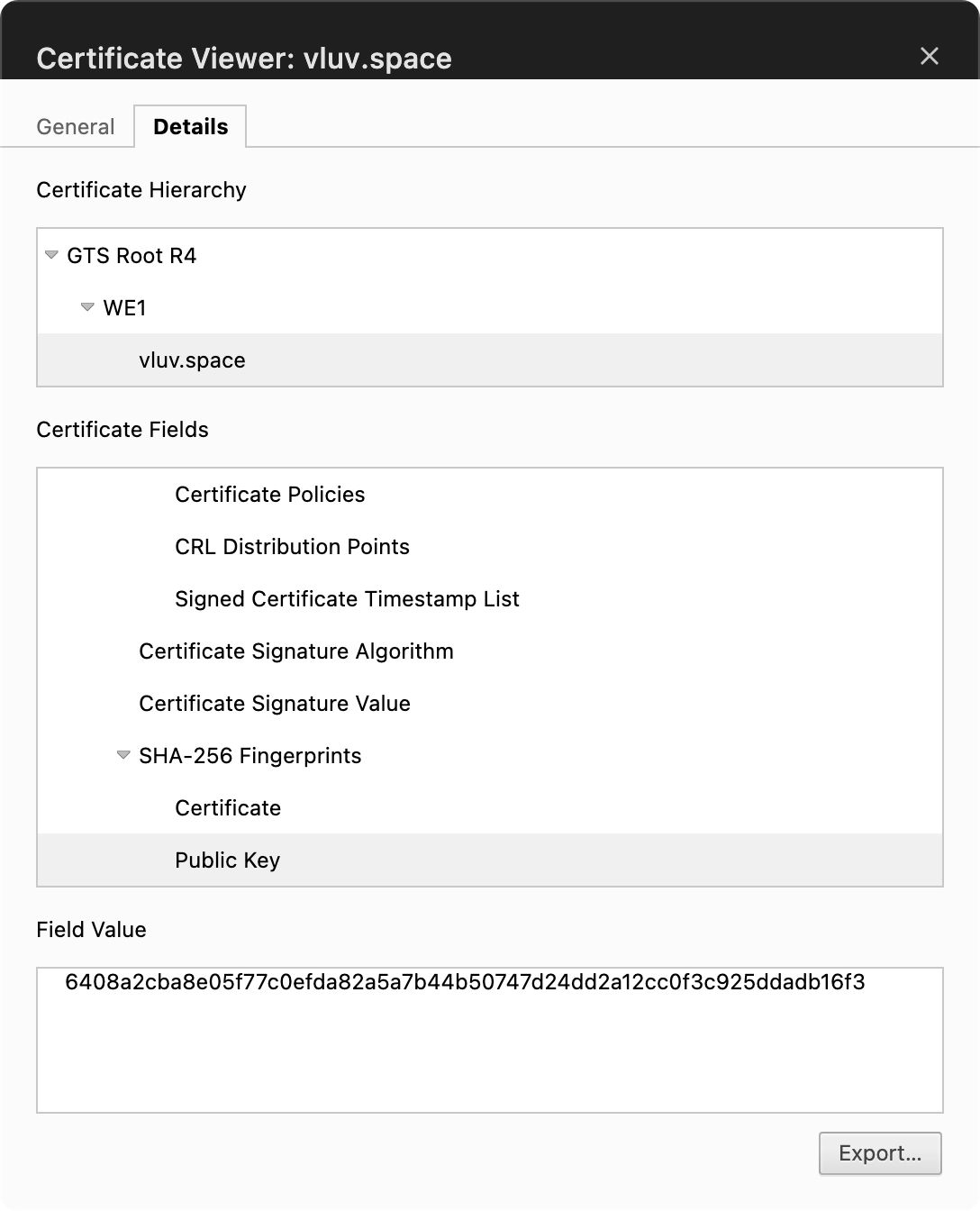
As mentioned earlier, the receiver (such as a browser) needs the CA's public key to verify the certificate's signature. The natural solution is a secure mechanism for distributing the public keys of a set of trusted CAs to clients; in practice this is usually done by preinstalling them in the operating system/browser.
On Windows, for example, they are installed in the *Trusted Root Certification Authorities certificate store*. See [Trusted Root Certification Authorities Certificate Store - Windows drivers | Microsoft Learn](https://learn.microsoft.com/en-us/windows-hardware/drivers/install/trusted-root-certification-authorities-certificate-store) for steps to access these certificates.
This way, the various **Intermediate Certificates** signed by a **Root CA** are considered trustworthy, and by the same reasoning, server certificates signed by those intermediates are trusted as well.
> [!danger]
>
> Wikipedia records several [incidents](https://en.wikipedia.org/wiki/Root_certificate#Incidents_of_root_certificate_misuse) where Root CAs accidentally signed malicious certificates, all of which damage the CA's reputation. In severe cases the CA may lose trust and no longer be bundled with operating systems.
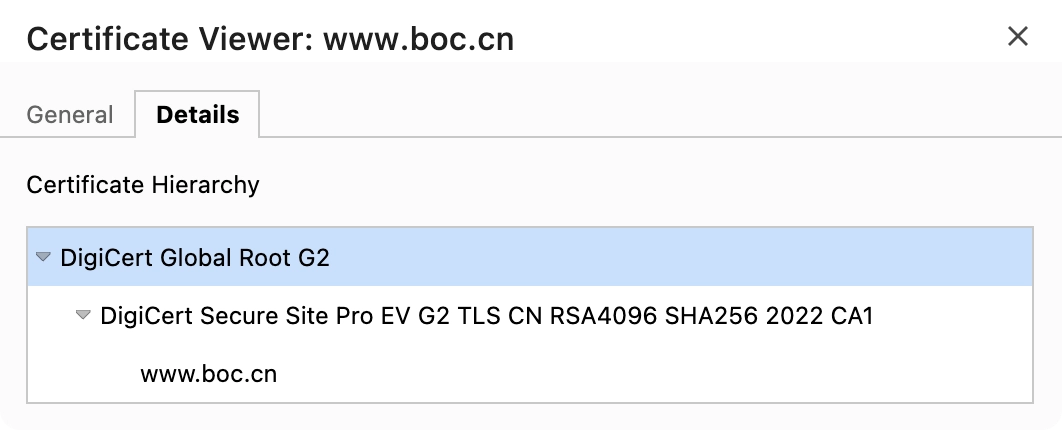
Take the Bank of China's official site as an example. There are three certificates, and the certificate for `www.boc.cn` is signed by `DigiCert CA1`.
#### Certificate Chain Validation
As mentioned earlier, the receiver (such as a browser) needs the CA's public key to verify the certificate's signature. The natural solution is a secure mechanism for distributing the public keys of a set of trusted CAs to clients; in practice this is usually done by preinstalling them in the operating system/browser.
On Windows, for example, they are installed in the *Trusted Root Certification Authorities certificate store*. See [Trusted Root Certification Authorities Certificate Store - Windows drivers | Microsoft Learn](https://learn.microsoft.com/en-us/windows-hardware/drivers/install/trusted-root-certification-authorities-certificate-store) for steps to access these certificates.
This way, the various **Intermediate Certificates** signed by a **Root CA** are considered trustworthy, and by the same reasoning, server certificates signed by those intermediates are trusted as well.
> [!danger]
>
> Wikipedia records several [incidents](https://en.wikipedia.org/wiki/Root_certificate#Incidents_of_root_certificate_misuse) where Root CAs accidentally signed malicious certificates, all of which damage the CA's reputation. In severe cases the CA may lose trust and no longer be bundled with operating systems.
Take the Bank of China's official site as an example. There are three certificates, and the certificate for `www.boc.cn` is signed by `DigiCert CA1`.
 ##### Step 1: Verify the End-Entity Certificate
1. **Receive the certificate**: the browser receives the `www.boc.cn` certificate from the Bank of China server. Inspecting it, the browser finds the issuer is `DigiCert ... CA-1`.
2. **Verify the signature**: to confirm the certificate's authenticity, the browser needs to find the certificate of `DigiCert ... CA-1` and extract its **public key**, then use that public key to decrypt and verify the digital signature on the `www.boc.cn` certificate.
##### Step 2: Verify the Intermediate Certificate
1. **Trace upward**: after successfully verifying the end-entity certificate, the browser must verify the legitimacy of the intermediate certificate `DigiCert ... CA-1` itself. It finds that this certificate's issuer is `DigiCert Global Root CA`.
2. **Verify the root certificate**: the browser looks up the public key of `DigiCert Global Root CA` in the _Trusted Root Certification Authorities certificate store_ and uses it to verify the certificate's authenticity.
Through this level-by-level upward verification, the browser ultimately confirms that the identity of `www.boc.cn` is trustworthy.
## The SSL/TLS Handshake
> [!NOTE]
> SSL (Secure Sockets Layer) was the original security protocol developed for HTTP. It was later replaced by the more capable and secure TLS (Transport Layer Security). So when we talk about the SSL handshake today, we actually mean the TLS handshake, but the name "SSL" remains widely used for historical reasons.
Technically speaking, HTTPS is not a new protocol independent of HTTP. It is essentially "HTTP over TLS/SSL": HTTP with encrypted transport provided by TLS/SSL.
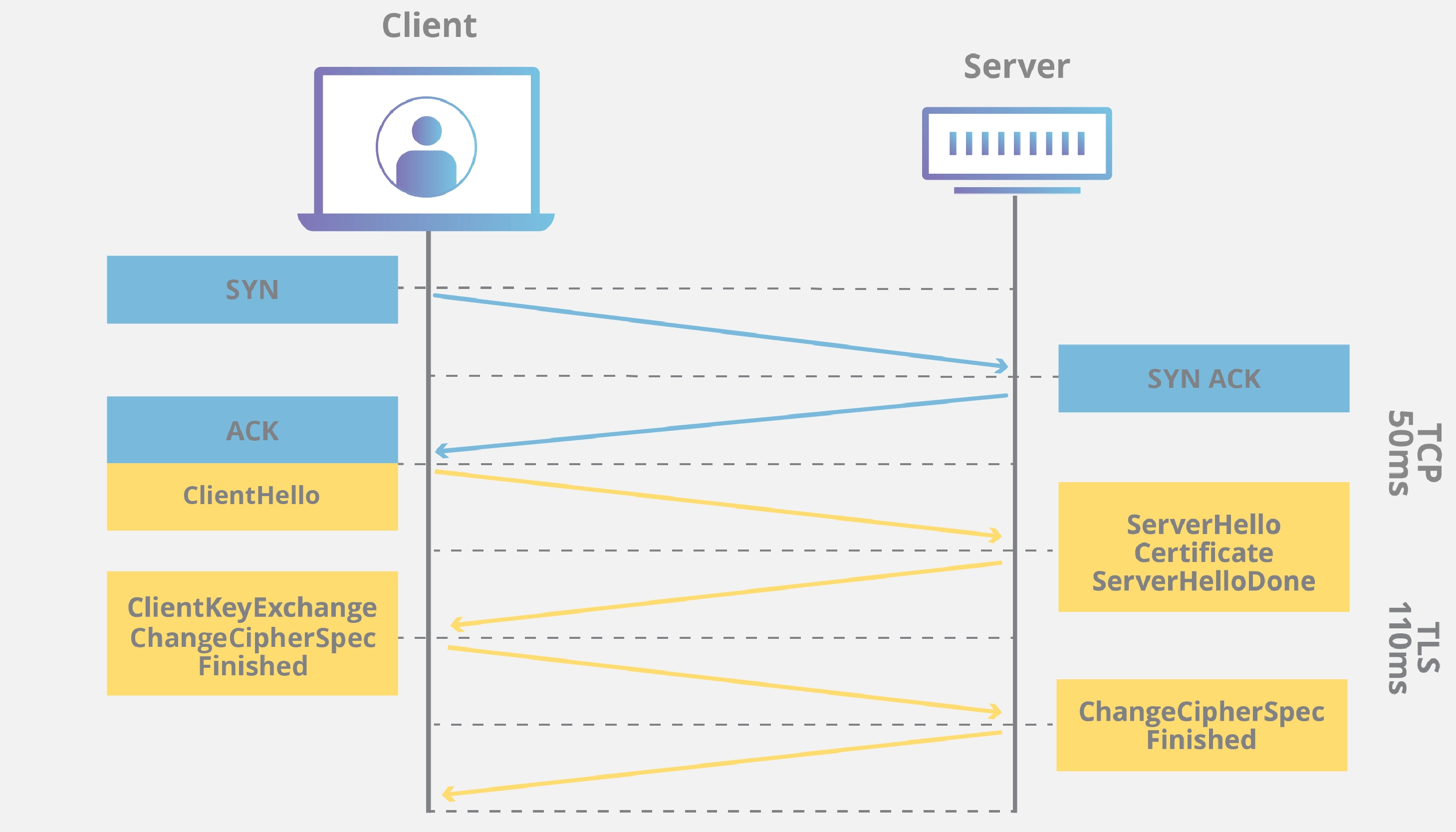
The TLS handshake happens after the TCP three-way handshake, and its core goals are:
- **Negotiate the version**: determine which TLS version both sides will use (e.g. TLS 1.2, 1.3).
- **Negotiate cipher suites**: determine the combination of cryptographic algorithms (Cipher Suites) to use.
- **Authenticate the server**: the client confirms the server's identity by verifying its digital certificate.
- **Generate the session key**: securely generate a symmetric key (the session key) for efficient encryption of subsequent communication.
The exact steps of the TLS handshake vary with the chosen key exchange algorithm and cipher suite. For a deeper dive, see [What happens in a TLS handshake? | Cloudflare](https://www.cloudflare.com/learning/ssl/what-happens-in-a-tls-handshake/).
## References
- [What is HTTPS? | Cloudflare](https://www.cloudflare.com/learning/ssl/what-is-https/)
- [What happens in a TLS handshake? | SSL handshake | Cloudflare](https://www.cloudflare.com/learning/ssl/what-happens-in-a-tls-handshake/)
- [【信息保护论】Ch9. 防止抵赖:数字签名-CSDN 博客](https://blog.csdn.net/Chahot/article/details/120178358)
##### Step 1: Verify the End-Entity Certificate
1. **Receive the certificate**: the browser receives the `www.boc.cn` certificate from the Bank of China server. Inspecting it, the browser finds the issuer is `DigiCert ... CA-1`.
2. **Verify the signature**: to confirm the certificate's authenticity, the browser needs to find the certificate of `DigiCert ... CA-1` and extract its **public key**, then use that public key to decrypt and verify the digital signature on the `www.boc.cn` certificate.
##### Step 2: Verify the Intermediate Certificate
1. **Trace upward**: after successfully verifying the end-entity certificate, the browser must verify the legitimacy of the intermediate certificate `DigiCert ... CA-1` itself. It finds that this certificate's issuer is `DigiCert Global Root CA`.
2. **Verify the root certificate**: the browser looks up the public key of `DigiCert Global Root CA` in the _Trusted Root Certification Authorities certificate store_ and uses it to verify the certificate's authenticity.
Through this level-by-level upward verification, the browser ultimately confirms that the identity of `www.boc.cn` is trustworthy.
## The SSL/TLS Handshake
> [!NOTE]
> SSL (Secure Sockets Layer) was the original security protocol developed for HTTP. It was later replaced by the more capable and secure TLS (Transport Layer Security). So when we talk about the SSL handshake today, we actually mean the TLS handshake, but the name "SSL" remains widely used for historical reasons.
Technically speaking, HTTPS is not a new protocol independent of HTTP. It is essentially "HTTP over TLS/SSL": HTTP with encrypted transport provided by TLS/SSL.

The TLS handshake happens after the TCP three-way handshake, and its core goals are:
- **Negotiate the version**: determine which TLS version both sides will use (e.g. TLS 1.2, 1.3).
- **Negotiate cipher suites**: determine the combination of cryptographic algorithms (Cipher Suites) to use.
- **Authenticate the server**: the client confirms the server's identity by verifying its digital certificate.
- **Generate the session key**: securely generate a symmetric key (the session key) for efficient encryption of subsequent communication.
The exact steps of the TLS handshake vary with the chosen key exchange algorithm and cipher suite. For a deeper dive, see [What happens in a TLS handshake? | Cloudflare](https://www.cloudflare.com/learning/ssl/what-happens-in-a-tls-handshake/).
## References
- [What is HTTPS? | Cloudflare](https://www.cloudflare.com/learning/ssl/what-is-https/)
- [What happens in a TLS handshake? | SSL handshake | Cloudflare](https://www.cloudflare.com/learning/ssl/what-happens-in-a-tls-handshake/)
- [【信息保护论】Ch9. 防止抵赖:数字签名-CSDN 博客](https://blog.csdn.net/Chahot/article/details/120178358)