---
title: Http Protocol
date: 2024-07-22
tags:
- Web
- Network
- Internet
- HTTP
- TCP
- Browser
cover: https://assets.vluv.space/cover/FrontEnd/http_protocol.webp
excerpt: "HTTP is an application-layer protocol for transferring hypermedia documents such as HTML. This post covers request and response messages."
updated: 2026-07-08 07:59:39
lang: en
i18n:
cn: /http_protocol
translation: 2
---
## HTTP Features
- **Request/response model**: all communication starts with a client request, and the server responds to that request.
- **Stateless**: the server does not store client state. Each request is independent.
- **Connectionless**: after a client and server complete one request-response cycle, the connection is closed. But `HTTP/1.1` introduced `Keep-Alive`, allowing multiple requests and responses over the same connection to reduce connection setup overhead.
```http
Connection: keep-alive
Keep-Alive: timeout=30, max=100
```
## HTTP Message
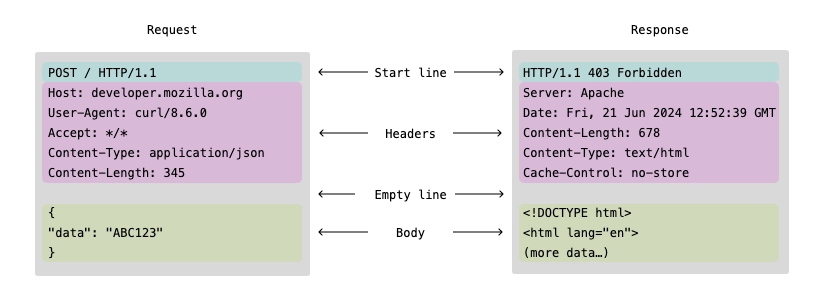
HTTP messages are divided into request messages and response messages. Their structures are similar. As shown below, both can be divided into three parts: the start line, headers, and an optional body.
### HTTP Request Message
#### Request Line
The first line of the message contains:
- Method: `GET, POST, PUT, DELETE, HEAD, OPTIONS, PATCH`
- Request Target: `/resource/user?id=10`
- Version: `HTTP/1.1`
##### Method
| **Method** | **Idempotent** | **Has body** | **Common use** |
| ---------- | -------------- | ------------ | -------------- |
| GET | ✅ | ❌ | Query |
| POST | ❌ | ✅ | Create |
| PUT | ✅ | ✅ | Full update |
| PATCH | ⚠️ | ✅ | Partial update |
| DELETE | ✅ | ❌/✅ | Delete |
| HEAD | ✅ | ❌ | Query metadata |
| OPTIONS | ✅ | ❌ | Probe capabilities |
#### Request Headers
Request metadata. Each header occupies one line, with the key and value separated by a colon. Common headers include:
- Host: the request target, such as `example.com`, `a.com:8080`, or `localhost:4000`. Combining Host with the Request Target determines the requested resource location, such as `example.com/index.html`.
---
- User-Agent: client software information, such as browser type and version.
- Referer: the URL of the source page.
---
- Content-Type: the data type of the request body, such as `application/json`.
- Content-Length: the request body length in bytes.
---
- Authorization: authentication information, such as `Bearer token` or `Basic base64encodedcredentials`.
- Cookie: cookie data stored on the client.
#### Request Body
An optional part containing data sent from the client to the server. Its format depends on the type specified by the `Content-Type` header.
```http
{
"username": "example",
"password": "password123"
}
```
```http
username=example&password=password123
```
### HTTP Response Message
#### Status Line
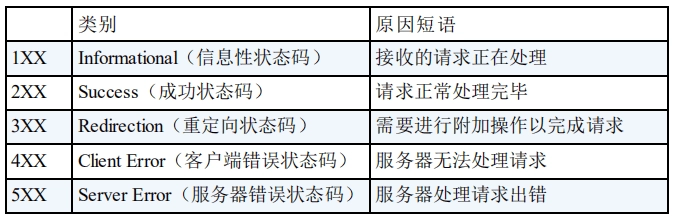
The first line of the message contains the HTTP version, status code, and reason phrase, for example `HTTP/1.1 200 OK`.
> [!hint] HTTP Status Code
>
> 
>
> See more details in [HTTP Common Status Code Summary (Application Layer) | JavaGuide](https://javaguide.cn/cs-basics/network/http-status-codes.html#_2xx-success-%E6%88%90%E5%8A%9F%E7%8A%B6%E6%80%81%E7%A0%81)
#### Response Headers
Response metadata. `curl` can use the `-I` option to view only response headers, for example `curl -I vluv.space`.
Common headers include:
- Server: server software information, such as `Apache/2.4.41 (Ubuntu)`.
---
- Cache-Control[^1]: tells the client how to cache the response, for example `public`, `private`, `no-cache`, or `max-age=3600`.
- Etag: a unique resource identifier used for cache validation. The server returns the ETag in the response. In later requests, the client sends that ETag through the `If-None-Match` header. The server uses the ETag to determine whether the resource has changed. If it has not changed, the server can avoid sending the response body and return `304 Not Modified`, saving bandwidth.
---
- Content-Type & Content-Length: the response body data type and length.
#### Response Body
An optional part containing the actual data returned by the server. Its format depends on the type specified by the `Content-Type` header.
[^1]: [What is cache-control? | Cache explained | Cloudflare](https://www.cloudflare.com/learning/cdn/glossary/what-is-cache-control/)