

HTTP Features
- Request/response model: all communication starts with a client request, and the server responds to that request.
- Stateless: the server does not store client state. Each request is independent.
- Connectionless: after a client and server complete one request-response cycle, the connection is closed. But
HTTP/1.1introducedKeep-Alive, allowing multiple requests and responses over the same connection to reduce connection setup overhead.
Connection: keep-aliveKeep-Alive: timeout=30, max=100HTTP Message
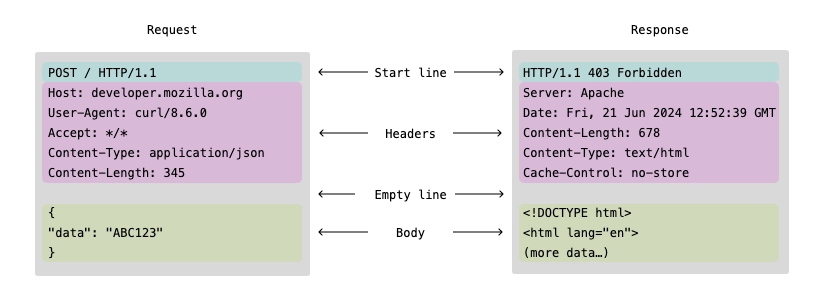
HTTP messages are divided into request messages and response messages. Their structures are similar. As shown below, both can be divided into three parts: the start line, headers, and an optional body.
HTTP Request Message
Request Line
The first line of the message contains:
- Method:
GET, POST, PUT, DELETE, HEAD, OPTIONS, PATCH - Request Target:
/resource/user?id=10 - Version:
HTTP/1.1
Method
| Method | Idempotent | Has body | Common use |
|---|---|---|---|
| GET | ✅ | ❌ | Query |
| POST | ❌ | ✅ | Create |
| PUT | ✅ | ✅ | Full update |
| PATCH | ⚠️ | ✅ | Partial update |
| DELETE | ✅ | ❌/✅ | Delete |
| HEAD | ✅ | ❌ | Query metadata |
| OPTIONS | ✅ | ❌ | Probe capabilities |
Request Headers
Request metadata. Each header occupies one line, with the key and value separated by a colon. Common headers include:
- Host: the request target, such as
example.com,a.com:8080, orlocalhost:4000. Combining Host with the Request Target determines the requested resource location, such asexample.com/index.html.
- User-Agent: client software information, such as browser type and version.
- Referer: the URL of the source page.
- Content-Type: the data type of the request body, such as
application/json. - Content-Length: the request body length in bytes.
- Authorization: authentication information, such as
Bearer tokenorBasic base64encodedcredentials. - Cookie: cookie data stored on the client.
Request Body
An optional part containing data sent from the client to the server. Its format depends on the type specified by the Content-Type header.
{ "username": "example", "password": "password123"}username=example&password=password123HTTP Response Message
Status Line
The first line of the message contains the HTTP version, status code, and reason phrase, for example HTTP/1.1 200 OK.
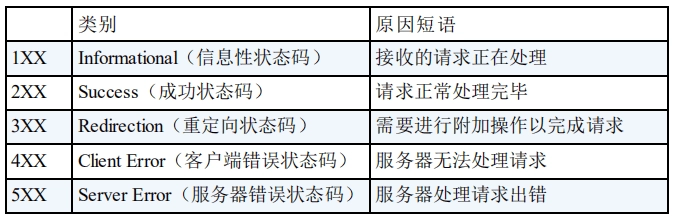
See more details in HTTP Common Status Code Summary (Application Layer) | JavaGuide
Response Headers
Response metadata. curl can use the -I option to view only response headers, for example curl -I vluv.space.
Common headers include:
- Server: server software information, such as
Apache/2.4.41 (Ubuntu).
- Cache-Control[1]What is cache-control? | Cache explained | Cloudflare: tells the client how to cache the response, for example
public,private,no-cache, ormax-age=3600. - Etag: a unique resource identifier used for cache validation. The server returns the ETag in the response. In later requests, the client sends that ETag through the
If-None-Matchheader. The server uses the ETag to determine whether the resource has changed. If it has not changed, the server can avoid sending the response body and return304 Not Modified, saving bandwidth.
- Content-Type & Content-Length: the response body data type and length.
Response Body
An optional part containing the actual data returned by the server. Its format depends on the type specified by the Content-Type header.