

Exactly twenty years ago, on April 7, 2005, Linus Torvalds made the very first commit to a new version control system called Git.
In 2005, the kernel team needed a replacement source control tool after the BitKeeper licensing dispute. Torvalds, who hated CVS with a passion, decided to build his own. He started thinking about the design in late 2004, and in early 2005 spent about 10 focused days building the first usable version of Git.
So I was like, okay, I’ll do something that works for me, and I won’t care about anybody else. And really that showed in the first few months and years—people were complaining that it was kind of hard to use, not intuitive enough.
Since it was originally built just for the Linux kernel team, early Git only had low-level plumbing commands and lacked friendly porcelain commands. It took the community’s efforts for Git to gradually evolve into a powerful and reasonably easy-to-use version control system (though compared to other SCM tools, Git still takes some getting used to).
Today Git has become one of the most popular version control systems, widely used in both open source and commercial projects. Much of Git’s success comes down to its network effect: since most projects use Git, new projects default to Git as well.Example commands Description Plumbing git hash-object, git cat-file, git update-index, git write-treeOperate on Git’s low-level objects: computing hashes, writing to the Git database, etc. Porcelain git add, git commit, git push, git statusHigh-level wrappers for typical day-to-day development workflows
In daily development we mostly use porcelain commands (I use LazyGit btw🤓), while the low-level plumbing commands are Git’s core implementation. Understanding Git’s data structures and object model helps you grasp how it works and makes Git commands feel less like a black box. That said, not knowing these internals usually doesn’t get in the way of everyday use.
Below is a brief introduction to Git’s data structures and object model. I’ll cover the implementation of some porcelain commands another time.
Objects
A Git repository mainly stores four types of objects, located under the .git/objects/ directory. Each object has a unique SHA-1[1]SHA, Secure Hash Algorithm value, which Git uses to look objects up.Object type Main purpose Stored content Mutability Blob[2]Blob, Binary Larger Objetc Store file contents Raw file data only Immutable Tree Represent directory structure List of file/directory entries Immutable Commit Record a version snapshot Project state metadata Immutable Tag Mark a specific version Metadata of the tagged object Immutable
Graph
The pointer relationships between objects look like the following; references between objects are implemented by recording SHA-1 hashes.
For example, the Commit 2 object stores a SHA-1 pointing to a Tree object, plus the SHA-1 of its Parent Commit (i.e. Commit1).
A few things worth noting:
- A commit object records:
Tree SHA-1, pointing to the tree object representing the state of the project rootParent(s) SHA-1, pointing to one or more parent commit objects
- Each
commitpoints to a complete project snapshot (via a tree object), rather than recording diffs between files. Diffs are computed on the fly when needed (e.g.git diff).
COMMIT1 --> COMMIT2 --> COMMIT3 --> ... | | | v v v TREE TREE TREE / | \ / | \ / | \ v v v v v v v v v B B T B B T B B B / \ / \ v v v v B B B BWhat we usually care about are the Commit objects. Through their Parent SHA-1 pointers they form a Directed Acyclic Graph - DAG, where each commit object points to its parent commit(s). With this structure, Git can track the project’s history efficiently.
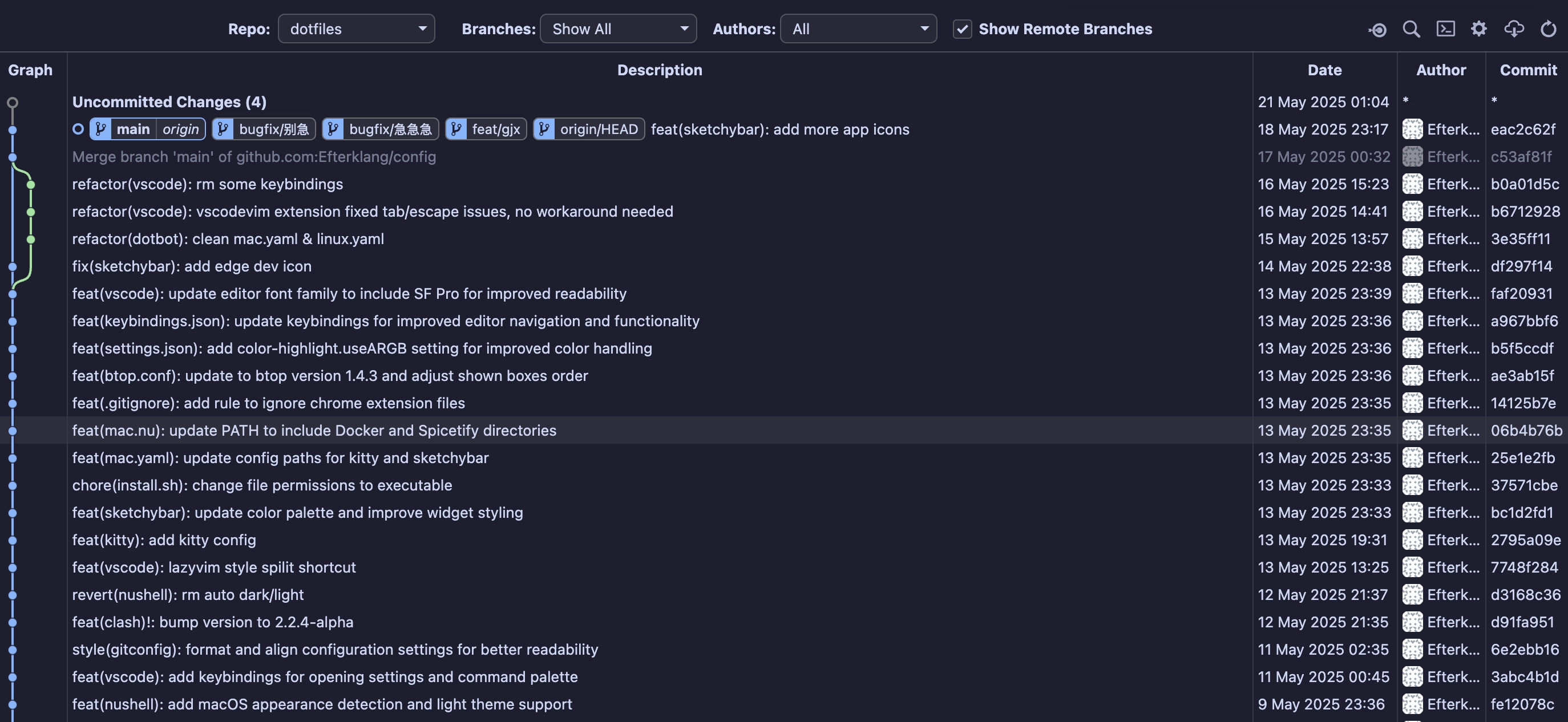
A commit may have multiple parent commits. For example, the Merge commit produced by the merge operation below has two parents.
Releated Plumbing Commands
You can use the plumbing commands mentioned above to verify the contents of git objects.# View the contents of a blob object$ git cat-file -p 38223a8b88cb79e6c50587200dddaa2bee632039*.log*.log.*history.txt**/state.yml**/state.jsonmisc/yasb/*.pyelevated-state.jsonlazy-lock.json*.bak# mac.DS_Store# chrome extension*.pak# View the contents of the commit object HEAD points to$ git cat-file -p HEAD~tree 6aa9038b7598f6c2fd28e1452ec12ce704889868parent df297f141f21ac41c6a225214b35729209e30b63parent b0a01d5c938c4bf617141898ecda2bfeeba39408author Efterklang <gaojiaxing2004@qq.com> 1747413172 +0800committer Efterklang <gaojiaxing2004@qq.com> 1747413172 +0800Merge branch 'main' of github.com:Efterklang/config# The output above includes a tree object's SHA-1; view the tree object's contents$ git cat-file -p 6aa9038b7598f6c2fd28e1452ec12ce704889868100644 blob 38223a8b88cb79e6c50587200dddaa2bee632039 .gitignore100644 blob 1af14d0fa103a0b5dd83294bbffe622afb7fc3b7 .gitmodules100644 blob 5acc0b549e71749f3dcfed94df73799688f3fca5 LICENSE.md100644 blob 5f01256728f790fb046b4a5ddf56b686711c1479 README.md040000 tree b5e786a9baf2ddc55c0dcf76f0aaf33c914d271b application040000 tree 9c417f15cdf72696abfd4b9d0de89922c714ca3e assets160000 commit b8891c5fb72485316fba54d2c1310320c9ebf4d5 dotbot100755 blob 841bc2e32b2f56a44569d24a481c6d4902dfcf68 install.ps1100755 blob 89195ec2a3b9f68939b77a6b71d0834ffc1603e2 install.sh100644 blob 7f6171b6606dbd811e4ce74b445ba08e09c86545 linux.yaml100644 blob 522b64e9e3533bf61720e054667189eda272727e mac.yaml040000 tree e9734049cb57b7427d64b24691a8ac7849352538 misc040000 tree 18a69f6feba9237aeccac753abe939f3218ccfa3 packages040000 tree 70301eeee8f9a1f3db7d7c6e35c7da73deaf83f0 shells040000 tree 62f6055d5e5983c976802e570c565b4e68b2068d terminal040000 tree adf3d257c2b7e8b63677d0488bf8939d00a7ace8 tui_cli100644 blob 551b11fa060531730df24bf230182d8bf3052526 windows.yaml
References
| Reference type | Storage location | Main purpose | Example |
|---|---|---|---|
| Local Branch | refs/heads/ | Mark a local line of development | refs/heads/master |
| Remote Branch | refs/remotes/ | Track branches in remote repos | refs/remotes/origin/master |
| Tag | refs/tags/ | Mark a specific commit | refs/tags/v1.0 |
| HEAD | .git/HEAD | Point to the current working position | HEAD |
In Git, a “reference” (usually abbreviated as ref) is a pointer to a commit object or to another reference (such as another branch or tag). They are Git’s convenient way of tracking history and branches. Common refs include branch names (like main, feat/gjx) and tag names (like v1.0.0).
For a detailed introduction to Git refs, see Git Refs: What You Need to Know | Atlassian Git Tutorial.
The ref design has a couple of benefits:
- Readability/manageability: refer to objects by human-readable names instead of raw SHA-1 hashes. The most commonly used ref is probably the branch; in team collaboration, branch names are far easier to understand and manage than SHA-1 hashes
- Lightweight: a ref itself is lightweight, storing only the SHA-1 hash of the object it points to rather than the full object data, which makes refs efficient to store and manipulate
Common Refs
HEAD is the most important and most frequently used special reference in Git. It usually points to the latest commit of the currently checked-out local branch (Symbolic HEAD), but it can also be “detached” to point directly at a specific commit (Detached HEAD). It is stored in the .git/HEAD file at the project root.
Also, when running operations like git merge, git cherry-pick, or git rebase, Git creates temporary references such as MERGE_HEAD, CHERRY_PICK_HEAD, and REBASE_HEAD. These references track the state of the operation in progress.
Branch
In Git’s internal implementation, a branch is really a reference to a commit, stored under the .git/refs/heads/ directory.
For example, I created four branches: main, bugfix/fix1, bugfix/别急, and feat/gjx. On the filesystem they look like this:$ ll ./.git/refs/heads/drwxr-xr-x - gjx 21 May 00:25 bugfixdrwxr-xr-x - gjx 21 May 00:24 feat.rw-r--r-- 41 gjx 18 May 23:17 main$ tree ./.git/refs/heads/./.git/refs/heads/├── bugfix│ ├── 别急│ └── fix1├── feat│ └── gjx└── main
Git branch names allow / as a separator because under the .git/refs/heads/ directory, Git interprets / in branch names as a subdirectory separator. In large repos, this lets you organize branches hierarchically, making them easier to manage and find. If you’re interested, see Conventional Branch
A ref itself is a text file whose content is a single SHA-1 hash pointing to the latest commit of the branch. For example, I can cat the bugfix/fix1 branch: it outputs one line with a SHA-1 hash. Following the steps above, let’s look at the contents of this branch.# A branch is just a text file, so cat it directly$ cat .git/refs/heads/bugfix/fix1 File: .git/refs/heads/bugfix/fix1 Size: 41 B1 eac2c62fcf0fe905ea475d1eb94d0e6d42916da8# Look at this commit's contents$ git cat-file -p eac2c62fcf0fe905ea475d1eb94d0e6d42916da8tree b09d937e4cdc5628e5818b08c7f3c303b5223470parent c53af81f5493d6c7aa1b7da30670da8b168d2c5cauthor Efterklang <gaojiaxing2004@qq.com> 1747581423 +0800committer Efterklang <gaojiaxing2004@qq.com> 1747581423 +0800feat(sketchybar): add more app icons
Releated Plumbing Commands
I won’t go into detail here; not recommended for daily use, just for fun.# List all references$ git show-refeac2c62fcf0fe905ea475d1eb94d0e6d42916da8 refs/heads/bugfix/别急eac2c62fcf0fe905ea475d1eb94d0e6d42916da8 refs/heads/bugfix/fix1eac2c62fcf0fe905ea475d1eb94d0e6d42916da8 refs/heads/feat/gjxeac2c62fcf0fe905ea475d1eb94d0e6d42916da8 refs/heads/maineac2c62fcf0fe905ea475d1eb94d0e6d42916da8 refs/remotes/origin/HEADeac2c62fcf0fe905ea475d1eb94d0e6d42916da8 refs/remotes/origin/main# Show symbolic ref; I'm currently on the bugfix/别急 branch$ git symbolic-ref HEADrefs/heads/bugfix/别急