

Intro
Linux file system architecture follows the Unix design philosophy. One of its core ideas is “Everything is a file” (Everything is a file). This means that ordinary text files, directories, devices such as printers and disks, pipes, sockets, and other system resources are all abstracted as files for operation, providing a consistent interface and a simple programming model.
Linux File System Architecture
VFS is an abstraction layer in the kernel. It hides the differences between underlying file systems, provides a unified interface for users and upper-layer applications, and defines standard file system objects such as inode, dentry, super_block, and file. When developing applications, you do not need to care whether the underlying file system is ext4, XFS, or Btrfs.
I will not explain specific file system differences here for now, because this touches my knowledge blind spot.
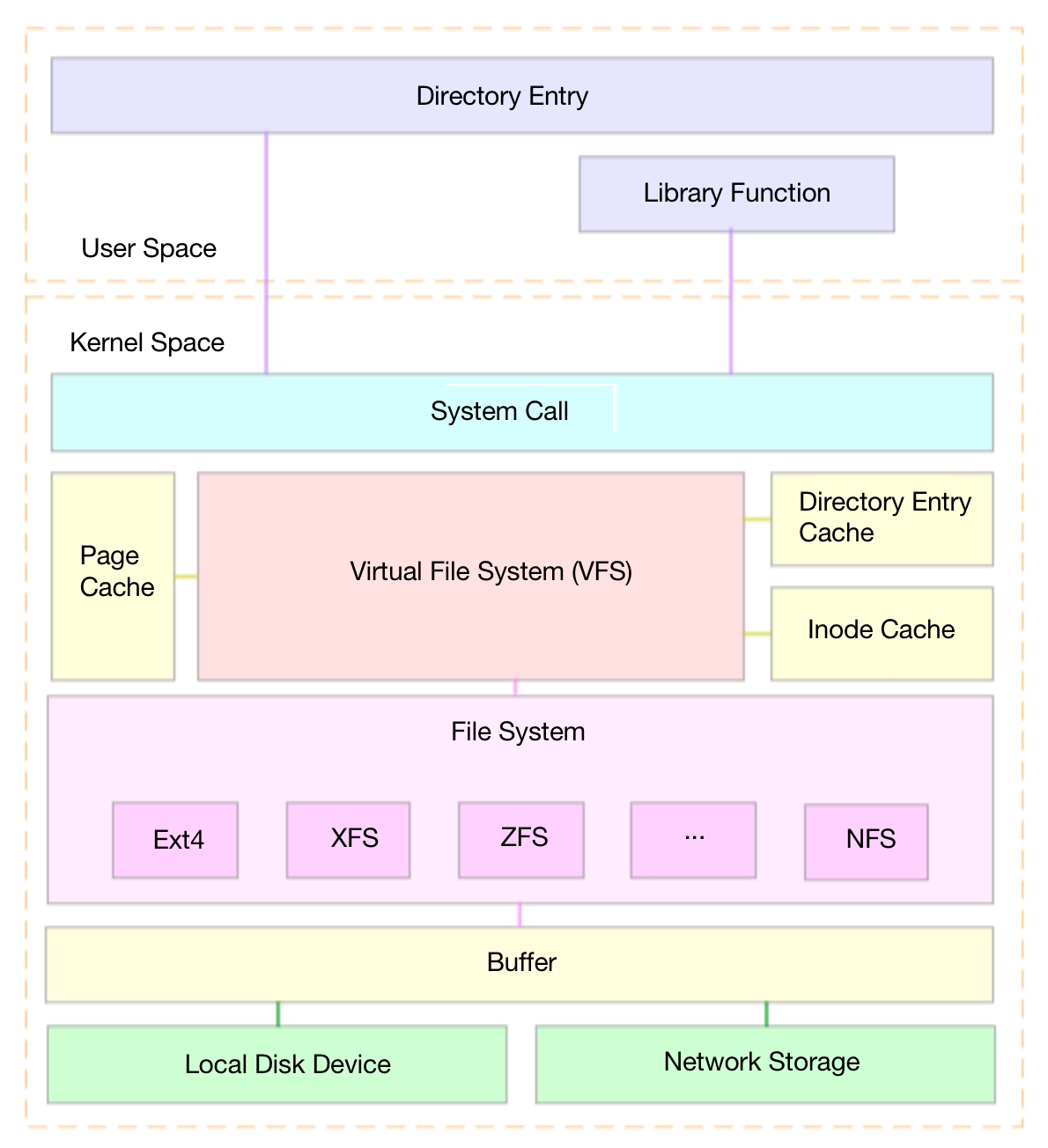
File system Features ext4 Stable, supports large files, many subdirectories, journaling, delayed allocation XFS High-performance 64-bit journaling file system, suitable for big data and concurrent writes
Files In Disk & Kernel
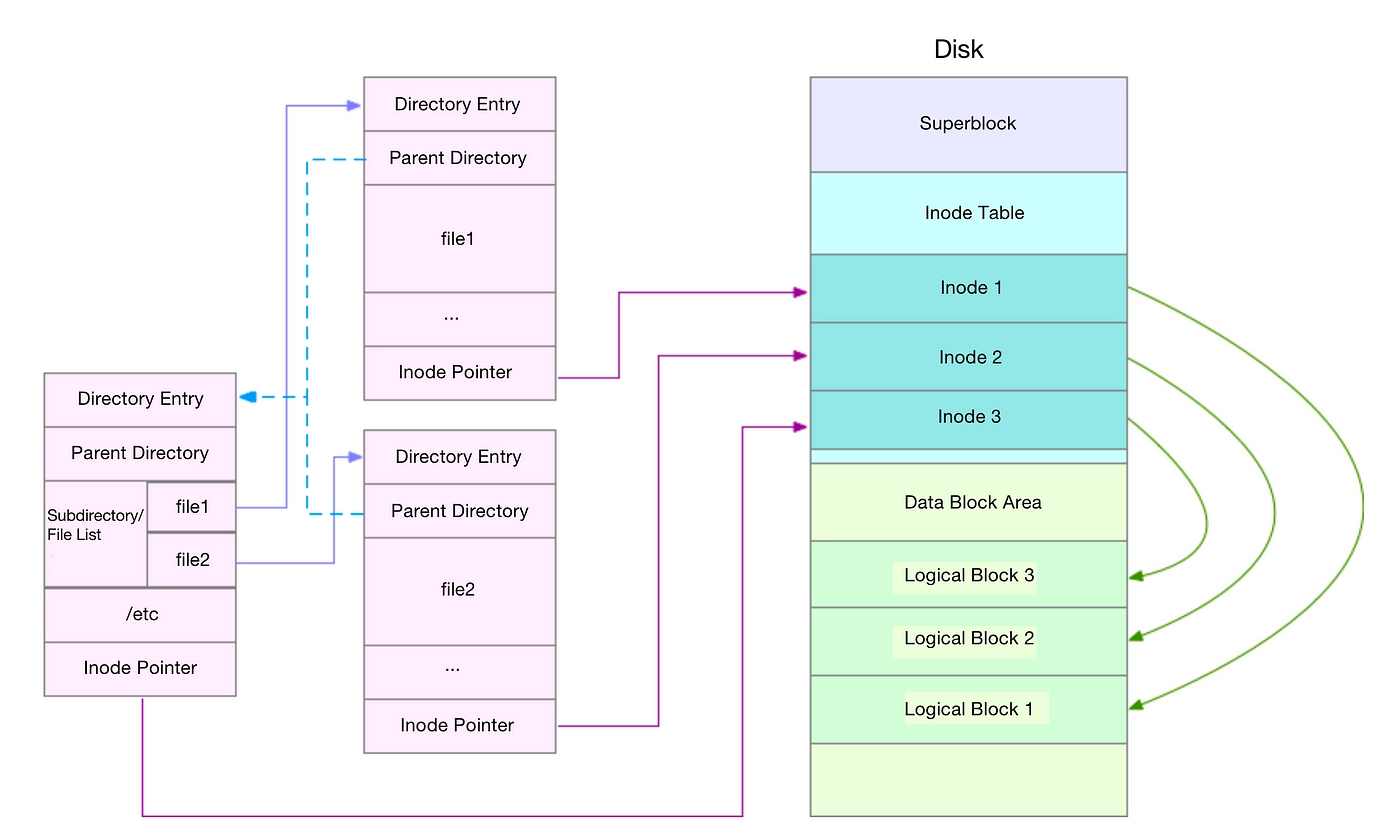
Linux file system design gives files different representations on disk and in the kernel. On disk, files are stored as data blocks. In the kernel, they are managed through structures such as file descriptors and inodes.
In Disk
Superblock: a data structure containing file system control information, including file system state, type, size, and more.
Inode: a data structure that stores file metadata, including file size, owner, creation time, data block locations, and more. Use ls -i to view a file’s inode number.
In Kernel
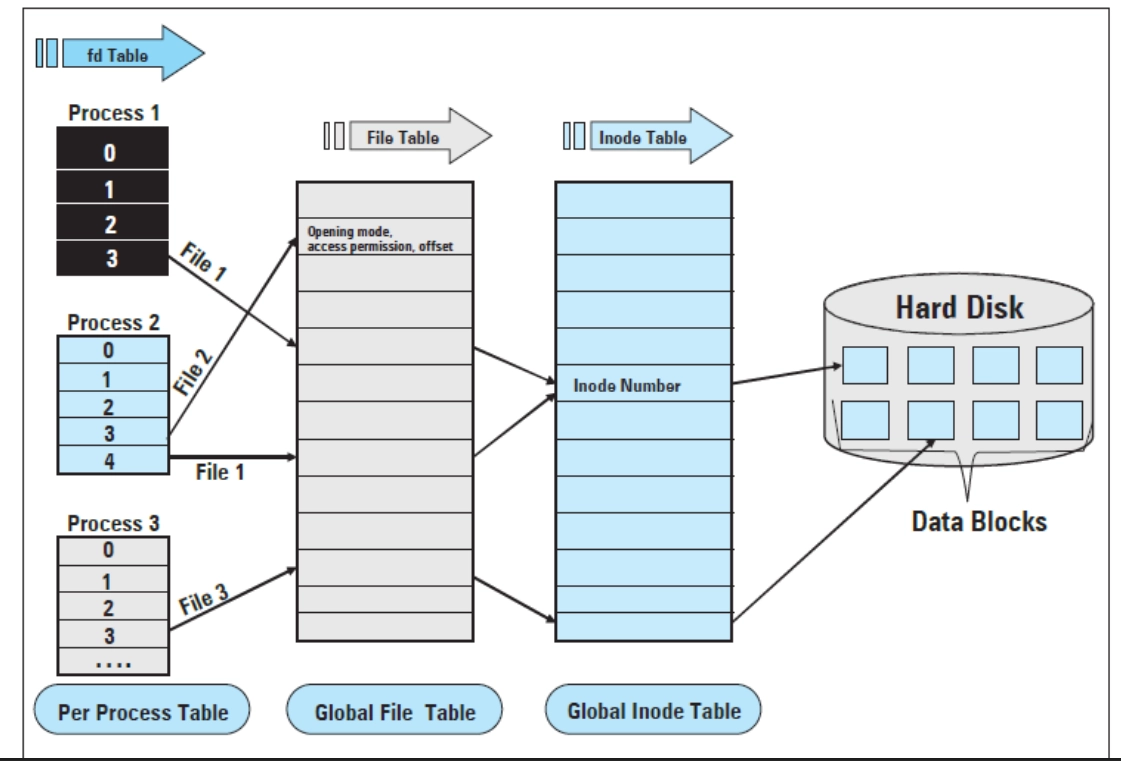
The kernel uses three tables to represent files used by processes:Layer name Private or shared Description fd table Private to each process An array of pointers stored in the PCB. The index is called fd, and fa_table[fd] points to an entry in the file tablefile table Can be shared by multiple processes Stores file state, such as file offset, open mode, reference count, and a pointer to an inode table entryinode table Shared by all processes File metadata: permissions, type, size, timestamps, disk block locations, etc. It is the abstract description of the real file
File Descriptor
Among the three tables above, the one developers most often encounter in daily work is probably the process file descriptor table, or fd table. When you use APIs to operate resources such as sockets, pipes, or files opened with open, the system returns a file descriptor (fd). You then use that fd to read, write, close, or pass the resource.
In inter-process communication (IPC), fd is also commonly passed as a resource handle to share resources.
A file descriptor is essentially an index into the fd table in the process control block (PCB). When each process is created, it opens three special file descriptors by default. Their numbers are fixed across all processes and are used for standard input and output:File descriptor Name Description fd 0Standard Input (stdin) Standard input, usually the keyboard fd 1Standard Output (stdout) Standard output, usually the terminal screen fd 2Standard Error (stderr) Standard error output, usually the terminal screen
Here is a simple Python script demonstrating how to use a file descriptor to redirect standard output to a file (using C here might be more consistent):import osimport sysfd = os.open("test.txt", os.O_WRONLY | os.O_CREAT | os.O_TRUNC, 0o644)# Redirect standard output to the fd for a.txt in the process. For readability, use `sys.stdout.fileno()` instead of the number `1`os.dup2(fd, sys.stdout.fileno())# Now all print output goes to a.txtprint("Hello, test.txt!")os.close(fd)
A common example is socket programming. When a socket is created, the system returns a file descriptor. For example, int sockfd = socket(AF_INET, SOCK_STREAM, 0); creates a socket, and the return value sockfd is a file descriptor. This descriptor can be used for read and write operations, just like a normal file. For example, you can use write(sockfd, data, len) to send data to the socket.