
About Theme
| Category | Extensions |
|---|---|
| Themes | Catppuccin for VScode |
| File Icon Theme | Material Icon Theme |
| Product Icons Theme | Fluent Icons |
// =================================================================================// * Theme *// ================================================================================={ "material-icon-theme.folders.color": "#9eb5f3", "material-icon-theme.files.color": "#42a5f5", "material-icon-theme.hidesExplorerArrows": true, "material-icon-theme.folders.theme": "specific", "materialTheme.accent": "Indigo", "workbench.colorTheme": "Catppuccin Mocha", "catppuccin.italicComments": true, "catppuccin.accentColor": "lavender", // Set Catppuccin's accent color; default is mauve "catppuccin.bracketMode": "neovim", "catppuccin.workbenchMode": "flat", "catppuccin.boldKeywords": true, "catppuccin.italicKeywords": true}Recommendations
Other Theme
- Dark Space
- Material Theme
- Tokyo Night
- Tokyo Night Ported Nvim
- Tokyo Night Frameless
- Solarized Palenight
- Bearded Theme
Other File Icon Theme:
- Catppuccin Icons for VSCode
- CodeUI
- background
Custom CSS
Require Custom CSS and JS Loader
Import a CSS file in the settings. I put mine under ~/.config/vscode/custom.css.{ "vscode_custom_css.imports": [ "file:///c:/Users/24138/.config/vscode/custom.css" ]}
Before customization, it helps to understand VS Code’s UI. See Visual Studio Code Docs — User Interface.
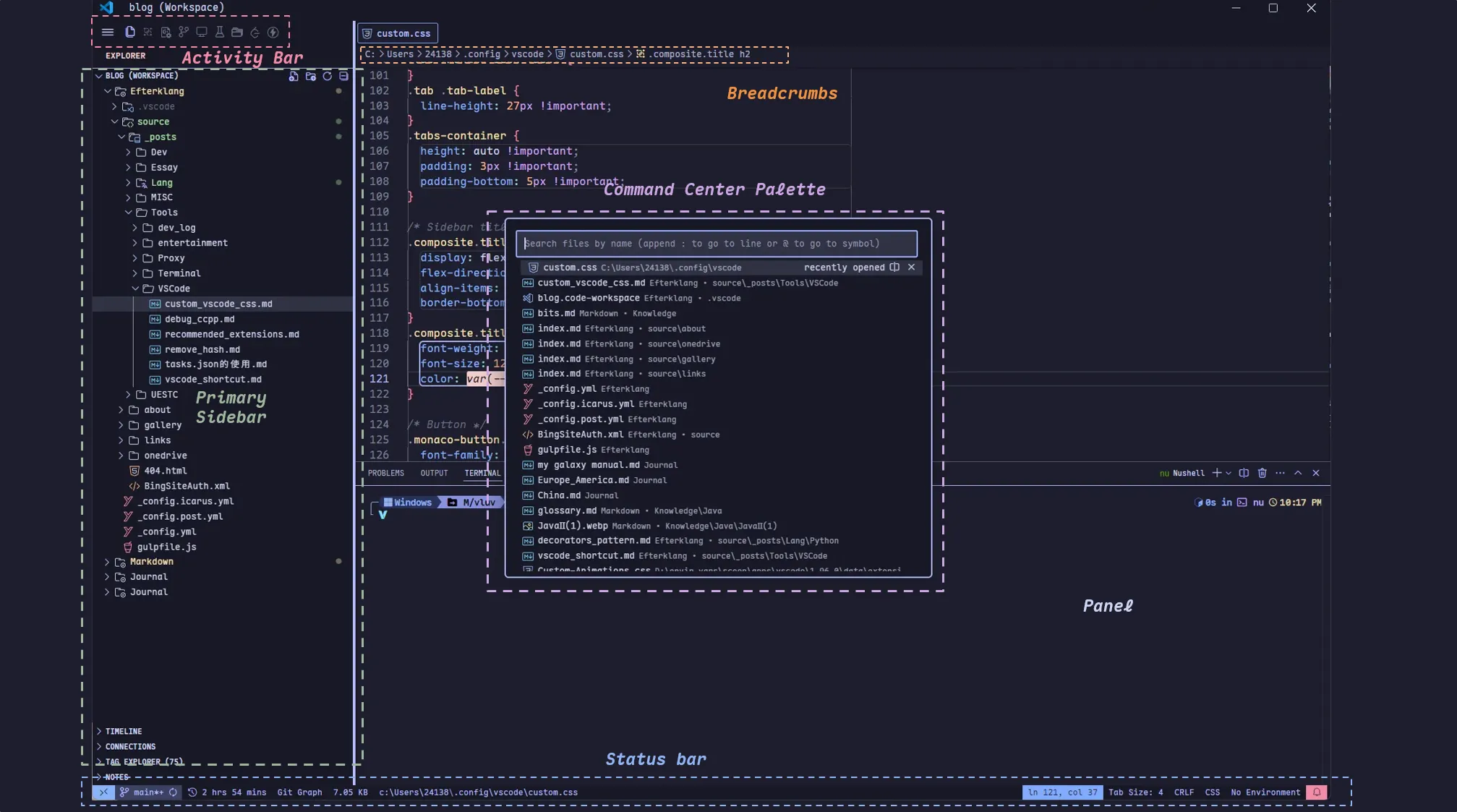
This plugin supports overriding VS Code styles with CSS and JavaScript. My personal CSS mainly changes:
- Fonts in different areas, including sidebar, tabs, etc. I mainly use
Maple Mono NF CN.Maple Monois a good Nerd Font with Chinese/English 1:2 monospace support and rich ligatures.
PS: After using VS Code for so long, v1.96.0 finally supports ligatures in the Integrated Terminal 🤓 - The status bar: set different background colors for different components, similar to LazyVim. The
orderproperty can adjust element ordering; I may tune this later. - Borders for some elements, including tabs, notifications, command palette, etc.
- Centered Command Palette display, similar to LazyVim.
Custom Animations
Require VSCode Animations and Custom CSS and JS Loader
This plugin provides smoother animations for VS Code. One feature is the Trail Cursor Effect.

My Settings
{ "animations.Active": "Indent", "animations.Enabled": true, "animations.CursorAnimation": true, "animations.Install-Method": "Custom CSS and JS", "animations.CursorAnimationOptions": { "Color": "#6d8be0", "TrailLength": 8, "CursorStyle": "block" }, "animations.Command-Palette": "Scale", "animations.Durations": { "Active": 200, "Scrolling": 200, "Tabs": 200 }}Further Steps
Use Developer: Toggle Developer Tools to inspect elements and find the corresponding CSS classes.
Credits
https://www.reddit.com/r/vscode/comments/1gsz7fh/my_vscode_w_custom_css
https://www.reddit.com/r/vscode/comments/1hdb5ul/turned_vs_code_to_neovimish