

Tools Used
| Tool | Core Role | Alternatives | Cost |
|---|---|---|---|
| DNSPod | Smart DNS resolution by domestic/overseas routes | Alibaba Cloud DNS | Free |
| Bitiful | CDN acceleration in mainland China (ICP filing required) | Alibaba Cloud CDN, Tencent Cloud CDN, Qiniu CDN | Paid |
| EdgeOne | CDN acceleration outside mainland China | Cloudflare CDN, Vercel CDN | Free |
| Cloudflare Pages | Static origin hosting Origin for overseas CDN nodes | Vercel, EdgeOne, GitHub Pages, personal server | Free |
| EdgeOne Pages | Static origin hosting Origin for mainland CDN nodes | Server in mainland China | Free |
How It Works
The idea is simple: split traffic with DNS CNAME records. Domestic users go through the domestic CDN, overseas users go through the overseas CDN.
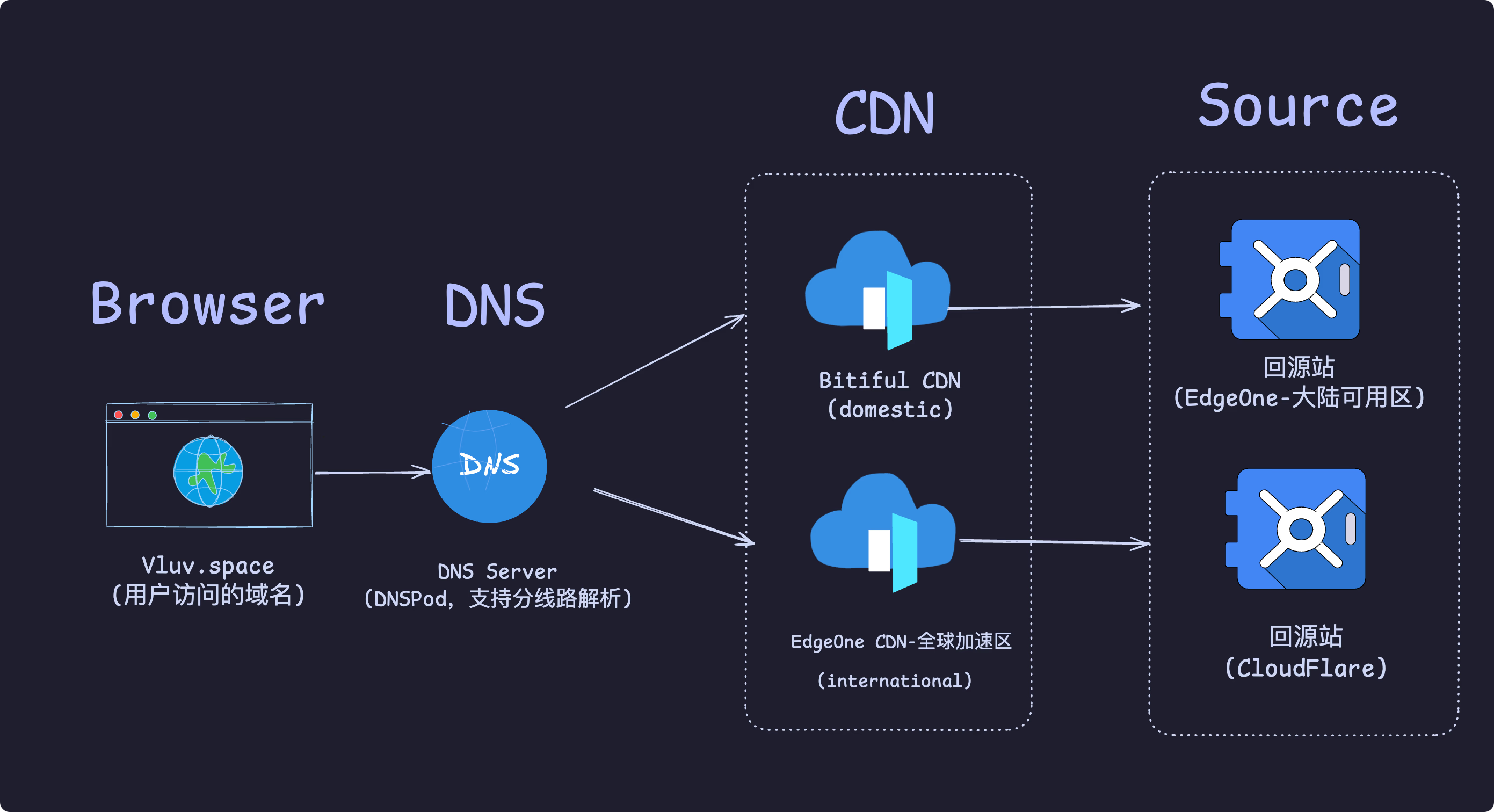
The rough flow:
- User request: The user types
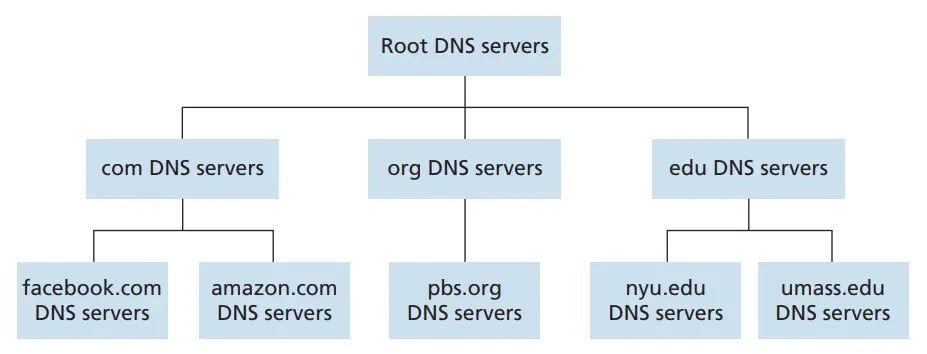
vluv.spaceinto the browser, and the OS sends a resolution request to the Local DNS Server (browsers and the OS also cache DNS results, skipped here) - Recursive query: If the Local DNS Server has no cache, it starts from the Root DNS Server, works its way down to the TLD (Top-Level-Domain) DNS Server for
.space, and finally reaches the Authoritative DNS Server responsible forvluv.space - Different CNAME records by route: The Authoritative DNS Server, the endpoint of the whole query chain, holds all DNS records for
vluv.space(e.g. A, CNAME, TXT records…); here that is Tencent Cloud’s DNSPod server.
Tencent Cloud’s smart resolution detects where the user comes from and returns an IP accordingly, see DNS smart resolution route documentation - DNSPod- Domestic route: if the user is judged to be in mainland China, the authoritative DNS server returns a CNAME record pointing to the domestic CDN, e.g.
vluv.space.s4cdn.dogecast.com. - Overseas visitors: otherwise, it returns a CNAME record pointing to the overseas CDN, e.g.
vluv.space.eo.dnse4.com.
- Domestic route: if the user is judged to be in mainland China, the authoritative DNS server returns a CNAME record pointing to the domestic CDN, e.g.
Final CDN resolution: After the Local DNS Server gets the CNAME record, it starts another full round of DNS resolution for the new domain in that record. In the end the CDN provider’s Authoritative DNS Server system takes over, and based on the user’s location, node load, and so on, returns the IP of the most suitable edge node. The user’s browser gets this IP, connects to the CDN edge node, and fetches the site content at full speed.Probe location Response IP IP location Response time Telecom, Dongguan 121.14.153.91China/Guangdong/Dongguan/Telecom <1ms Telecom, Taiyuan 1.71.145.167China/Shanxi/Taiyuan/Telecom 1ms Telecom, Longyan 106.126.9.144China/Fujian/Quanzhou/Telecom 5ms Telecom, Chongqing 124.115.13.87China/Shaanxi/Xi’an/Telecom 18ms Telecom, Suzhou 58.216.60.143China/Jiangsu/Changzhou/Telecom 4ms Seoul, South Korea 43.159.99.18Anycast/Tencent Cloud 32ms London, UK 43.159.99.18Anycast/Tencent Cloud 18ms
43.159.99.18. This is actually multiple servers in different locations sharing one IP address, see What is Anycast? | How Anycast works | Cloudflare
To verify the split routing works, run curl -I <your-domain> and inspect the response headers. Taking EdgeOne as an example, if the response contains an eo-cache-status header, the request went through an EdgeOne CDN node. See the EdgeOne default HTTP response headers documentation
Steps
Domestic and Overseas CDN Setup
Onboard each CDN following the provider’s instructions. For EdgeOne, see EdgeOne walkthrough: quick onboarding for security and acceleration - Tencent EdgeOne and just follow the steps. Roughly:
- Add the site
- Choose the service region and plan
- Choose the acceleration region and access mode (usually CNAME access)
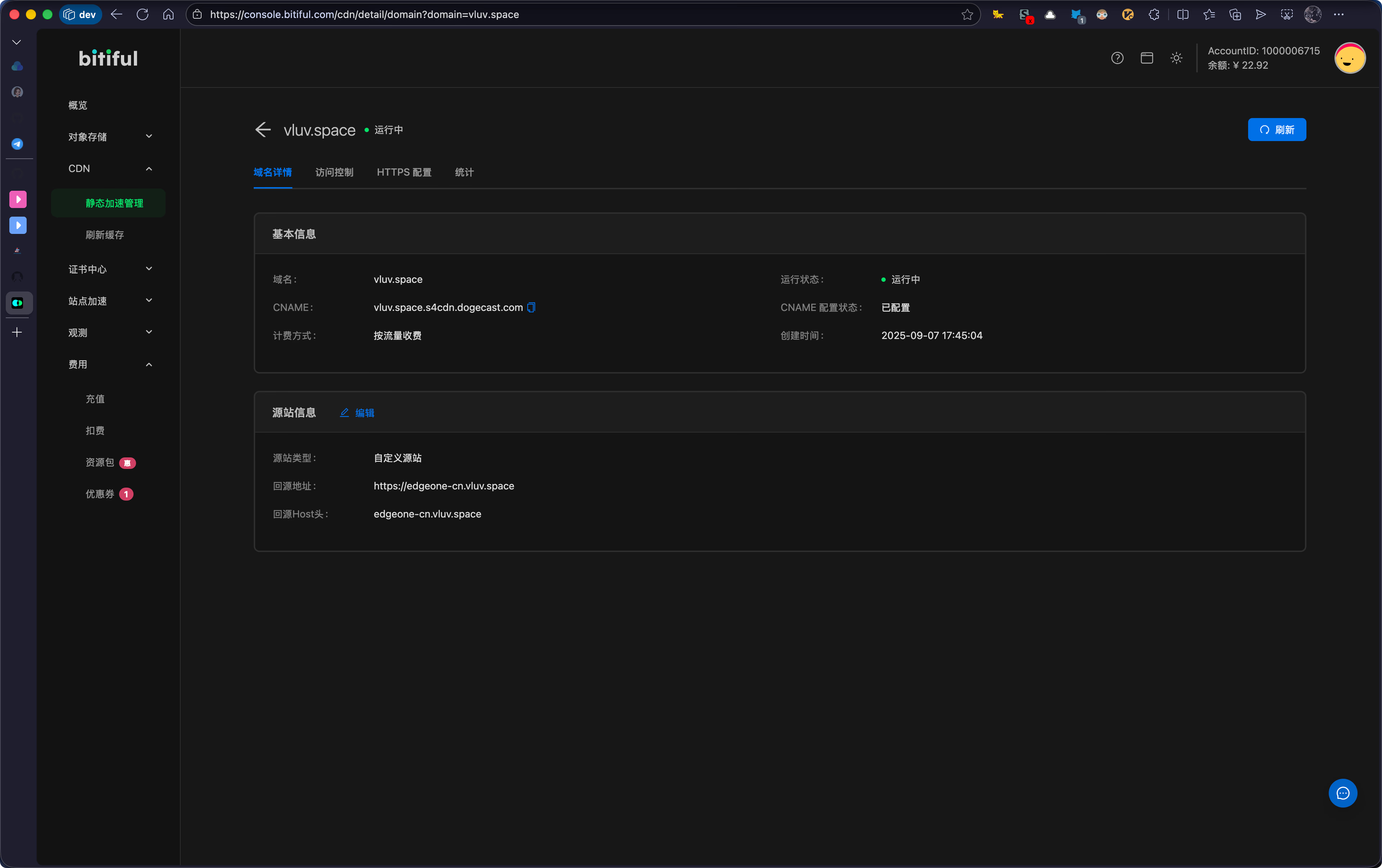
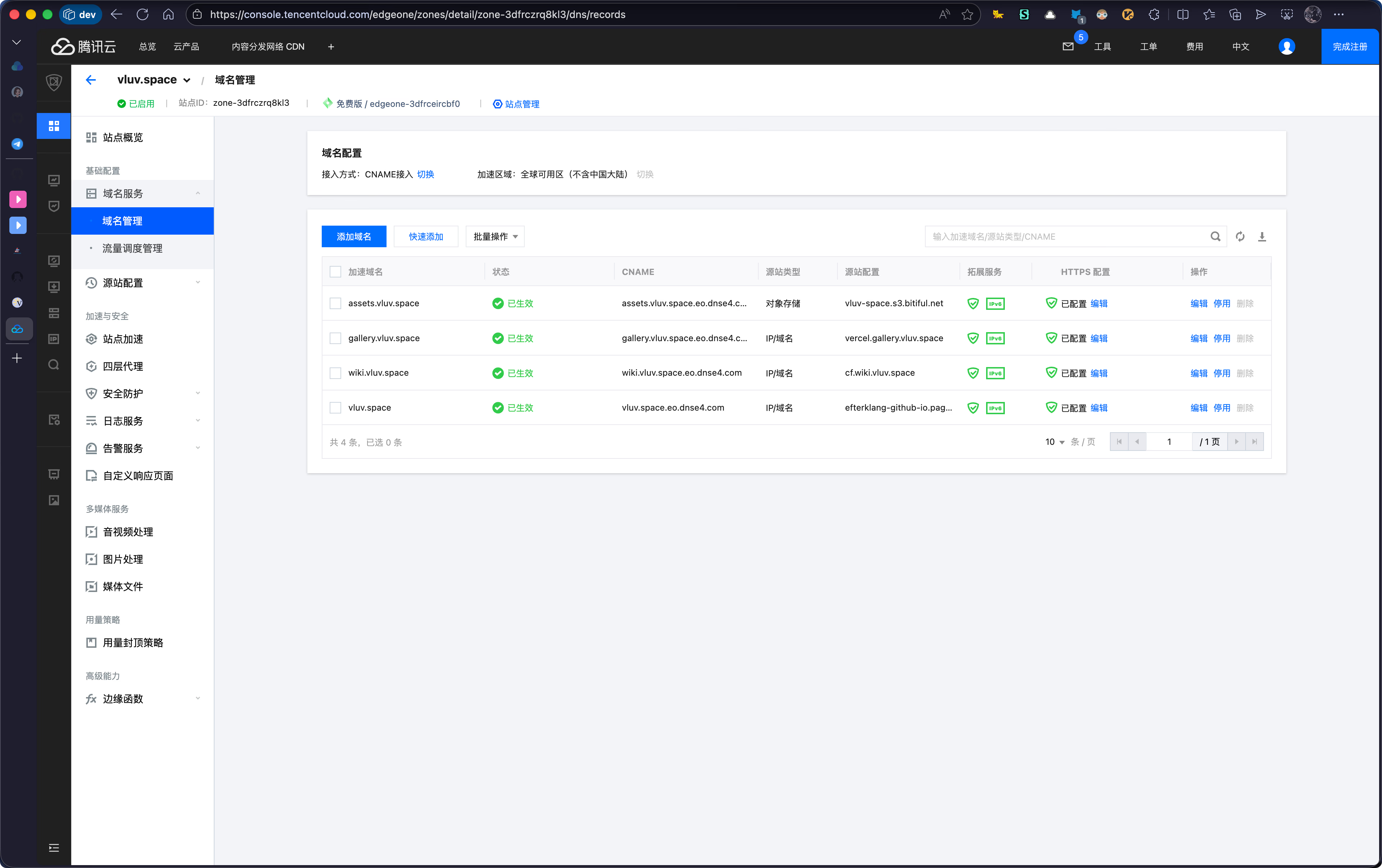
EdgeOne: it is recommended to place your origin in the same region as the acceleration region. For example, if the acceleration region is the Chinese mainland availability zone, configure a domestic origin. If the origin is in the global availability zone (excluding the Chinese mainland), origin pulls cross the border and performance cannot be guaranteed.
- For the domestic CDN, use an origin inside mainland China; EdgeOne’s China version (Chinese mainland availability zone) works
- For the overseas CDN there are more origin options: Cloudflare Pages, EdgeOne Pages, Vercel, GitHub Pages, etc.
DNSPod CNAME Split Routing
DNSPod can return different CNAMEs depending on the user’s route, so domestic users go to Bitiful and overseas users go to EdgeOne.
Configuration steps:
- Log in to the DNSPod console, select the domain, and open the “Record Management” page
- Add two CNAME records, one for the domestic route and one for the overseas route, as in the table below
| Host | Type | Route | Value | TTL | Note |
|---|---|---|---|---|---|
@ | CNAME | Domestic | vluv.space.s4cdn.dogecast.com. | 600 | Domestic CDN |
@ | CNAME | Overseas | vluv.space.eo.dnse4.com. | 600 | Global CDN |
Do the same for the image hosting domain:Host Type Route Value TTL Note assetsCNAME Domestic assets.vluv.space.s4cdn.dogecast.com.600 Domestic CDN assetsCNAME Overseas assets.vluv.space.eo.dnse4.com.600 Global CDN
Results
Test site: ITDOG
Region/ISP Fastest Slowest Average All nodes Shanghai Telecom <1ms Taiyuan Mobile 191ms 12ms China Telecom Shanghai Telecom <1ms Yuxi Telecom 144ms 12ms China Unicom Xining Unicom <1ms Yuxi Unicom 47ms 10ms China Mobile Changsha Mobile <1ms Taiyuan Mobile 191ms 13ms East China Shanghai Telecom <1ms Zhoushan Unicom 21ms 7ms South China Dongguan Telecom <1ms Shenzhen Mobile 27ms 11ms Central China Changsha Mobile <1ms Yueyang Unicom 18ms 7ms North China Tianjin Mobile 2ms Taiyuan Mobile 191ms 27ms Southwest Kunming Telecom <1ms Yuxi Telecom 144ms 24ms Northwest Xining Unicom <1ms Yinchuan Mobile 71ms 8ms Northeast Dalian Unicom <1ms Songyuan Unicom 15ms 5ms HK/MO/TW Hong Kong 2ms Taiwan 27ms 14ms
Region Fastest Slowest Average All nodes Los Angeles <1ms South Africa 178ms 35ms Asia Singapore 1ms Turkey 35ms 17ms Europe Frankfurt <1ms London 16ms 8ms North America Los Angeles <1ms Seattle 27ms 9ms South America Argentina 21ms São Paulo 50ms 35ms Africa Cairo <1ms South Africa 178ms 89ms Oceania New Zealand 142ms New Zealand 142ms 142ms