---
title: Tomcat
date: 2024-07-24
tags: [Java, Web, Tomcat, Apache]
excerpt: Apache Tomcat is an open-source, lightweight web application server that implements the Java Servlet and JavaServer Pages (JSP) specs and part of Java EE.
thumbnail: https://assets.vluv.space/cover/Dev/Java/JavaWeb_Tomcat.webp
cover: https://assets.vluv.space/cover/Dev/Java/JavaWeb_Tomcat.webp
updated: 2026-07-08 21:23:11
lang: en
i18n:
cn: /Tomcat
translation: 2
---
## Apache Tomcat Introduction
Tomcat is an open-source, lightweight web server and **Servlet container**, developed and maintained by the Apache Software Foundation. It implements the Servlet and JSP specifications and also supports protocols such as WebSocket and HTTP/2, letting developers write server-side applications in Java to generate dynamic web content and handle client requests. Through its core container, Catalina, Tomcat provides an efficient request-handling and response mechanism.
Container: the runtime environment for an application. Tomcat is a Servlet container, meaning Tomcat provides the runtime environment for Servlets.
> "Apache" is originally the name of a Native American tribe.
>
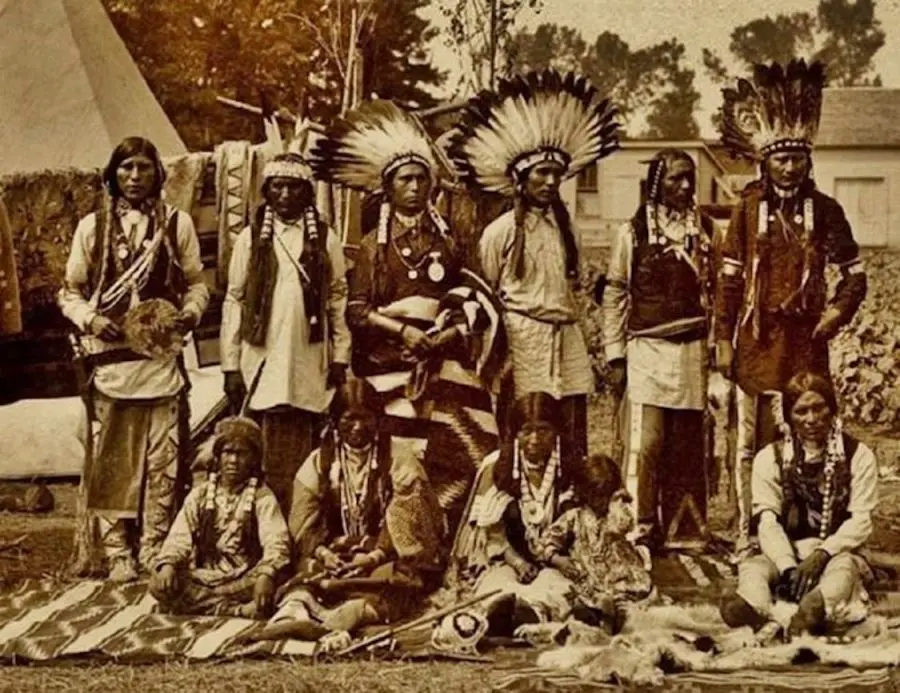
> Here, Apache refers to the Apache Software Foundation (ASF), a US non-profit corporation founded in 1999.
### Directory Structure
```shell
├───bin Scripts for starting and stopping the Tomcat server
├───conf The main configuration directory of Tomcat
│ │─── server.xml: defines the global settings of the Tomcat server, including ports, connectors, engines, virtual hosts, etc.
│ │─── web.xml: defines the default configuration for all web applications, such as error pages and MIME types.
│ │─── tomcat-users.xml: configures user access-control permissions.
│ │─── context.xml: defines the shared default context configuration for all web applications.
│ └───Catalina Projects loaded by default can be set under this directory
│ └───localhost
├───lib Shared libraries (JAR packages) required by the Tomcat server
├───logs Runtime logs
├───temp Temporary files used by the JVM
├───webapps Web applications. Apps can be deployed as folders, war packages, or jar packages
└───work Temporary files created by Tomcat at runtime
```
## Servlet
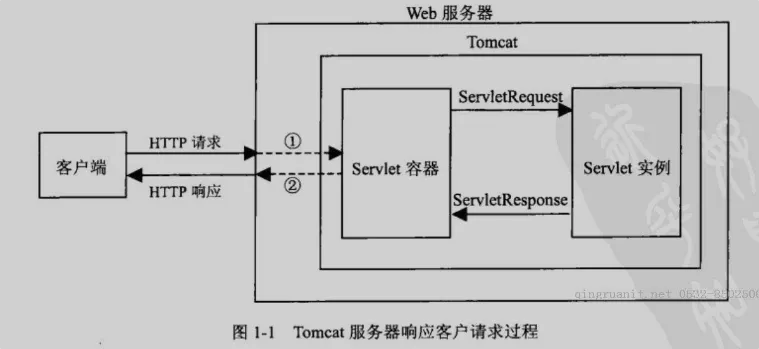
Servlet is a Java EE standard supported by most web servers. In a web application, the Servlet is mainly responsible for handling requests and coordinating dispatching. You can think of the Servlet as the **"controller"** of a web application.
### Create Servlet
```java
// Register with an annotation
@WebServlet(name = "HelloServlet", urlPatterns = "/hello")
public class HelloServlet implements Servlet {
public TestServlet(){
System.out.println("I am the constructor!");
}
@Override
public void init(ServletConfig servletConfig) throws ServletException {
System.out.println("I am init");
}
@Override
public ServletConfig getServletConfig() {
System.out.println("I am getServletConfig");
return null;
}
@Override
public void service(ServletRequest servletRequest, ServletResponse servletResponse) throws ServletException, IOException {
// First cast it to HttpServletRequest (extends ServletRequest, usually the implementation of this interface)
HttpServletRequest request = (HttpServletRequest) servletRequest;
System.out.println(request.getProtocol()); // Get the protocol version
System.out.println(request.getRemoteAddr()); // Get the visitor's IP address
System.out.println(request.getMethod()); // Get the request method
// Get the headers
Enumeration enumeration = request.getHeaderNames();
while (enumeration.hasMoreElements()){
String name = enumeration.nextElement();
System.out.println(name + ": " + request.getHeader(name));
}
@Override
public String getServletInfo() {
System.out.println("I am getServletInfo");
return null;
}
@Override
public void destroy() {
System.out.println("I am destroy");
}
}
}
// You can also register it in web.xml
//
// HelloServlet
// com.example.HelloServlet
//
//
// HelloServlet
// /hello
//
```
### LifeCycle Of Servlet
- The constructor runs to initialize the Servlet
- The init() method is called.
- The service() method is called to handle client requests.
- The destroy() method is called before destruction.
- Finally, the Servlet is garbage-collected by the JVM's garbage collector.
## Tomcat Component
### Connector
The Connector component is the front end of Tomcat. It receives network requests from clients and hands them to the backend container for processing. Connectors support different protocols, such as HTTP/1.1, HTTP/2, AJP (Apache Jserv Protocol), NIO (Non-blocking I/O), and NIO2. In Tomcat, Coyote is the default connector implementation.
#### Coyote
Coyote is Tomcat's connector component, responsible for network I/O. Coyote can use different protocol processors to handle different kinds of requests, such as an HTTP/1.1 processor, an HTTP/2 processor, or an AJP processor. Coyote also supports NIO as well as traditional blocking I/O.
### Servlet Container
Catalina is the core component of Tomcat; it implements the Servlet container. Catalina consists of the following container hierarchy:
- Engine: each Engine represents a complete server instance. A Tomcat instance usually has only one Engine, but multiple can be configured to support several independent deployment environments.
- Host: a Host is a virtual host, allowing multiple sites or applications to be hosted on the same Tomcat instance. Each Host can have its own domain and port configuration.
- Context: a Context is the container of a web application; each Context corresponds to one web app. It loads and manages web components such as servlets, JSP pages, filters, and listeners.
- Wrapper: a Wrapper is the container of a servlet. Each Wrapper encapsulates one servlet instance and manages its lifecycle.
## Cluster
In a Tomcat cluster, session replication ensures that even if one node fails, user sessions remain valid on other nodes, improving high availability and load-balancing capability.
```shell
Server
|
Service
|
Engine
| \
| --- Cluster --*
|
Host
|
------
/ \
Cluster Context(1-N)
| \
| -- Manager
| \
| -- DeltaManager
| -- BackupManager
|
---------------------------
| \
Channel \
----------------------------- \
| \
Interceptor_1 .. \
| \
Interceptor_N \
----------------------------- \
| | | \
Receiver Sender Membership \
-- Valve
| \
| -- ReplicationValve
| -- JvmRouteBinderValve
|
-- LifecycleListener
|
-- ClusterListener
| \
| -- ClusterSessionListener
|
-- Deployer
\
-- FarmWarDeployer
```
**DeltaManager** is the core component for session replication in Tomcat; it keeps session state in sync. Compared with StandardManager, DeltaManager only transfers the changes to session state rather than the whole session, which reduces network bandwidth consumption.
**Session Replication in Tomcat Clusters**
Tomcat clusters can use several replication strategies, the most common being TCP/IP-based replication. The main steps of session replication:
1. Session Creation and Modification:
When a user session is created or modified on one Tomcat server, that server's DeltaManager detects the change.
2. Replication Trigger:
DeltaManager fires a replication event and sends the session change to the other servers in the cluster over TCP/IP. This can happen immediately after every session modification, or be optimized by some policy (such as a dirty flag) to reduce replication frequency.
3. Session State Transfer:
The DeltaManager on each other server receives the session state update from the source server and updates its local session store, keeping its state consistent with the source.
4. Failure Recovery:
If one server in the cluster fails, the others detect it automatically, and since the session state has already been replicated, they can keep handling the failed server's sessions without any data loss or interruption.
## Ref
[wiki-The_Apache_Software_Foundation](https://en.wikipedia.org/wiki/The_Apache_Software_Foundation)
[Apache Tomcat 11](https://tomcat.apache.org/tomcat-11.0-doc/)
[Baima Knowledge Base](https://www.itbaima.cn/document/ycpagby2v7j4p728?segment=1)