---
title: Apache Maven
date: 2024-07-18
excerpt: Maven, the project management tool for Java. Covers basic usage including dependency management, the build lifecycle, and multi-module design.
tags: [Java, Maven, Apache]
cover: https://assets.vluv.space/cover/Dev/Java/maven.webp
updated: 2026-07-08 21:22:05
lang: en
i18n:
cn: /Maven
translation: 2
---
## Maven Introduction
> Apache Maven is a software project management and comprehension tool. Based on the concept of a project object model (POM), Maven can manage a project's build, reporting and documentation from a central piece of information.
### Maven's main functions
- manage project dependencies
- build project artifacts
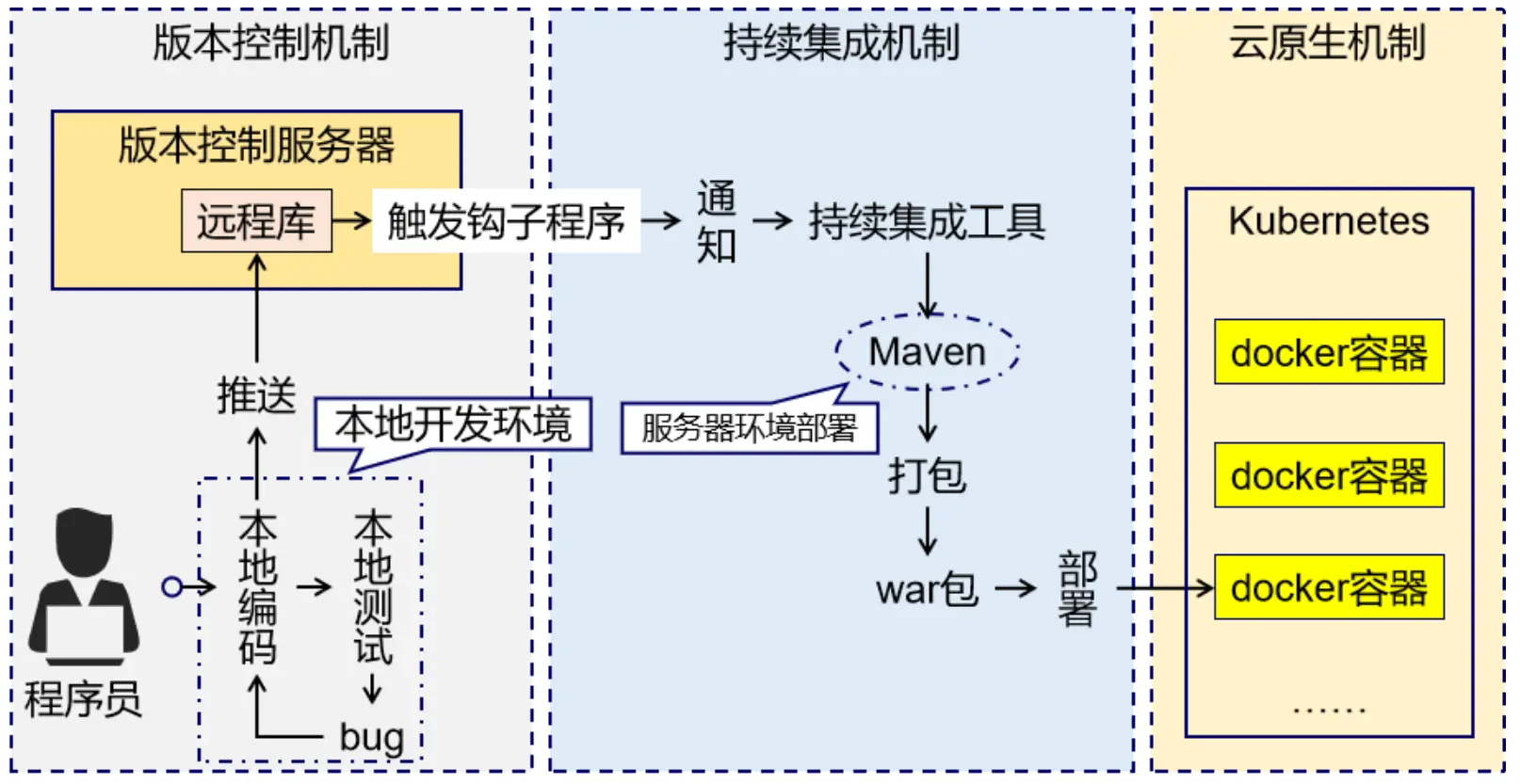
### Maven's Mechanism
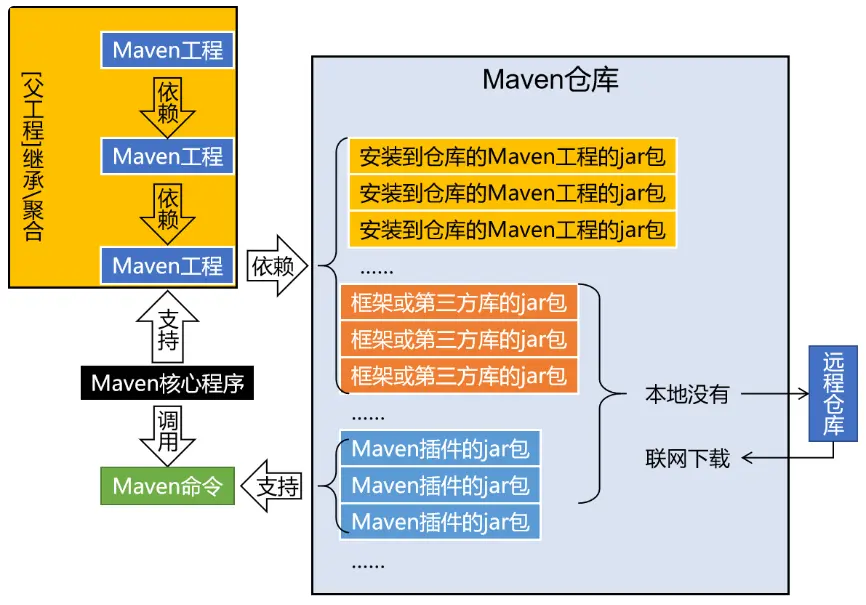
## Dependency
### Dependency Management
Dependency management is one of Maven’s most powerful features. It allows developers to declare the libraries their project depends on, and Maven will automatically download these libraries and their dependencies from remote repositories.
In a Maven project, dependencies are declared in the pom.xml file. Together, the combination of groupId, artifactId, and version forms a unique **coordinate** that Maven uses to locate, download, and manage dependencies. This coordinate system is critical for resolving dependencies during the build process and ensuring that the correct versions of libraries are used in the project.
- `groupId`: represents the organization or company that produces the project. It typically follows a reverse domain name convention to ensure uniqueness across the entire Maven ecosystem.
- `artifactId`: identifies the specific project or module within the scope of the groupId. It is akin to the project's name and should be unique within the groupId.
- `version`: indicates the release version of the artifact. It follows semantic versioning rules and is crucial for dependency management.
```xml
junitjunit4.13.2test
```
### POM
**POM** (Project Object Model) is the core configuration file used by Maven to manage a project. It is an XML file that contains information about the project, its dependencies, and other settings.
```xml
4.0.0com.examplemy-app1.0-SNAPSHOTjarMy Java ApplicationThis is a simple Java application using Maven.http://example.com/my-appcentralhttps://repo.maven.apache.org/maven2junitjunit4.13.2testorg.springframeworkspring-context5.3.15org.apache.maven.pluginsmaven-compiler-plugin3.8.11.81.8org.apache.maven.pluginsmaven-jar-plugin3.2.2com.example.App
```
Maven enforces a standardized directory layout for several key reasons, which contribute significantly to the efficiency, maintainability, and consistency of projects managed by Maven.
> Convention Over Configuration
> Configuration Over Code
#### Project Structure
**JAR (Java ARchive) project structure**
```shell
.
├── pom.xml # Maven project configuration file
├── src
│ ├── main
│ │ ├── java # Java source code
│ │ │ └── com.example # Package structure for classes
│ │ ├── resources # Resource files (like properties, XML)
│ │ │ └── config.properties # Example resource file
│ └── test # Test source code and resources
│ ├── java # Test Java source code
│ │ └── com.example # Package structure for test classes
│ └── resources # Test resources
└── target # Built output goes here
├── classes # Compiled .class files
└── my-library.jar # Final JAR file after build
```
**WAR (Web ARchive) project structure**
```shell
.
├── pom.xml # Maven project configuration file
├── src
│ ├── main
│ │ ├── java # Java source code
│ │ │ └── com.example # Package structure for classes
│ │ ├── resources # Resource files (like properties, XML)
│ │ └── webapp # Web application content
│ │ ├── WEB-INF # Web application metadata and private files
│ │ │ ├── classes # Compiled .class files
│ │ │ ├── lib # JAR files (dependencies)
│ │ │ └── web.xml # Deployment descriptor
│ │ ├── index.jsp # Main entry point for the web app
│ │ ├── static # Static resources (CSS, JavaScript, images)
│ │ │ ├── css
│ │ │ ├── js
│ │ │ └── img
│ │ └── META-INF # Metadata information
│ └── test # Test source code and resources
└── target # Built output goes here, including the .war file
└── classes # Compiled test classes
```
### Dependency Scope
Maven uses dependency scopes to control how dependencies are included during different stages of the build process. The most common scopes include:
- **compile**
This is the default scope, used if none is specified. Compile dependencies are available in all classpaths of a project. Furthermore, those dependencies are propagated to dependent projects.
- **provided**
This is much like compile, but indicates you expect the JDK or a container to provide the dependency at runtime. For example, when building a web application for the Java Enterprise Edition, you would set the dependency on the Servlet API and related Java EE APIs to scope provided because the web container provides those classes. This scope is only available on the compilation and test classpath, and is not transitive.
- **runtime**
This scope indicates that the dependency is not required for compilation, but is for execution. It is in the runtime and test classpaths, but not the compile classpath.
- **test**
This scope indicates that the dependency is not required for normal use of the application, and is only available for the test compilation and execution phases. This scope is not transitive.
- **system**
This scope is similar to provided except that you have to provide the JAR which contains it explicitly. The artifact is always available and is not looked up in a repository.
- **import (only available in Maven 2.0.9 or later)**
This scope is only supported on a dependency of type pom in the section. It indicates the dependency to be replaced with the effective list of dependencies in the specified POM’s section. Since they are replaced, dependencies with a scope of import do not actually participate in limiting the transitivity of a dependency.
| scope | valid range | transitive | example |
| :------- | :------------ | :--------- | :---------- |
| compile | all | yes | spring-core |
| provided | compile, test | no | servlet-api |
| runtime | runtime, test | yes | JDBC |
| test | test | no | JUnit |
| system | compile, test | yes | |
> [!info] Transitive Dependency
>
> A transitive dependency occurs when a project directly depends on another project, which in turn depends on a third project. Maven manages these transitive dependencies automatically, ensuring that all required libraries are available during the build process.
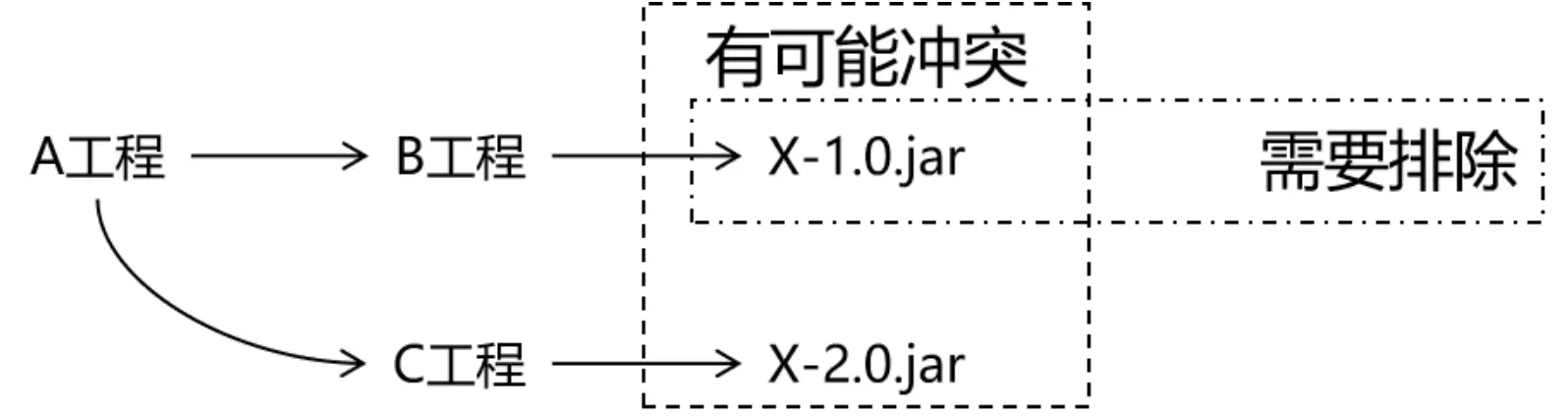
### Exclude Dependencies
Maven allows you to exclude dependencies from a project by adding them to the `` tag in the `` tag. This can be useful when you want to use a different version of a dependency than the one specified in the parent project.
## Maven Lifecycle
The Maven lifecycle is a series of phases that define the order in which tasks are executed. The most commonly used lifecycle is the default lifecycle, which includes the following phases:
- `validate` Validates that the project is correct and all necessary information is available.
- `compile` Compiles the source code of the project.
- `test` Runs tests for the project.
- `package` Takes the compiled code and packages it in its distributable format, such as a JAR.
- `integration`test: Processes and deploys the package if necessary into an environment where integration tests can be run.
- `verify` Runs any checks to verify the package is valid and meets quality criteria.
- `install` Installs the package into the local repository, for use as a dependency in other projects locally.
- `deploy` Copies the final package to the remote repository for sharing with other developers and projects.
## Maven Advanced
### Multi-module Project
Maven's multi-module design is a common way to organize large projects: split a complex project into several interdependent submodules, each managed as an independent Maven project. This keeps the code structure clear and highly modular, which helps with code reuse, dependency management, and development efficiency.
#### Concepts
- Parent Project:
- The parent project is a top-level Maven project, usually containing only a pom.xml file and no actual code. It defines configuration shared by all submodules (dependency management, plugin configuration, and so on).
- The parent's pom.xml references the submodules, and can define the version, dependency management, and build process for the whole project.
- Submodules:
- Each submodule is part of the parent project and also an independent Maven project with its own pom.xml.
- A submodule can be a service, library, or tool. Each module handles a specific piece of functionality, and modules interoperate through dependencies.
- Submodules are declared in the parent project via the modules element, and they usually share the dependencies and plugins defined in the parent.
Inheritance and aggregation are two core concepts in Maven project management, especially important for multi-module projects. They help us organize, share, and manage the configuration and dependencies of multiple related projects.
- **Inheritance** lets child projects pick up common configuration from a parent project, mainly for code reuse and dependency management.
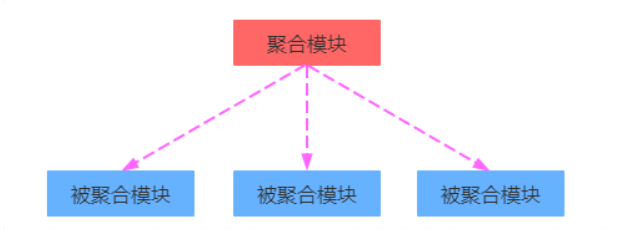
- **Aggregation** lets one parent project build multiple submodules as a whole, mainly for managing multi-module projects as a unit. Building on the aggregator project builds everything at once, with no need to build modules by hand in dependency order.
- **Purpose**: aggregation is for building the project quickly; inheritance is for simplifying dependency configuration and managing dependencies in one place.
- **Similarity**: both aggregation and inheritance use `pom` as the packaging type in `pom.xml`, and the two relationships can live in the same pom file; both are design-only modules with no actual module content.
- **Difference**: aggregation is configured in the aggregator project, so the aggregator knows which modules participate; inheritance is configured in the child modules, so the parent has no way of knowing which children inherit from it.
#### Maven Inheritance
Maven's inheritance mechanism lets one project inherit another project's configuration. Multiple related projects can share the same build configuration, dependency management, plugins, and so on, which reduces duplicated configuration and makes the code easier to maintain.
**Inheritance characteristics**
- Parent and child projects: a child project (submodule) can inherit configuration from a parent project, and each child can inherit from only one parent.
- Hierarchy: Maven organizes projects as an inheritance tree; a child project declares its parent in pom.xml via the tag.
- Inherited elements: a child project can inherit the parent's dependency management (dependencyManagement), build plugins, version control, properties, and more. If parent and child configure different versions of the same dependency, the child's own pom.xml wins (similar to an override).
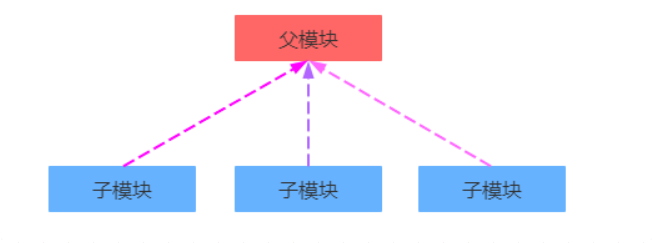
Inheritable POM elements include
- **groupId**: the project group ID, a core element of the project coordinates.
- **version**: the project version, a core element of the project coordinates.
- description: the project description.
- organization: the project's organization information.
- inceptionYear: the year the project was founded.
- url: the project URL.
- developers: the project's developer information.
- contributors: the project's contributor information.
- distributionManagement: the project's deployment configuration.
- issueManagement: the project's issue tracking system information.
- ciManagement: the project's continuous integration system information.
- scm: the project's version control system.
- malilingLists: the project's mailing list information.
- **properties**: custom Maven properties.
- **dependencies**: the project's dependency configuration.
- **dependencyManagement**: the project's dependency management configuration.
- repositories: the project's repository configuration.
- build: includes source directory configuration, output directory configuration, plugin configuration, plugin management configuration, and more.
- reporting: includes report output directory configuration, report plugin configuration, and more.
> What is the difference between `` and ``?
> `` declares direct dependencies: dependencies configured in the parent are inherited directly by the children.
> `` manages dependency versions in one place without introducing the dependencies themselves; children still need to declare the dependencies they want (no version required).
```xml
4.0.0com.thrParentpom1.0-SNAPSHOT5.2.6.RELEASE4.11junitjunit${junit.version}testorg.springframeworkspring-core${spring.version}
```
```xml
Parentcom.thr1.0-SNAPSHOT4.0.0Child1junitjunittestorg.springframeworkspring-core
```
#### Maven Aggregation
Aggregation means managing multiple submodules through one parent project so they can be built as a whole. The parent project defines and manages all submodules, and when we run a build command on the parent, all submodules are built together. Think of a car: it is an aggregation of tires, engine, chassis, electrical equipment, and so on.
**Aggregation characteristics**
- Parent project and module list: the aggregator's parent project declares all its submodules through the `` element.
- Independent module builds: submodules can be built independently, but through the parent's aggregation, all modules can be built or installed in one go.
- Suited to multi-module projects: aggregation works well for large projects, organizing multiple modules under one project while sharing the same build process.
#### Application Scenarios
Large enterprise projects: as a project grows, code volume and complexity increase; modular design keeps each part of the project clear.
Microservice architecture: each microservice can be managed as a module, and modules interact through interfaces and dependencies.
Plugin development: a multi-module project can have one core module, with other modules extending the core functionality as plugins.
```xml
4.0.0com.exampleaggregator-project1.0-SNAPSHOTpommodule1module2
```
### Private Repository
A private repository is a special kind of remote repository: a repository service hosted on the local network that proxies the external central repository, used to share and synchronize resources within a team.
Project versions:
- RELEASE: features are stable and updates have stopped; a version ready for release, stored in the private server's RELEASE repository.
- SNAPSHOT: features are unstable and still under development; a snapshot version, stored in the private server's SNAPSHOT repository.
Steps to access the private repository
1. Fill in the username/password for the private repository
```xml
FILE:settings.xml
maven-releasesadminadminmaven-snapshotsadminadmin
```
2. Configure the upload (publish) addresses in the pom file of the Maven project in IDEA
```xml
maven-releaseshttp://192.168.150.101:8081/repository/maven-releases/maven-snapshotshttp://192.168.150.101:8081/repository/maven-snapshots/
```
3. Set the repository group address for downloading dependencies from the private server (configured in mirrors and profiles in settings.xml)
```xml
maven-public*http://192.168.150.101:8081/repository/maven-public/
```
## Ref
[Maven 工具学习(七)----Maven 的继承与聚合](https://www.cnblogs.com/tanghaorong/p/13100934.html)
[黑马程序员 JavaWeb](https://www.bilibili.com/video/BV1m84y1w7Tb)