---
title: Hexo Site Performance Optimization Notes
date: 2025-10-12
tags:
- Blog
- Hexo
- Performance
- Image
- HTML
- CSS
- Font
- CDN
cover: https://assets.vluv.space/hexo_perf_optmize.avif
excerpt: Last September I wrote up my Hexo blog performance work. Recently I tackled the remaining issues with another round of optimizations, recorded here as a follow-up.
lang: en
i18n:
cn: /Hexo_Perf_Optmize
translation: 2
updated: 2026-07-08 21:17:39
---
| Problem Area | Description |
| ---------------------- | --------------------------------------------------------------------------------------------------------------------------------------------------------------------------------- |
| CDN | Cloudflare CDN performs poorly in mainland China |
| Fonts | Some fonts still exceed 10MB even after converting to WOFF2 |
| Images | No responsive images (can't serve size-appropriate images per device resolution) No progressive image loading WebP can be further replaced with the superior AVIF format |
| HTML/JS/CSS | Some static assets are not minified |
| Redundant CSS rules | The Hexo Icarus theme depends on the Bulma CSS framework, much of which is never actually used; it needs targeted detection and trimming. |
| Third-party JavaScript | Third-party JavaScript the blog depends on (files loaded from CDNs like jsDelivr, gstatic, etc.) performs poorly on mainland China networks |
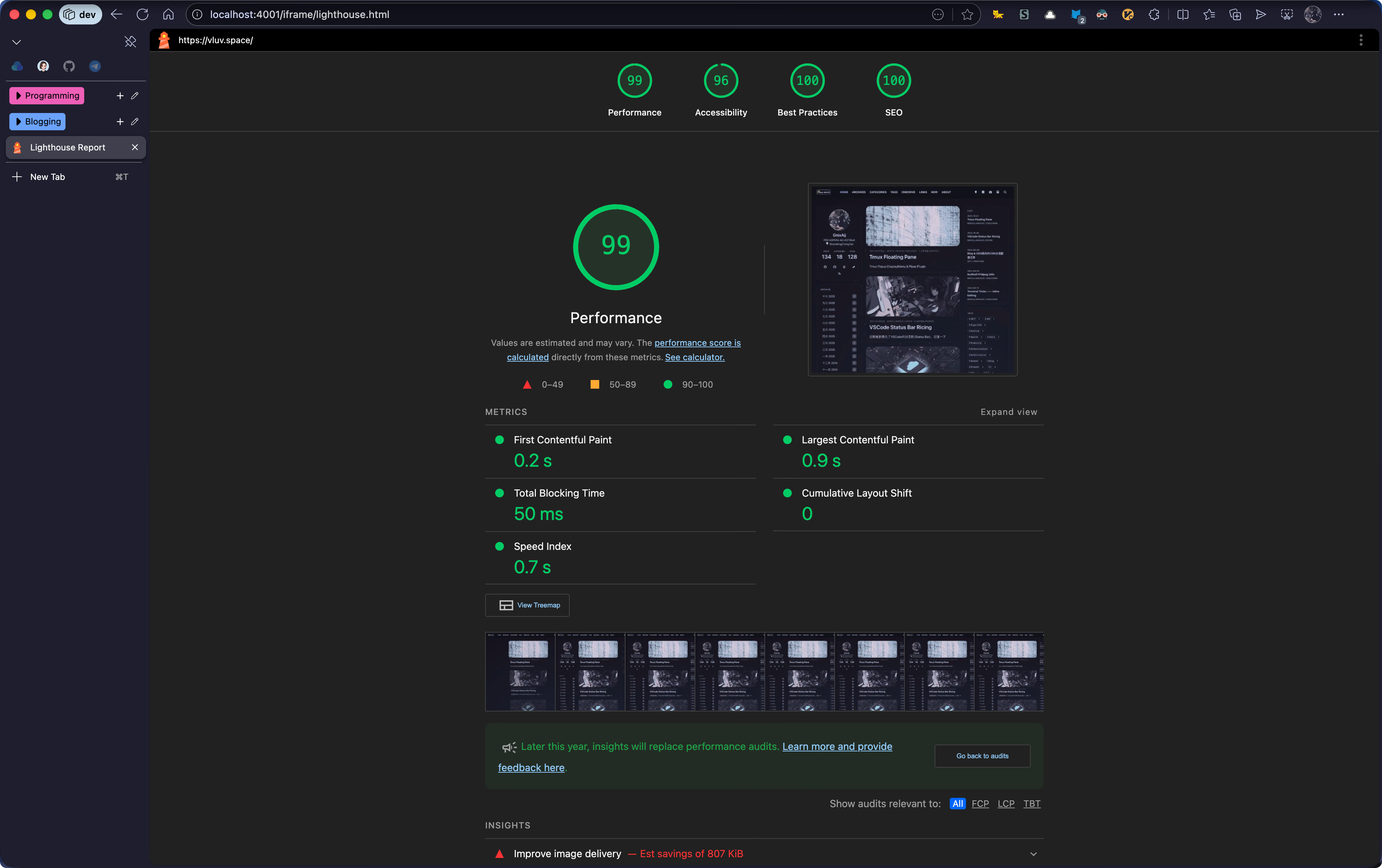
😄 The results were pretty good; I measured a `Performance=99` score in the afternoon
### Optimization Tools
Mainly features of Chrome DevTools:
- Network Panel: analyze network requests and their timing
- Coverage: locate unused CSS rules & JavaScript code
- Lighthouse: generate a performance report with targeted optimization suggestions
## Specific Optimizations
### CDN
In [[cdn_traffic_splitting|a previous post]], I used DNSPod's split-line resolution for the CDN: mainland requests go through Bitiful, and overseas requests go through EdgeOne global acceleration (excluding the mainland), improving response times for mainland users. The line configuration:
| Line | CDN | Origin |
| -------- | -------------------------------------------------- | -------------------------------------------- |
| Mainland | Bitiful | EdgeOne Pages (mainland acceleration) |
| Overseas | EdgeOne CDN (global acceleration, excl. mainland) | Cloudflare Pages |
But some third-party resources (e.g. mathjax, medium-zoom, etc.) were still requested from jsDelivr's CDN, which is slow in mainland China. If you can find a suitable domestic CDN mirror, you can swap it in directly.
Since the third-party resources the blog depends on (mathjax, medium-zoom, etc.) were still loaded via jsDelivr and slow to access domestically, and I only use a handful of them, I chose to bundle these resources directly into the build output. For Icarus, see my commit[^1] for how to do this. Afterwards, all resource requests go through my own Bitiful CDN.
The improvement here is quite noticeable. A curl speed comparison on a mainland China network:
```shell cURL speed comparison
Testing jsDelivr CDN (https://cdn.jsdelivr.net/npm/pjax@0.2.8/pjax.min.js)
------------------------------------------------
Test 1: connect=0.209s, TTFB=0.830s, total=0.849s
Test 2: connect=0.209s, TTFB=0.828s, total=0.836s
Test 3: connect=1.197s, TTFB=1.610s, total=2.597s
Test 4: connect=0.196s, TTFB=0.607s, total=1.553s
Test 5: connect=0.197s, TTFB=0.659s, total=0.907s
------------------------------------------------
jsDelivr CDN averages:
Average connect time: 0.401s
Average TTFB: 0.906s
Average total time: 1.348s
------------------------------------------------
Testing vluv.space (https://vluv.space/js/host/pjax/0.2.8/pjax.min.js)
------------------------------------------------
Test 1: connect=0.100s, TTFB=0.152s, total=0.155s
Test 2: connect=0.025s, TTFB=0.096s, total=0.097s
Test 3: connect=0.026s, TTFB=0.088s, total=0.088s
Test 4: connect=0.028s, TTFB=0.079s, total=0.080s
Test 5: connect=0.030s, TTFB=0.095s, total=0.096s
------------------------------------------------
vluv.space averages:
Average connect time: 0.041s
Average TTFB: 0.102s
Average total time: 0.103s
------------------------------------------------
```
### Fonts
If your CSS uses non-system fonts, font delivery is worth optimizing.
One part is using an efficient storage format (woff2). Beyond that, Chinese fonts are generally large, and most pages don't use anywhere near the full character set, so you can slice the font into subsets. Concretely, use unicode-range[^2] in `{css} @font-face` to reference the font slices; the browser analyzes the range of characters on the current page and downloads only the slices it needs, cutting redundant transfer.
Making the slices yourself can be tedious; in most cases just linking to Google Fonts works (though it may hurt the mainland China experience). For Chinese fonts, you can use the free services from [ZeoSeven Fonts (ZSFT)](https://fonts.zeoseven.com/) or [字图 CDN | 中文网字计划](https://chinese-font.netlify.app/zh-cn/cdn/). For example, this is how I load Maple Mono NF CN as my code font
```html
```
### Minify HTML/JS/CSS
> [!error] Deprecated
>
> hexo-all-minifier is slow, and its CSS minification fails on modern syntax. This approach has been abandoned; the current one is described in [[post-build]]
When optimizing the blog before, I tried a Gulp script for asset minification, but it broke my CSS styles, so I dropped it.
Recently I found that the [chenzhutian/hexo-all-minifier](https://github.com/chenzhutian/hexo-all-minifier) plugin solves minification in one place. It bundles the following sub-plugins and can minify HTML, JS, CSS, and local images.
- [hexo-html-minifier](https://github.com/hexojs/hexo-html-minifier), which is based on [HTMLMinifier](https://github.com/kangax/html-minifier)
- [hexo-clean-css](https://github.com/hexojs/hexo-clean-css), which is based on [clean-css](https://github.com/jakubpawlowicz/clean-css)
- [hexo-uglify](https://github.com/hexojs/hexo-uglify), which is based on [UglifyJS](http://lisperator.net/uglifyjs/)
- [hexo-imagemin](https://github.com/vseventer/hexo-imagemin), which is based on [imagemin](https://github.com/imagemin/imagemin)
The plugin works out of the box; after installing, just enable it in `_config.yml`
```yml _config.yml
all_minifier: true # [!code ++]
```
I like to run static asset minification in the CI/CD pipeline. For local debugging, set the `NODE_ENV` environment variable to `development` to skip minification
### Image Delivery
Images and videos are core elements of a web page and usually the largest assets. Sensible image and video delivery optimization can significantly improve user experience
#### Choose Better Formats: AVIF & WebP
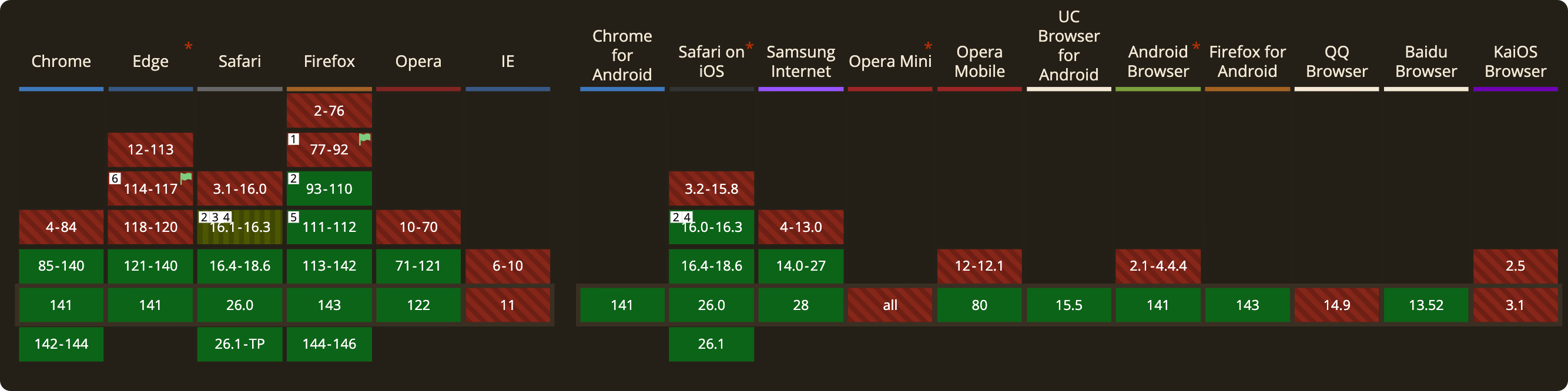
Format-level optimization is easy. Recommended formats are WebP and AVIF[^3]; check browser support on [Can I use...](https://caniuse.com/). Apart from QQ Browser and IE, mainstream browsers basically all support AVIF.
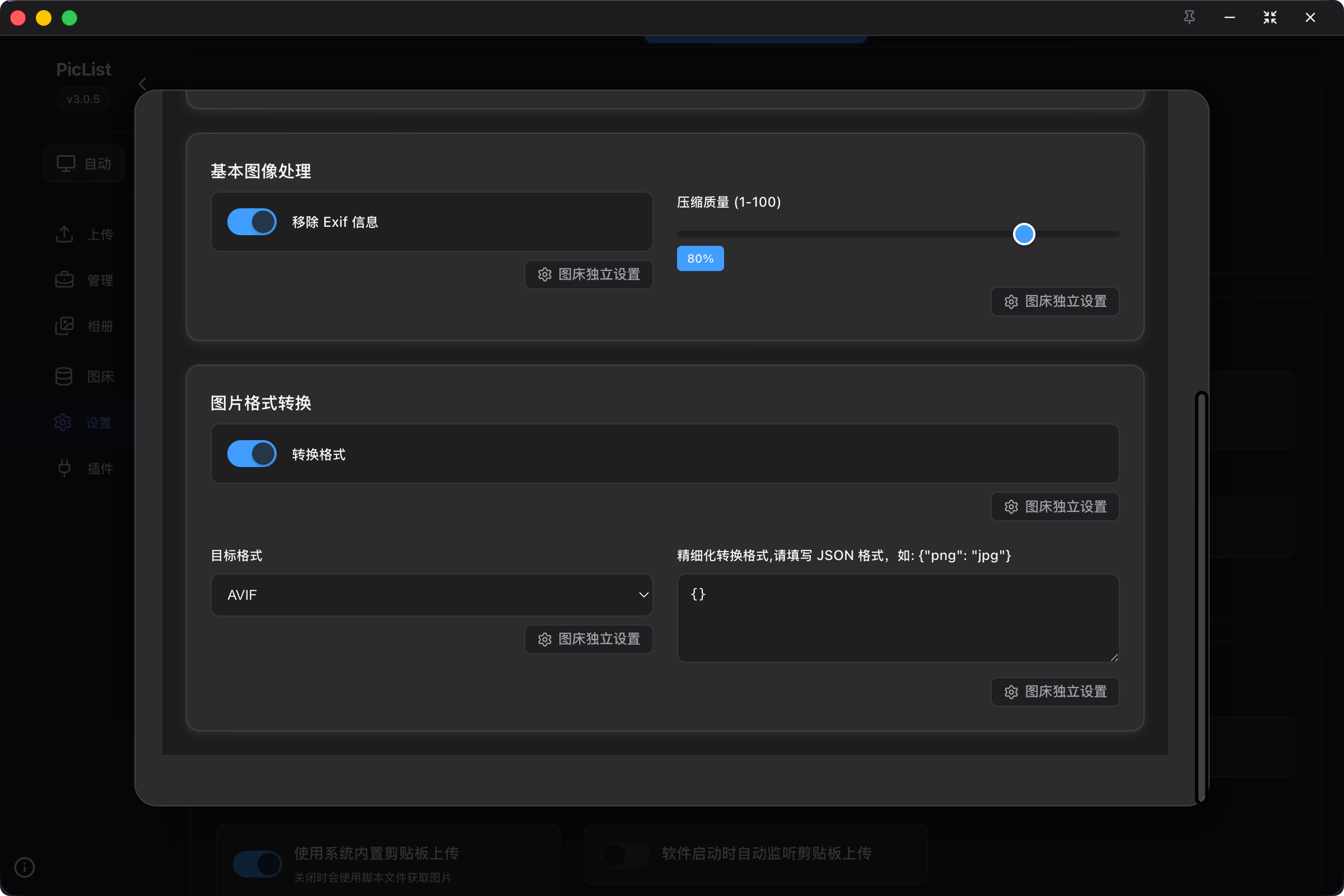
PicList users can enable converting images to AVIF before upload under `Settings - Image Preprocessing`. For images already uploaded, you can write a script and batch-convert with ffmpeg
For video, you can likewise use more advanced codecs to shrink size, e.g. AV1, HEVC, or VP9 codecs with a container format like WebM.
#### Serve Responsive Images
Suppose an image is 4K but the user's screen is 1K. Sending the full-size original does nothing useful, ~~just burns power~~
Responsive images[^4] fix this nicely: the browser can request the appropriate resource based on conditions (screen resolution, window size, device pixel ratio, etc.), avoiding unnecessary network cost.
I use a Bitiful S4 (S3 compatible) bucket as my image host and vibe-coded a Hexo plugin that outputs image elements like this;
```html
```
If your image host has no media processing capability, consider the `sharp` library and vibe-coding a JS script for it.
#### Progressive Image Loading
There are many ways to do progressive image loading. The idea is to load a low-resolution placeholder first, then swap in the original once it finishes loading, so the page never shows blank regions while loading. My blog implements this with thumbhash[^5]; the effect is shown below, and the code is at [Efterklang/Bitiful_Responsive_And_Progressive_Image](https://github.com/Efterklang/Bitiful_Responsive_And_Progressive_Image)
### Coverage
- Use Chrome DevTools' Coverage feature to locate and remove redundant CSS/JavaScript;
- Use the CSS Overview feature to analyze CSS usage and locate non-simple selectors
As shown below, Coverage flags unused CSS/JavaScript, helping us locate redundant code. Be sure to test several pages to avoid deleting something that's actually used.
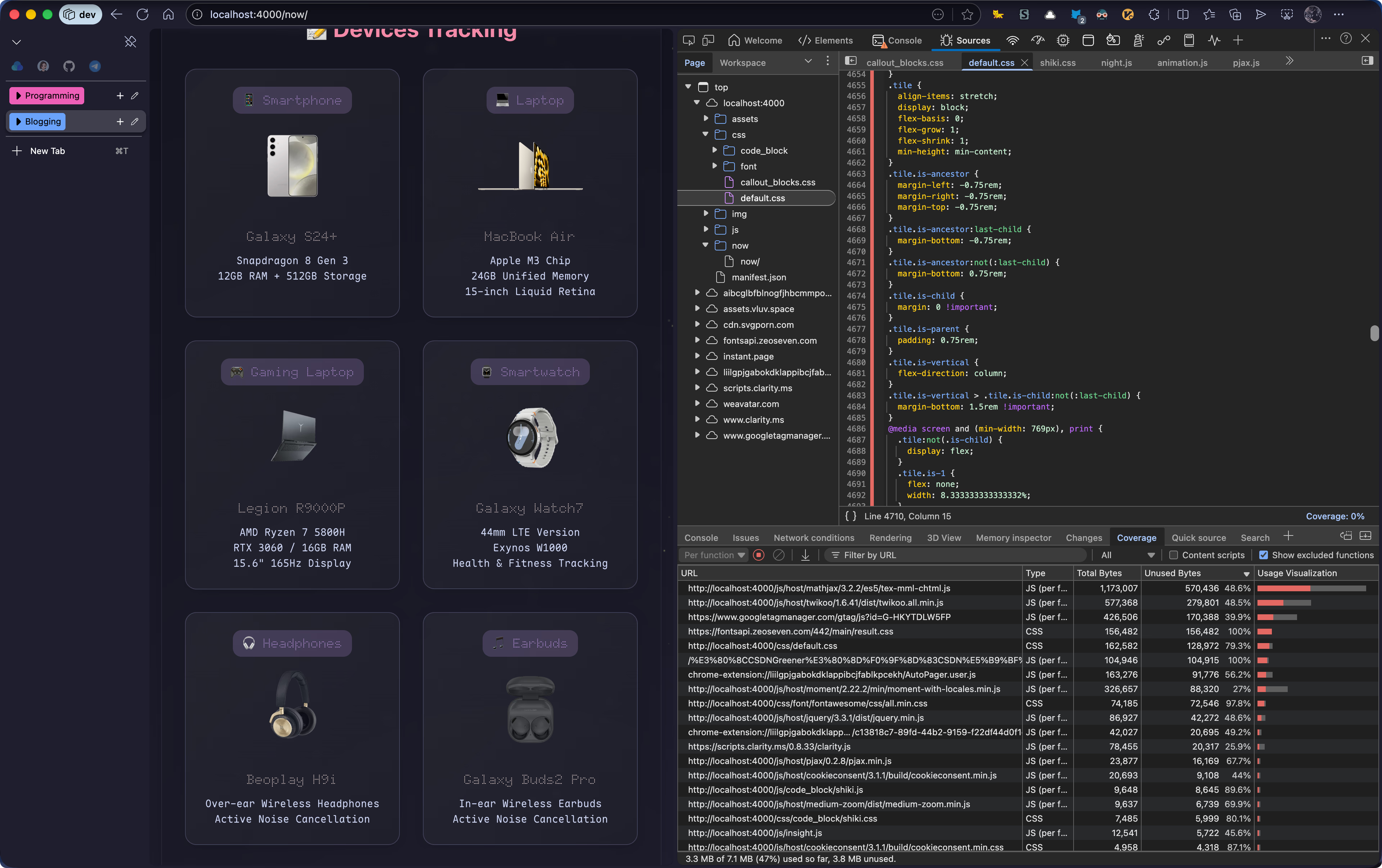
My blog's CSS went from `260.8KB` to `18.1KB`
With unused CSS rules removed, the browser also spends less time parsing CSS. If you're up for it, you can further split the CSS and import it per page as needed, and replace inefficient CSS selectors for additional gains
### Deferred JavaScript Loading
You can mark JavaScript with the `defer/async` attributes so that downloading the script doesn't block DOM parsing. The two differ in when the script executes; see the diagram below
For a blog, the visitor-counting `busuanz.js` is a good candidate for the `defer` attribute
```html
```
[^1]: [feat(cdn): cdn now support host · Efterklang/hexo-theme-icarus@f508116](https://github.com/Efterklang/hexo-theme-icarus/commit/f50811635981172a430396d4078ba605bcd5dd8f#diff-d780f04e2567fc97ba7b9c7c1dd57b539953f6842f2e1e085cf25b39e1afb86e)
[^2]: [unicode-range - CSS | MDN](https://developer.mozilla.org/en-US/docs/Web/CSS/%40font-face/unicode-range)
[^3]: The AVIF (AV1 Image File) format was introduced by the Alliance for Open Media in 2019
[^4]: For background see [[responsive_image|Introduction to Responsive Images]]; for implementation steps see [[lcp_optmization#Server Responsive Images|Server Responsive Image]]
[^5]: [ThumbHash: A very compact representation of an image placeholder](https://evanw.github.io/thumbhash/)
 ```
If your image host has no media processing capability, consider the `sharp` library and vibe-coding a JS script for it.
#### Progressive Image Loading
There are many ways to do progressive image loading. The idea is to load a low-resolution placeholder first, then swap in the original once it finishes loading, so the page never shows blank regions while loading. My blog implements this with thumbhash[^5]; the effect is shown below, and the code is at [Efterklang/Bitiful_Responsive_And_Progressive_Image](https://github.com/Efterklang/Bitiful_Responsive_And_Progressive_Image)
### Coverage
- Use Chrome DevTools' Coverage feature to locate and remove redundant CSS/JavaScript;
- Use the CSS Overview feature to analyze CSS usage and locate non-simple selectors
As shown below, Coverage flags unused CSS/JavaScript, helping us locate redundant code. Be sure to test several pages to avoid deleting something that's actually used.

My blog's CSS went from `260.8KB` to `18.1KB`
With unused CSS rules removed, the browser also spends less time parsing CSS. If you're up for it, you can further split the CSS and import it per page as needed, and replace inefficient CSS selectors for additional gains
### Deferred JavaScript Loading
You can mark JavaScript with the `defer/async` attributes so that downloading the script doesn't block DOM parsing. The two differ in when the script executes; see the diagram below
For a blog, the visitor-counting `busuanz.js` is a good candidate for the `defer` attribute
```html
```
[^1]: [feat(cdn): cdn now support host · Efterklang/hexo-theme-icarus@f508116](https://github.com/Efterklang/hexo-theme-icarus/commit/f50811635981172a430396d4078ba605bcd5dd8f#diff-d780f04e2567fc97ba7b9c7c1dd57b539953f6842f2e1e085cf25b39e1afb86e)
[^2]: [unicode-range - CSS | MDN](https://developer.mozilla.org/en-US/docs/Web/CSS/%40font-face/unicode-range)
[^3]: The AVIF (AV1 Image File) format was introduced by the Alliance for Open Media in 2019
[^4]: For background see [[responsive_image|Introduction to Responsive Images]]; for implementation steps see [[lcp_optmization#Server Responsive Images|Server Responsive Image]]
[^5]: [ThumbHash: A very compact representation of an image placeholder](https://evanw.github.io/thumbhash/)
```
If your image host has no media processing capability, consider the `sharp` library and vibe-coding a JS script for it.
#### Progressive Image Loading
There are many ways to do progressive image loading. The idea is to load a low-resolution placeholder first, then swap in the original once it finishes loading, so the page never shows blank regions while loading. My blog implements this with thumbhash[^5]; the effect is shown below, and the code is at [Efterklang/Bitiful_Responsive_And_Progressive_Image](https://github.com/Efterklang/Bitiful_Responsive_And_Progressive_Image)
### Coverage
- Use Chrome DevTools' Coverage feature to locate and remove redundant CSS/JavaScript;
- Use the CSS Overview feature to analyze CSS usage and locate non-simple selectors
As shown below, Coverage flags unused CSS/JavaScript, helping us locate redundant code. Be sure to test several pages to avoid deleting something that's actually used.

My blog's CSS went from `260.8KB` to `18.1KB`
With unused CSS rules removed, the browser also spends less time parsing CSS. If you're up for it, you can further split the CSS and import it per page as needed, and replace inefficient CSS selectors for additional gains
### Deferred JavaScript Loading
You can mark JavaScript with the `defer/async` attributes so that downloading the script doesn't block DOM parsing. The two differ in when the script executes; see the diagram below
For a blog, the visitor-counting `busuanz.js` is a good candidate for the `defer` attribute
```html
```
[^1]: [feat(cdn): cdn now support host · Efterklang/hexo-theme-icarus@f508116](https://github.com/Efterklang/hexo-theme-icarus/commit/f50811635981172a430396d4078ba605bcd5dd8f#diff-d780f04e2567fc97ba7b9c7c1dd57b539953f6842f2e1e085cf25b39e1afb86e)
[^2]: [unicode-range - CSS | MDN](https://developer.mozilla.org/en-US/docs/Web/CSS/%40font-face/unicode-range)
[^3]: The AVIF (AV1 Image File) format was introduced by the Alliance for Open Media in 2019
[^4]: For background see [[responsive_image|Introduction to Responsive Images]]; for implementation steps see [[lcp_optmization#Server Responsive Images|Server Responsive Image]]
[^5]: [ThumbHash: A very compact representation of an image placeholder](https://evanw.github.io/thumbhash/)