

SQL Grammar
Data type
Numeric Types
| Data Type | Size (Bytes) |
|---|---|
TINYINT | 1 |
SMALLINT | 2 |
MEDIUMINT | 3 |
INT | 4 |
BIGINT | 8 |
FLOAT | 4 |
DOUBLE | 8 |
DECIMAL(M, N) | Depends on M and N |
Numeric types can be modified with UNSIGNED, e.g. age TINYINT UNSIGNED.
For DECIMAL(M, N), M is the maximum total number of digits and N is the number of digits after the decimal point. The value range depends on M and N. For example, 123.45 has M=5,N=2.
String Types
| Data Type | Size | Description |
|---|---|---|
| CHAR | 0-255Bytes | Fixed-length string |
| VARCHAR | 0-65535Bytes | Variable-length string |
| BLOB | 0-65535Bytes | Long text data in binary form |
| TEXT | 0-65535Bytes | Long text data |
char(10) always occupies storage for 10 characters, padding with spaces if fewer than 10 are stored; it performs better than varchar
varchar(10) occupies storage based on the actual number of characters stored, so no space is wasted
Date & Time
| Type | Format | Range |
|---|---|---|
| DATE | YYYY-MM-DD | 1000-01-01 to 9999-12-31 |
| TIME | HH:MM:SS | -838:59:59 to 838:59:59 |
| YEAR | YYYY | 1901 to 2155, plus 0000 |
| DATETIME | YYYY-MM-DD HH:MM:SS | 1000-01-01 00:00:00 to 9999-12-31 23:59:59 |
| TIMESTAMP | YYYY-MM-DD HH:MM:SS | 1970-01-01 00:00:01 UTC to 2038-01-19 03:14:07 UTC |
SQL Syntax
CATEGORY
| Category | Full Name | Description |
|---|---|---|
| DDL | Data Definition Language | Defines database objects (databases, tables, fields) |
| DML | Data Manipulation Language | Inserts, updates, and deletes data in tables |
| DQL | Data Query Language | Queries records in database tables |
| DCL | Data Control Language | Creates database users and controls access privileges |
| TCL | Transaction Control Language | Saves or restores operations performed on database objects |
Difference between DML and DDL statements: DML stands for Data Manipulation Language and refers to operations on table records, mainly inserting, updating, deleting, and querying them. These are the operations developers use most in daily work. DDL (Data Definition Language) is, simply put, the language for creating, dropping, and modifying objects inside the database. The biggest difference from DML is that DML only operates on the data inside tables, without touching table definitions or structure, let alone other objects. DDL statements are mostly used by database administrators (DBAs); ordinary developers rarely use them. In addition, since select does not damage tables, some sources classify select separately as Data Query Language (DQL). They also differ in execution speed.
Excerpted from JavaGuide — SnailClimb
DDL
Database Manipulation
- Create:
CREATE DATABASE <DATABASE_NAME>; - Drop:
DROP DATABASE <DATABASE_NAME>; - List:
SHOW DATABASES; - Use:
USE <DATABASE_NAME>; - Query the current database:
SELECT DATABASE();
Table Manipulation
- Drop:
DROP TABLE <TABLE_NAME>; - Create:
CREATE TABLE <TABLE_NAME> (field_name field_type, ...); - Rename:
ALTER TABLE <TABLE_NAME> RENAME TO <NEW_TABLE_NAME>; - Drop and recreate:
TRUNCATE TABLE <TABLE_NAME>; - Describe table structure:
DESC <TABLE_NAME>; - List tables in the current database:
SHOW TABLES; - Show a table’s creation statement:
SHOW CREATE TABLE <TABLE_NAME>;
CREATE TABLE student( id int, name varchar(32), age int);DESC student;ALTER TABLE student RENAME TO student_info;DROP student_info;- Add/Modify Field:
ALETR TABLE <TABLE_NAME> <ADD|MODIFY> <FIELD_NAME> <FIELD_TYPE>; - Change Field:
ALTER TABLE <TABLE_NAME> CHANGE <FIELD_NAME> <NEW_FIELD_NAME> <FIELD_TYPE>; - Drop Field:
ALTER TABLE <TABLE_NAME> DROP <FIELD_NAME>;
-- Field Manipulation ExamplesALTER TABLE student ADD age int UNSIGNED;ALTER TABLE student MODIFY age tinyint UNSIGNED;ALTER TABLE student CHANGE nickname username tinyint UNSIGNED;DML
INSERT
The basic INSERT statement syntax is:INSERT INTO table_name (field1, field2, field3, ...) VALUES (value1, value2, value3, ...);
For example, if you have a table named users with four fields, id, name, email, and gender, you can insert data with the following INSERT statement:INSERT INTO users (id, name, email) VALUES (1, 'John Doe', '123@gmail.com');
You can omit the column names, but you must then provide values for all fields, in the same order as the columns in the table:INSERT INTO users VALUES (1, 'John Doe', '222@gmail.com','男');
Batch insert:INSERT INTO users (id, name, email)VALUES(1, 'Alice', 'alice@example.com'),(2, 'Bob', 'bob@example.com'),(3, 'Charlie', 'charlie@example.com');
DELETE
DELETE FROM student; -- delete all rows in the tableDELETE FROM student where id = 1; -- delete the row with id 1TRUNCATE TABLE student; -- delete all rows but keep the table structure🪧Differences between drop, delete, and truncate:
DROP TABLEis aDDLcommand. It is used to delete a table and free space associated with the table. It also deletes the table structure.TRUNCATE TABLEis aDDLcommand. It is used to delete all the rows from a table and free the space used by those rows. It does not generate any undo logs, so it is faster than the DELETE command. However, you CANNOT roll back a TRUNCATE operation. Also, TRUNCATE TABLE resets the identity of the table.DELETE FROMis aDMLcommand. It is used to delete all the rows from a table or certain rows that match a condition. It generates undo logs for every deleted row, so you CAN roll back a DELETE operation. It does not reset the identity of the table. DELETE FROM without a WHERE clause behaves like TRUNCATE TABLE.
PS:identity is a property of a column that is used to generate a sequence of numbers(id e.g.). The identity column is commonly used as a primary key.
For further reading:
UPDATE
UPDATE student SET age = 18; -- Note:affects all rows in the table.UPDATE student SET age = 18 WHERE id = 1;DQL
OVERVIEW
Data Query Language (DQL) is used to retrieve data from the database.
Sequence Of DQL
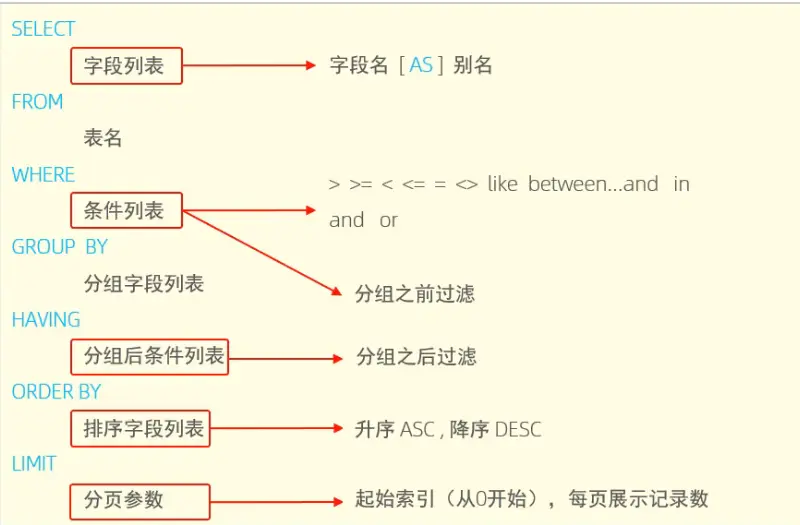
Writing order: SELECT->FROM->WHERE->GROUP BY->HAVING->ORDER BY->LIMIT>
Execution order: FROM->WHERE->GROUP BY->HAVING->SELECT->ORDER BY->LIMIT
Exercises
-- table name: emp-- 1. Query female employees aged 20, 21, 22, or 23SELECT * FROM emp WHERE gender='女' && age IN (20,21,22,23);-- 2. Query male employees aged within [20,40] whose names are 3 characters longSELECT * FROM emp WHERE gender='男' && age BETWEEN 20 AND 40 && name LIKE '___';-- 3. Count male and female employees under 60SELECT gender,count(*) FROM emp GROUP BY gender-- 4. Query the names and ages of all employees aged 35 or younger, sorted by age ascending; if ages are equal, sort by entry date descendingSELECT name,age,entrydate FROM emp WHERE age <= 35 ORDER BY age ASC,entrydate DESC;-- 5. Query the first 5 male employees aged within [20,40], sorted by age ascending; if ages are equal, sort by entry date descendingSELECT name,age,entrydate FROM emp WHERE gender='男' && age BETWEEN 20 AND 40 ORDER BY age ASC,entrydate DESC LIMIT 5;Basic Queries
table: student+-----+-------+-----------+------+| Sid | Sname | Sage | Ssex |+-----+-------+-----------+------+| 01 | 赵雷 | 1/1/1990 | 男 || 02 | 钱电 | 21/12/1990| 男 || 03 | 孙风 | 20/5/1990 | 男 || 04 | 李云 | 6/8/1990 | 男 || 05 | 周梅 | 1/12/1991 | 女 || 06 | 吴兰 | 1/3/1992 | 女 || 07 | 郑竹 | 1/7/1989 | 女 || 08 | 王菊 | 20/1/1990 | 女 |+-----+-------+-----------+------+Basic Syntax
- Query specific fields:
SELECT field1, field2, ... FROM table_name; - Query all fields:
SELECT * FROM table_name; - Query with conditions:
SELECT field1, field2, ... FROM table_name WHERE condition; - Deduplicate query results:
SELECT DISTINCT field1, field2, ... FROM table_name;
Condition Syntax
List of Comparison Operators
=, !=,<>, < <=, >, >= 🪧Note:<> is the same as !=BETWEEN ... AND ...IN(...)LIKE 🪧Note:pattern matching,placeholders:%,_IS NULL,IS NOT NULL
List of Logical Operators
AND,&&,OR,||,NOT,!
SELECT * FROM student; -- query all fields in the tableSELECT id,name FROM student; -- query specific fieldsSELECT * FROM student WHERE id = 1 && age <=30; -- && can be replaced with ANDSELECT * FROM student WHERE id = 1 || age <=30; -- || can be replaced with ORSELECT * FROM student WHERE Sid BETWEEN 01 AND 20; -- BETWEEN queries the range [01,20]SELECT * FROM student WHERE Sid IN (01,02,03); -- IN queries within a setSELECT DISTINCT Ssex FROM student; -- DISTINCT removes duplicatesSELECT * FROM student WHERE enligh IS NOT NULL; -- IS NULL checks for null values-- =================================-- * LIKE *-- =================================SELECT * FROM student WHERE Sname LIKE '赵%'; -- % any number of charactersSELECT * FROM student WHERE Sname LIKE '赵_'; -- _ any single characterSELECT * FROM student WHERE Sname LIKE '赵__'; -- __ any two charactersSELECT * FROM student WHERE Sname LIKE '%子%'; -- records whose Sname contains 子Examples-- example 1SELECT Sid,Sname FROM student WHERE Ssex='男';+-----+-------+| Sid | Sname |+-----+-------+| 01 | 赵雷 || 02 | 钱电 || 03 | 孙风 || 04 | 李云 |+-----+-------+-- example 2SELECT DISTINCT Ssex FROM student;+------+| Ssex |+------+| 男 || 女 |+------+
Aggregate Functions
Aggregate functions compute over the values of a column (NULL values are excluded) and return a single value. Common aggregate functions:
AVG(): returns the average of a columnCOUNT(): returns the number of rows in a columnMAX(): returns the maximum value of a columnMIN(): returns the minimum value of a columnSUM(): returns the sum of a column’s values
COUNT(*)counts all rows, including NULL values
COUNT(field)counts rows in the specified column, excluding NULL values
COUNT(DISTINCT field)counts distinct values in the specified column, excluding NULL values
ExamplesSELECT count(Sid) FROM student;+------------+| count(Sid) |+------------+| 8 |+------------+SELECT avg(Sage) FROM student;+---------------+| avg(Sage) |+---------------+| 19903121.3750 |+---------------+SELECT avg(Sage) FROM student WHERE Ssex='男';+---------------+| avg(Sage) |+---------------+| 19900662.0000 |+---------------+
Grouped Queries
Grouped queries (Group By) work with aggregate functions to group the result set by one or more columns.
Syntax:SELECT field1, field2, ... FROM table_name GROUP BY field1, field2, ... HAVE condition;
Difference between WHERE and HAVING
- They run at different times:
WHEREfilters records before grouping,HAVINGfilters records after grouping.
Execution order: where -> aggregate -> having - They accept different arguments:
WHEREcan only be followed by condition expressions, whileHAVINGcan be followed by condition expressions and aggregate functions.
WHEREis used to filter records before any groupings take place.
HAVINGis used to filter values after they have been grouped.
Examples-- Query the max/min age of male and female studentsSELECT Ssex,max(Sage),min(Sage) FROM student GROUP BY Ssex;+------+------------+------------+| Ssex | max(Sage) | min(Sage) |+------+------------+------------+| 男 | 1990-12-21 | 1990-01-01 || 女 | 1992-03-01 | 1989-07-01 |+------+------------+------------+-- Query the max/min age of male and female students with Sid>2SELECT Ssex,max(Sage),min(Sage) from student WHERE Sid>2 GROUP BY Ssex;+------+------------+------------+| Ssex | max(Sage) | min(Sage) |+------+------------+------------+| 男 | 1990-08-06 | 1990-05-20 || 女 | 1992-03-01 | 1989-07-01 |+------+------------+------------+-- Query the max/min age of male and female students, showing only the group where Ssex=男SELECT Ssex,max(Sage),min(Sage) from student GROUP BY Ssex HAVING Ssex='男';+------+------------+------------+| Ssex | max(Sage) | min(Sage) |+------+------------+------------+| 男 | 1990-12-21 | 1990-01-01 |+------+------------+------------+-- Query employees aged < 45, group by workaddress, and show groups with address_count>3SELECT workaddress,count(*) AS address_count FROM employee WHERE age < 45 GROUP BY workaddress HAVING address_count>3;+--------------+----------------+| workaddress | address_count |+--------------+----------------+| Beijing | 4 || Shanghai | 5 |+--------------+----------------+
Sorted Queries
Syntax SELECT field1, field2, ... FROM table_name ORDER BY field1 [ASC|DESC], field2 [ASC|DESC], ...;
- ASC: ascending order
- DESC: descending order
- With multiple sort conditions, the second condition is only considered when values for the first condition are equal.
SELECT * FROM student ORDER BY Sage ASC;+-----+-------+------------+------+| Sid | Sname | Sage | Ssex |+-----+-------+------------+------+| 07 | 郑竹 | 1989-07-01 | 女 || 01 | 赵雷 | 1990-01-01 | 男 || 08 | 王菊 | 1990-01-20 | 女 || 03 | 孙风 | 1990-05-20 | 男 || 04 | 李云 | 1990-08-06 | 男 || 02 | 钱电 | 1990-12-21 | 男 || 05 | 周梅 | 1991-12-01 | 女 || 06 | 吴兰 | 1992-03-01 | 女 |+-----+-------+------------+------+-- Sort by age ascending; if ages are equal, sort by entrydate descendingSELECT * FROM emp ORDER BY age ASC,entrydate DESC;Paginated Queries
Syntax SELECT field1, field2, ... FROM table_name LIMIT offset, count;
offset is the offset, count is the number of records to fetch.
offset = (pageNo - 1) * pageSize
Pagination is a MySQL extension, not standard SQL; different databases implement it differently.SELECT * FROM student LIMIT 0,3; -- page 1SELECT * FROM student LIMIT 3,3; -- page 2SELECT * FROM student LIMIT 6,2; -- page 3+-----+-------+------------+------+| Sid | Sname | Sage | Ssex |+-----+-------+------------+------+| 01 | 赵雷 | 1990-01-01 | 男 || 02 | 钱电 | 1990-12-21 | 男 || 03 | 孙风 | 1990-05-20 | 男 |+-----+-------+------------+------+3 rows in set (0.27 sec)+-----+-------+------------+------+| Sid | Sname | Sage | Ssex |+-----+-------+------------+------+| 04 | 李云 | 1990-08-06 | 男 || 05 | 周梅 | 1991-12-01 | 女 || 06 | 吴兰 | 1992-03-01 | 女 |+-----+-------+------------+------+3 rows in set (0.23 sec)+-----+-------+------------+------+| Sid | Sname | Sage | Ssex |+-----+-------+------------+------+| 07 | 郑竹 | 1989-07-01 | 女 || 08 | 王菊 | 1990-01-20 | 女 |+-----+-------+------------+------+2 rows in set (0.22 sec)
DCL
User Management
CREATE creates a new user and sets its password
ALTER changes the password of an existing user
DROP deletes an existing user
%: the user can connect to the database from any hostlocalhost: the user can only connect from the local host192.168.1.1: the user can only connect from the specified IP address%.example.com: the user can connect from any host under the example.com domain
CREATE USER 'Jason'@'xxx.xxx.x.x' IDENTIFIED BY 'password'; -- can connect from the specified hostCREATE USER 'Jason'@'%' IDENTIFIED BY 'JasonPassword'; -- can connect from any hostALTER USER 'Jason'@'%' IDENTIFIED BY 'NewJasonPassword';DROP USER 'username'@'host';Privilege Management
GRANT: grants a user access privileges on the database
REVOKE: revokes a user’s access privileges. For example:-- Grant user the privileges to run SELECT, INSERT, and DELETE on database.tableGRANT SELECT, INSERT, DELETE ON database.table TO 'user'@'host';-- Revoke user's privileges to run INSERT and DELETE on database.tableREVOKE INSERT, DELETE ON database.table FROM 'user'@'host';
Common Privileges
ALL, ALL PRIVILEGESall privilegesSELECTquery dataINSERTinsert dataUPDATEmodify dataDELETEdelete dataALTERmodify tablesDROPdrop databases/tables/viewsCREATEcreate databases/tables