

Introduction to the Linux Operating System
What Is Linux
Linux is a Unix-like operating system that is free to use and freely distributed. It is a multi-user, multi-tasking operating system based on POSIX and UNIX, with support for multiple threads and multiple CPUs. Linux inherits Unix’s network-centric design philosophy and is a stable multi-user network operating system.
A Linux operating system consists of four major parts: the Linux kernel, the Linux shell, the Linux file system, and Linux applications.
- The kernel is the core of the operating system, providing its most fundamental functions
- The shell is the system’s user interface, an interface through which users interact with the kernel
- The file system is the way files are organized on storage devices such as disks
- A standard Linux system generally ships with a collection of programs called applications, i.e. Linux applications
Components of the Linux Operating System
Kernel
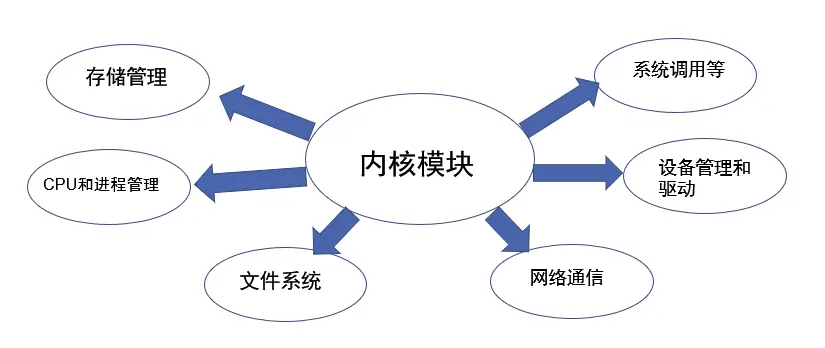
The kernel is the core of the operating system and provides its most fundamental functions, such as virtual memory, multitasking, shared libraries, demand loading, executable programs, and TCP/IP networking.
uname –a 查看内核版本号Linux Efterklang 5.15.146.1-microsoft-standard-WSL2 #1 SMP Thu Jan 11 04:09:03 UTC 2024 x86_64 x86_64 x86_64 GNU/Linuxls –l /boot 查看内核文件
Shell
The shell is the system’s user interface, an interface through which users interact with the kernel. It receives the commands entered by the user and passes them to the kernel for execution. The shell is in fact a command-language interpreter: it interprets commands typed by the user and sends them to the kernel.
In Linux, “shell” collectively refers to the command language, the command interpreter, and the programming language.
- The shell is a command-language interpreter.
It has its own built-in set of shell commands, and the shell can also be invoked by other applications on the system. Every command the user types at the prompt is first interpreted by the shell and then passed to the Linux kernel, so the user does not need to care whether a command is built into the shell or is a separate program. - The shell is an interpreted programming language.
The shell programming language supports most of the program elements found in high-level languages, such as functions, variables, arrays, and control structures. Shell programming is easy to learn: any command you can type at the prompt can be put into an executable shell program.
Execution process
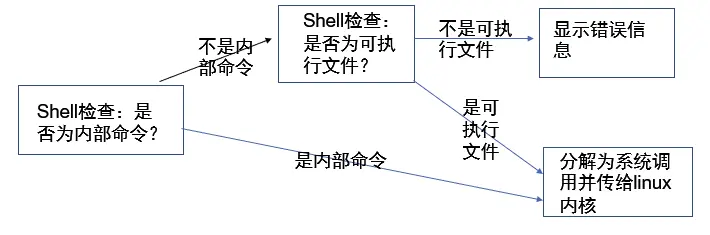
The shell first checks whether the command is a built-in command. If not, it checks whether it is an application, which may be one of Linux’s own utilities, such as ls or rm.
The shell then tries to find the application in the search path ($PATH), a list of directories where executable programs can be found. If the command you typed is not a built-in and no executable is found in the path, an error message is displayed. If the command is found, the shell built-in or application is broken down into system calls and passed to the Linux kernel.
File System
In the Linux file system, a file is a collection of data; the file system contains not only the data in files but also its own structure. All the files, directories, symbolic links, and file protection information seen by Linux users and programs are stored there.
Each concrete file system is separated from the operating system and system services; they communicate through an interface layer, the Virtual File System (VFS).
The main file types include:
- Regular files
- Directories
- Links
- Devices and device files
- Sockets
- Pipes (FIFO, pipe)
Features of the Linux Operating System
Linux is a powerful operating system. Compared with other operating systems, it has the following main features.
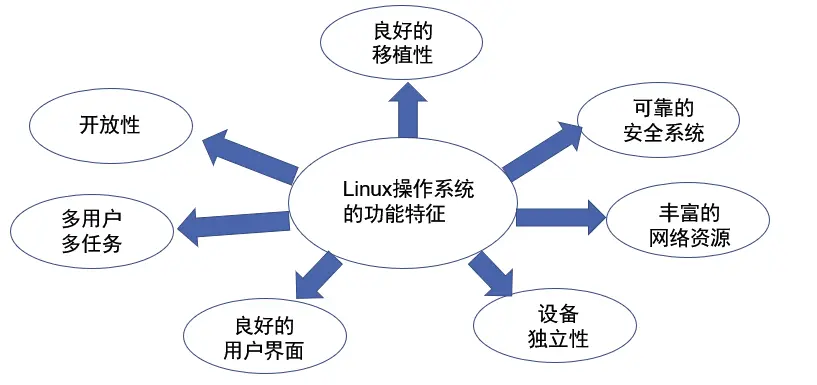
- Openness: it follows the Open Systems Interconnection (OSI) international standards.
- Multi-user: Linux supports multiple users. Operating system resources can be used by different users, and each user has specific permissions over their own resources (e.g. files, devices), ensuring users do not interfere with one another.
- Multitasking: Linux can run multiple programs simultaneously and independently. The computer executes several programs at the same time, and each program runs independently of the others.
- Good user interfaces: Linux offers users two kinds of interface: a character interface and a graphical interface. In the character interface, users operate the system by typing commands on the keyboard. Linux also provides a graphical user interface, the X-Window system, which is similar to the Windows GUI. Using the mouse, menus, windows, scroll bars, and so on, it presents an intuitive, easy-to-use, highly interactive, friendly graphical interface. Working in an X-Window environment feels much like working in Windows; you could call it a Linux version of Windows.
- Device independence: the operating system treats all external devices uniformly as files. Once a driver is installed, any user can manipulate and use these devices just like files. Linux is a device-independent operating system, and its kernel is highly adaptable.
- Rich networking capabilities: comprehensive built-in networking is one of Linux’s defining features.
- A reliable security system: Linux adopts many security techniques, including read/write access control, protected subsystems, audit trails, and kernel authorization, providing the necessary security for users in a networked multi-user environment.
- Good portability: moving Linux from one platform to another lets it keep running in its own way. Linux is a portable operating system that can run in any environment and on any platform, from microcomputers to mainframes. It runs on many hardware platforms, such as those with x86, ARM, SPARC, and Alpha processors. Linux is also an embedded operating system that can run on handheld computers, set-top boxes, or game consoles. The Linux 2.4 kernel released in January 2001 already fully supported Intel’s 64-bit chip architecture. Linux also supports multiprocessor technology: with multiple processors working simultaneously, system performance improves greatly.
Core Linux characteristics: multi-user, multi-process
The multi-user, multi-process management at the core of Linux is implemented as follows:
(1) Account management
The system distinguishes each user’s files, processes, and tasks by account ID, and gives each user a specific working environment (such as the user’s working directory, shell version, and X-Window configuration), so that every user can work independently without interference.
(2) Permission management
In Linux, people who use system resources fall into four categories across three groups: the superuser; the owner of a file or directory; users in the owner’s group; and everyone else. Each group of users is assigned different access permissions to files and directories.
(3) Process management
Process control is a feature of the shell that lets users switch between multiple independent processes.
For example, a user can suspend a running process and resume it later. Bash records and keeps track of every process it starts; at any point during the lifetime of a running process, the user can freely suspend it or restart it to resume execution.
Major Versions of Linux
Linux versions fall into kernel versions and distributions, as follows.
(1) Linux kernel versions:
The Linux kernel has mainly used two different version numbering schemes. The first was used up to and including version 1.0. The second was used from after 1.0 up to 2.6: the number has three parts, “A.B.C”, where A is the major version, B is the minor version, and C is the smaller patch version.
(2) Linux distributions
A Linux distribution is essentially the Linux kernel plus surrounding utilities, bundled into one large software package.
Calling SUSE, RedHat (now usually called Red Hat Enterprise Linux, or RHEL), Ubuntu, Slackware, and so on “Linux” is imprecise; they are Linux distributions. More precisely, they should be called operating system packages built around the Linux kernel.
Distributions can be broadly divided into the Debian family and the RedHat family. The Debian family mainly includes Ubuntu, Debian, Linux Mint, Linux Lite, and others. The RedHat family mainly includes CentOS, Fedora, RedHat Enterprise Linux, Oracle Linux, and others. Debian is a non-commercial project driven entirely by the community. Red Hat offers a free community edition (Fedora) while providing commercial support and services through its enterprise edition (RHEL).