Database Connectivity
ODBC
ODBC (Open Database Connectivity) is a database access API standard proposed by Microsoft in the early 1990s. It uses SQL as the primary access language and hides the differences between DBMSs behind a unified interface, so an application can access multiple databases without rewriting large amounts of code.
An ODBC driver is an implementation library targeting a specific DBMS. The application calls the ODBC API, the ODBC Driver Manager forwards the request to the corresponding database driver, and the driver communicates with the DBMS.
What ODBC provides:
- A common, SQL-based database access API
- The ability for one codebase to access different database systems
- Decoupling of the application from a specific DBMS, making the data access layer more portable
- Access to multiple data sources from a single application
JDBC
JDBC (Java Database Connectivity) is the database access API of the Java platform. The java.sql package defines interfaces for connecting, executing SQL, and reading result sets, while database vendors supply concrete JDBC Driver implementations. A Java program talks to the DBMS through the JDBC Driver.
The typical steps for a JDBC program:
- Import the
java.sqlpackage - Load and register the driver
- Create a
Connectionobject - Create a
StatementorPreparedStatementobject - Execute SQL statements
- Read query results through a
ResultSet - Close the
ResultSet,Statement, andConnectionin order
// In real projects, never store passwords in plain text. Use a config file,// environment variable, or a secrets manager instead.public class ProcessAccountData { private static final String SQL_URL = "jdbc:mysql://localhost:3306/free_chat?serverTimezone=GMT&useSSL=false&allowPublicKeyRetrieval=true"; private static final String DB_USER = "root"; private static final String DB_PASSWORD = "<password>"; /** * @apiNote Read account data from the database into validUsers * @param validUsers the HashMap to fill with account data * @throws IOException */ public void readAccountFile(ConcurrentHashMap<String, User> validUsers) { try { Class.forName("com.mysql.cj.jdbc.Driver"); } catch (ClassNotFoundException e) { e.printStackTrace(); return; } try (Connection conn = DriverManager.getConnection(SQL_URL, DB_USER, DB_PASSWORD); Statement stmt = conn.createStatement(); ResultSet rs = stmt.executeQuery("SELECT account, pwd FROM accounts")) { while (rs.next()) { User user = new User(rs.getString("account"), rs.getString("pwd")); validUsers.put(rs.getString("account"), user); } } catch (SQLException e) { e.printStackTrace(); } } /** * @apiNote On registration, write userId and pwd into the database * @param userId user id * @param pwd user password * @throws IOException */ public void writeAccountFile(String userId, String pwd) { String sql = "INSERT INTO accounts (account, pwd) VALUES (?, ?)"; try (Connection conn = DriverManager.getConnection(SQL_URL, DB_USER, DB_PASSWORD); PreparedStatement pstmt = conn.prepareStatement(sql)) { pstmt.setString(1, userId); pstmt.setString(2, pwd); pstmt.executeUpdate(); } catch (SQLException e) { e.printStackTrace(); } }}Servlet
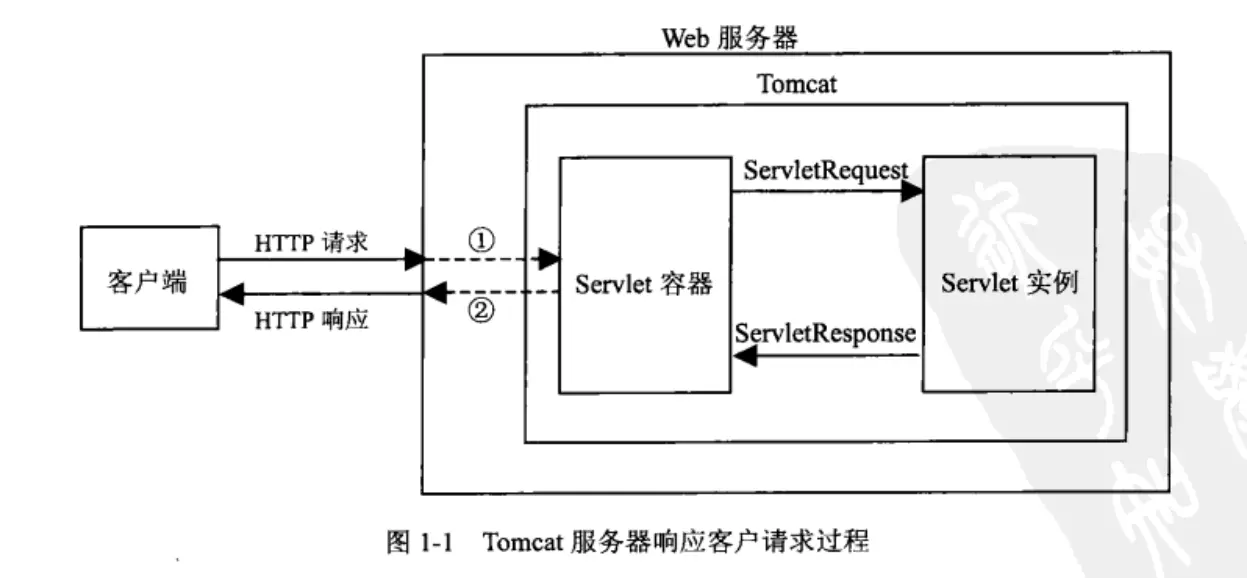
Servlets are the core component of Java Web technology. They run on the server side, are managed by a Web container, and handle HTTP requests from clients to generate dynamic responses. Servlets used to be part of the Java EE specification; after Java EE 8, the specifications were handed over to the Eclipse Foundation and renamed Jakarta EE.
Key points about Servlets:
- Lifecycle: the Web container loads, instantiates, initializes, serves requests, and destroys the Servlet; the core methods are
init(),service(), anddestroy(). - Request handling: Servlets handle GET, POST, and other HTTP requests. Requests and responses are wrapped as
HttpServletRequestandHttpServletResponse. - Thread safety: the container usually serves multiple requests with multiple threads sharing a single Servlet instance, so any mutable shared state inside a Servlet needs extra care.
- Configuration and context: Servlets access init parameters and application-level context through
ServletConfigandServletContext. - Session management: Servlets manage per-user session state through
HttpSession. - Filters and listeners: the Servlet API provides
FilterandListenerfor intercepting requests/responses or listening for application events.
MyBatis
MyBatis is a persistence framework that supports custom SQL, stored procedures, and advanced mapping. It wraps most of the JDBC boilerplate, including parameter binding, result set iteration, and object mapping. Developers configure SQL via XML or annotations and map query results to Java objects.
MyBatis is usually seen as a middle ground between a fully automatic ORM framework and raw JDBC: it does not enforce object-relational mapping as strictly as Hibernate, nor does it require developers to handle every JDBC detail by hand.
Advantages of MyBatis:
- Supports custom SQL, stored procedures, and advanced mapping
- Binds SQL parameters automatically
- Parses and wraps result sets automatically
- Supports configuration and mapping through XML or annotations
- Manages data source connection info through configuration files
JSP
JSP stands for Java Server Pages. It is a text-based dynamic web page technology whose defining feature is embedding Java code inside HTML.
Mechanically, a JSP can be understood as a special form of Servlet: after compilation, a JSP page is converted into a Servlet and executed by the Web container. Compared with writing Servlets directly, JSP is better suited to describing page structure, while Servlets are better suited to request control and business dispatching.
JSP provides 9 built-in objects: out, session, response, request, config, page, application, pageContext, exception.
SSM: a Typical Java Web Architecture
- JSP/HTML pages send requests
- The Controller layer receives user requests and handles the corresponding flow
- The Service layer implements the concrete business logic
- The DAO (Data Access Object) layer operates on the database
- The database
Stored Procedures
A stored procedure is a group of SQL or procedural statements stored on the database server. It is typically used to encapsulate database logic that is executed repeatedly. The client only specifies the procedure name and passes arguments, and the database executes the corresponding logic.
In PostgreSQL, procedural database functions were historically written with CREATE FUNCTION; since PostgreSQL 11, CREATE PROCEDURE can also create stored procedures in the true sense.
Advantages
- Reduces network traffic between client and database
- Compiled or parsed server-side logic usually executes faster
- Complex data processing logic can be reused
- Reduces coupling between business code and database operation details
- Lowers the cost of re-implementing complex SQL logic in the application layer
- Can hide part of the database metadata
- Helps centralize permission control and strengthens database security
Disadvantages
- SQL leans declarative while stored procedures lean procedural; complex business logic can be hard to maintain in a stored procedure.
- If parameters or the returned data structure change, both the stored procedure and the application code that calls it usually need to change together.
- The debugging experience is generally worse than in general-purpose programming languages, raising development and troubleshooting costs.
- Procedural languages differ significantly across DBMSs, so portability is poor.
-- Create a functionCREATE [ OR REPLACE ] FUNCTION name([ [ argmode ] [ argname ] argtype [ { DEFAULT | = } default_expr ] [, ...] ])[ RETURNS retype | RETURNS TABLE ( column_name column_type [, ...] ) ]AS $$ -- $$ marks the start of the function bodyDECLARE -- declaration sectionBEGIN -- function body statementsEND;$$ LANGUAGE lang_name; -- LANGUAGE specifies the procedural language used-- Drop a functionDROP FUNCTION [ IF EXISTS ] name( [ [ argmode ] [ argname ] argtype [, ...] ] )[ CASCADE | RESTRICT ];Main parameters:
name: the name of the function to create or drop.OR REPLACE: overwrite the definition if a function with the same name exists.argmode: parameter mode, one ofIN,OUT,INOUT, orVARIADIC; the default isIN.argname: name of the formal parameter.RETURNS: the return type.RETURNS TABLE: return a table structure.CASCADE: cascade-drop objects that depend on this function, such as triggers.RESTRICT: refuse to drop if dependent objects exist; this is the default.
PL/pgSQL Syntax
Variable Declarations
Variables are declared in the DECLARE section, in this basic form:variable_name data_type;
To declare a variable of record type, use RECORD:variable_name RECORD;
RECORD is not a data type with a fixed structure; it is a placeholder type that can hold a query result row at runtime.DECLARE counter integer; rec RECORD;
Conditionals
IF condition THEN statement;END IF;IF condition THEN statement;ELSE statement;END IF;IF condition1 THEN statement;ELSIF condition2 THEN statement;ELSE statement;END IF;Loops
LOOP statement;END LOOP [label];LOOP i = i + 1; EXIT WHEN i > 10;END LOOP;LOOP i = i + 1; EXIT WHEN i > 100; CONTINUE WHEN i < 50; j = j + 1;END LOOP;WHILE condition LOOP statement;END LOOP;FOR i IN 1..10 LOOP RAISE NOTICE 'i = %', i;END LOOP;CREATE FUNCTION out_record() RETURNS RECORD AS $$DECLARE rec RECORD;BEGIN FOR rec IN SELECT * FROM student LOOP RAISE NOTICE 'student data: %, %', rec.studentID, rec.studentName; END LOOP; RETURN rec;END;$$ LANGUAGE plpgsql;Return Type
In SQL and PL/pgSQL, a function can return the following kinds of values:
Scalar: the simplest return type; any basic data type such as
INTEGER,VARCHAR, orBOOLEAN.CREATE FUNCTION add_one(INTEGER) RETURNS INTEGER AS $$BEGIN RETURN $1 + 1;END;$$ LANGUAGE plpgsql;Record: a function can return a complete record, whose structure usually matches an existing table or a query result.
CREATE FUNCTION get_employee(INTEGER) RETURNS employee AS $$DECLARE rec employee%ROWTYPE;BEGIN SELECT * INTO rec FROM employee WHERE id = $1; RETURN rec;END;$$ LANGUAGE plpgsql;Table: a function can return a table, i.e., multiple records. The table can have a custom structure or match an existing table.
CREATE FUNCTION get_employees() RETURNS TABLE(id INTEGER, name VARCHAR) AS $$BEGIN RETURN QUERY SELECT id, name FROM employee;END;$$ LANGUAGE plpgsql;Trigger: in PostgreSQL, a trigger function must be declared to return
TRIGGER.CREATE FUNCTION check_update() RETURNS TRIGGER AS $$BEGIN IF NEW.updated_at < OLD.updated_at THEN RAISE EXCEPTION 'Update timestamp must be newer'; END IF; RETURN NEW;END;$$ LANGUAGE plpgsql;Composite type: a function can return a user-defined composite type.
CREATE TYPE my_type AS (f1 integer, f2 text);CREATE FUNCTION return_compound() RETURNS my_type AS $$BEGIN RETURN ROW(1, 'test')::my_type;END;$$ LANGUAGE plpgsql;Void: if the function does not need to return anything, use the
VOIDtype.CREATE FUNCTION log_message(text) RETURNS VOID AS $$BEGIN RAISE NOTICE '%', $1;END;$$ LANGUAGE plpgsql;
Examples
- Count how many records the student table contains.
CREATE OR REPLACE FUNCTION count_records()RETURNS integer AS $$DECLARE student_count integer;BEGIN SELECT count(*) INTO student_count FROM student; -- INTO assigns the query result to a variable RETURN student_count;END;$$ LANGUAGE plpgsql;SELECT count_records();If
grade >= 60, the student earns the credits for that course. Write SQL to compute each student’s total credits; the result should include student id, name, and total credits.Course(courseid, coursename, credit)
Grade(gradeid, studentid, courseid, grade)
Student(studentid, studentname, sex, age)
CREATE OR REPLACE FUNCTION get_credit() RETURNS TABLE( vsid CHAR, vsname VARCHAR, vscredit BIGINT )AS $vscredit$BEGIN RETURN QUERY SELECT c.studentid AS vsid, c.studentname AS vsname, SUM(a.credit) AS vscredit FROM course AS a JOIN grade AS b ON a.courseid = b.courseid JOIN student AS c ON b.studentid = c.studentid WHERE b.grade >= 60 GROUP BY c.studentid, c.studentname;END;$vscredit$ LANGUAGE plpgsql;SELECT * FROM get_credit();- Create a stored procedure named
add_data(a, b, c)that computesa + band puts the result inc.
CREATE OR REPLACE PROCEDURE add_data(a integer, b integer, INOUT c integer)AS $$BEGIN c = a + b;END;$$ LANGUAGE plpgsql;Triggers
A trigger is a special database object defined on a table or view. It fires automatically on specified operation events, and can implement integrity checks and business rules more complex than what constraints allow.
By granularity, triggers fall into two kinds:
- Statement-level triggers: execute once per triggering statement.
- Row-level triggers: execute once for each affected row.
Common trigger context variables:
NEW: of typeRECORD. For row-levelINSERTorUPDATE, holds the new row; for statement-level triggers, it isNULL.OLD: of typeRECORD. For row-levelDELETEorUPDATE, holds the old row; for statement-level triggers, it isNULL.TG_OP: of typetext, with valueINSERT,UPDATE, orDELETE, indicating which operation fired the trigger.INSTEAD OFtriggers: commonly used on views. When the event occurs, the trigger logic runs instead of the original SQL operation.
The general steps to create a trigger:
- Make sure the table or view the trigger attaches to exists.
- Create a trigger function with return type
TRIGGER. - Create the trigger, binding the event, the firing time, and the trigger function.
-- Create tablesCREATE TABLE stu_score ( sid character(10) NOT NULL, cid character(10) NOT NULL, score numeric(5, 1), CONSTRAINT stu_score_pkey PRIMARY KEY (sid, cid));CREATE TABLE audit_score ( username character(20), -- user name sid character(10), cid character(10), updatetime timestamp, -- modification time oldscore numeric(5, 1), -- score before the change newscore numeric(5, 1) -- score after the change);-- Create the trigger functionCREATE OR REPLACE FUNCTION score_audit()RETURNS TRIGGERAS $score_audits$BEGIN IF TG_OP = 'DELETE' THEN INSERT INTO audit_score VALUES (user, OLD.sid, OLD.cid, now(), OLD.score, NULL); RETURN OLD; ELSIF TG_OP = 'UPDATE' THEN INSERT INTO audit_score VALUES (user, OLD.sid, OLD.cid, now(), OLD.score, NEW.score); RETURN NEW; ELSIF TG_OP = 'INSERT' THEN INSERT INTO audit_score VALUES (user, NEW.sid, NEW.cid, now(), NULL, NEW.score); RETURN NEW; END IF; RETURN NULL;END;$score_audits$ LANGUAGE plpgsql;-- Create the triggerCREATE TRIGGER score_audit_triggerAFTER INSERT OR UPDATE OR DELETE ON stu_scoreFOR EACH ROW EXECUTE FUNCTION score_audit();-- Rename the triggerALTER TRIGGER score_audit_trigger ON stu_score RENAME TO score_audit_trig;-- Drop the triggerDROP TRIGGER IF EXISTS score_audit_trig ON stu_score CASCADE;Cursors
A cursor is a database object for processing query results row by row. It is associated with one query statement and internally keeps the query result plus a current position pointer, which makes it well suited to reading a result set one row at a time in a procedural language.-- Declare cursorscur_student CURSOR FOR SELECT * FROM student;cur_student_one CURSOR (key integer) IS SELECT * FROM student WHERE sid = key;-- Open cursorsOPEN cur_vars1 FOR SELECT * FROM student WHERE sid = mykey;OPEN cur_vars1 FOR EXECUTE 'SELECT * FROM ' || quote_ident($1);OPEN cur_student;OPEN cur_student_one('20160230302001');-- Fetch values through a cursorFETCH cur_vars1 INTO rowvar; -- rowvar is a row variableFETCH cur_student INTO sid, sname, sex;-- Close a cursorCLOSE cursor_name;