
Precedence Graph and Program Execution
Precedence Graph
A precedence graph is a directed acyclic graph (DAG) that describes the execution order among processes. Each node can represent a statement, a program segment, and so on; a directed edge between two nodes represents a precedence relation between them.
Initial node: a node with no predecessor in the precedence graph.
Final node: a node with no successor in the precedence graph.
If a program consists of several program segments (i.e., operations) that must run in a certain order, this kind of execution is called sequential execution of the program.
Program Execution
Ways a program executes
- Sequential execution — single-program batch systems
- Concurrent execution — multiprogrammed batch systems
- Application-level concurrency: several application programs executing concurrently.
- System-level concurrency: the operating system’s own software executing concurrently.
Sequential execution
If a program consists of several program segments (i.e., operations) that must run in a certain order, this kind of execution is sequential execution of the program.
- Sequentiality: the processor performs its operations strictly in the order the program specifies.
- Closedness: the program monopolizes all machine resources while running; once it starts, its result is unaffected by external factors.
- Reproducibility: as long as the program runs under the same environment and initial conditions, it produces the same result.
Characteristics of concurrent execution
- Intermittence: because concurrent programs share system resources and cooperate to accomplish the same task, mutual constraints form among them, giving concurrent programs an intermittent “execute — pause — execute” pattern of activity.
- Loss of closedness: multiple programs share the system’s resources, so the state of those resources is changed by multiple programs, and each program’s execution loses its closedness.
- Irreproducibility: when programs execute concurrently, the loss of closedness leads to irreproducibility.
Process
Definition, Features, Components, States
Why introduce processes?
Concurrent execution: processes let multiple tasks run interleaved within the same time span. While one task waits for an I/O operation to finish, the CPU can execute another, improving system efficiency and throughput.
Independence: each process has its own private address space, which means one process cannot directly access another’s memory. This memory protection helps prevent one process from accidentally or maliciously interfering with another.
Simpler programming model: without processes, programmers would have to manage multitasking and resource allocation by hand. With processes, the operating system handles these automatically, and programmers can focus on application logic.
Resource management: the process is the basic unit of resource allocation and management. The operating system can allocate resources such as CPU time and memory according to each process’s needs and priority.
Process Control Block (PCB)
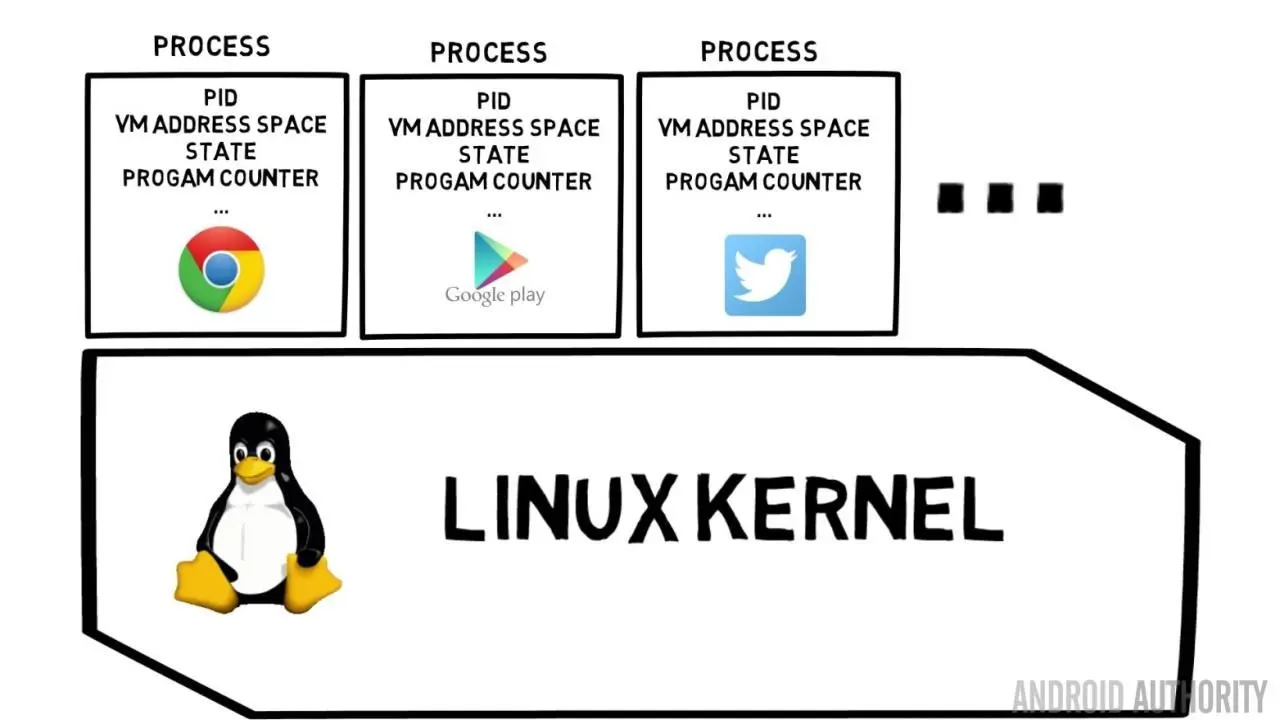
The PCB is a data structure the operating system uses to describe a process, and it is one of the most important data structures in the OS. The PCB contains all the information about a process; it is the data structure through which the operating system controls and manages the process. Its main contents are:
- Process identifier information
- Processor state information
- Process scheduling information
- Process control information
Main Contents of the PCB
Process identifier (PID)
A process identifier uniquely identifies a process. A process usually has two kinds of identifiers:
- Internal identifier. Each process is given a unique numeric identifier, usually the process’s sequence number. Internal identifiers exist mainly for the operating system’s convenience.
- External identifier. Provided by the creator, usually composed of letters and digits, and typically used by users (or processes) when accessing the process.
Processor State Information
Processor state information consists mainly of the contents of the processor’s registers. For example:
- General-purpose registers, also called user-visible registers.
- The program counter (PC), which holds the address of the next instruction to fetch.
- The program status word (PSW), which contains status information such as condition codes, execution mode, and interrupt mask flags.
- The user stack pointer (SP), used to store system call parameters and return addresses. The stack pointer points to the top of the stack.
Scheduling Information
The PCB also stores information related to process scheduling and swapping.
- Process state: the process’s current state.
- Process priority.
- Event: the event the process is waiting for when it moves from the running state to the blocked state, i.e., the reason for blocking.
- Other information, such as the total time the process has waited for the CPU and the total time it has executed;
see thelinux kernel sched.h task_structstructure for reference.
Process Control Information
- Addresses of program and data: the memory or external storage addresses where the process’s program and data reside.
- Process synchronization and communication mechanisms: mechanisms needed for process synchronization and communication, such as message queue pointers and semaphores.
- Resource list: a list of all the resources the process needs and those already allocated to it.
- Link pointer: the starting address of the PCB of the next process in the same queue.
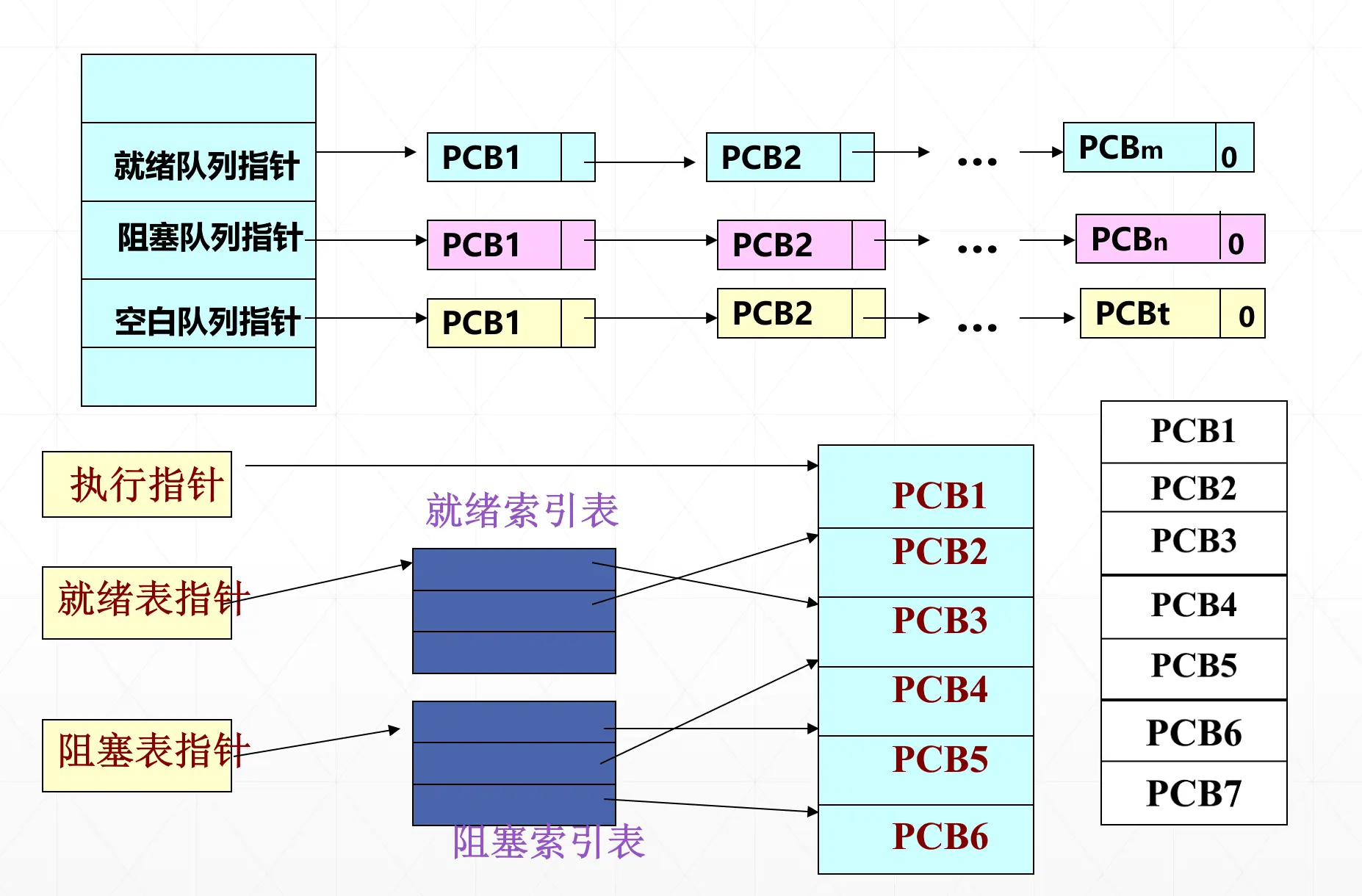
How PCBs Are Organized
- Linear organization: all PCBs in the system are organized in one linear table.
- Linked organization: PCBs in the same state are linked into a queue via their link pointers. (Usually, multiple blocked queues can be organized by the event being waited for, such as waiting for the printer or waiting for memory.)
- Indexed organization: PCBs of processes in the same state are organized into one table; the system builds several index tables based on process states and records the starting address of each PCB table.
Since the main operations on processes are insertion and deletion, the linked organization is used more often.
Role of the PCB
The role of the process control block is to turn a program (with its data) that cannot run independently in a multiprogramming environment into a basic unit that can run independently — a process.
Throughout a process’s lifetime, the operating system always controls it through its PCB. In this sense, the PCB is the sole sign that a process exists.
The OS controls and manages concurrently executing processes based on their PCBs, for example:
Process creation: allocate a process control block.
Process scheduling: save and read the process control block.
Process termination: reclaim the process control block.
Process Control
Definition
Process control: one of the core functions of the operating system, covering process creation, termination, scheduling, state transitions, synchronization, communication, and so on. Process control is generally implemented by a set of primitives in the OS kernel.
Primitive: a procedure or function provided by the OS kernel or microkernel for calls from outside the kernel; it consists of a number of instructions and forms a piece of program that accomplishes a specific function. A primitive must not be interrupted during execution.
Atomic operation: an operation that cannot be interrupted by other processes (threads) during execution. If the operation cannot complete, the state must be rolled back to what it was before the operation; an atomic operation is indivisible.
Kernel: the first layer of software extending the computer hardware, providing effective mechanisms for process control, memory management, and so on. The kernel is resident in memory, sits close to the hardware, and runs efficiently. The functions included in the kernel differ across operating systems, but generally include:
Support functions: interrupt handling, clock management, primitive operations.
Resource management functions: process management, memory management, device management.
Process Creation and Termination
Operations performed by the process creation primitive:
- Request a free PCB.
- Allocate resources for the new process.
- Initialize the process control block.
- Initialize the identifier information.
- Initialize the processor state information: make the program counter point to the program’s entry address and the stack pointer point to the top of the stack.
- Initialize the processor control information: the process’s state and priority.
- Insert the new process into the ready queue and start the scheduler.
Main events that trigger process creation
User login
Job scheduling
Providing a service
Application request
Events that trigger process termination
Normal completion.
Abnormal termination:
- Out-of-bounds error.
- Protection error.
- Illegal instruction.
- Privileged instruction error.
- Run timeout.
- Wait timeout.
- Arithmetic error, division by zero.
- I/O failure.
External intervention: this does not mean an abnormal event occurred while the process was running, but that the process terminates at an external request.
- Operator or operating system intervention. For some reason, such as a deadlock, the operator or the OS terminates the process.
- The parent process requests that the process be terminated.
- When a parent process terminates, the OS also terminates all of its descendant processes.
The process termination procedure
- Find the PCB of the process to be terminated by its PID and read its state from the PCB.
- If the process is currently executing, stop its execution immediately and reschedule.
- If the process has descendant processes, terminate all of them immediately.
- Return all resources owned by the terminated process to its parent process, or to the system.
- Remove the terminated process’s PCB from the queue it is in.
Block and Wakeup
Causes of process blocking
- Requesting a system service.
- Starting some operation, such as an I/O operation.
- New data has not yet arrived.
- No new work to do.
How a process blocks
A running process may, during execution, wait for some event to occur, such as keyboard input, completion of a disk transfer, or a message from another process. When the awaited event has not occurred, the process itself executes the block primitive, changing itself from running to blocked. So blocking is an active behavior of the process itself.
- When the executing process encounters one of the events above and cannot continue, it blocks itself by calling the blocking primitive
block(blocking is an active behavior); - The current state in its process control block changes from
runningtoblocked, and the PCB is inserted into a blocked queue; - Control transfers to the scheduler for rescheduling; the processor is assigned to another ready process and a switch takes place.
How a process is woken up
When the event a blocked process is waiting for occurs — for example, a process enters the blocked state after issuing an I/O request — it cannot stay blocked forever. When the I/O operation completes, the system uses the wakeup primitive to wake the blocked process so it can continue executing.
- When the awaited event occurs, a related process (for example, the process that has finished using and released the I/O device) calls the wakeup primitive
wakeup()to wake the process waiting for that event. (Waking up is a passive behavior.) - The wakeup primitive executes as follows:
Remove the blocked process from the blocked queue of processes waiting for that event
Change the current state in its PCB from blocked to ready
Insert the PCB into the ready queue to wait for CPU scheduling
Suspend and Activate
When an event that causes suspension occurs, the system uses the suspend primitive suspend() to suspend the specified process or a process in the blocked state.
When an event that activates a process occurs, if there is enough space for the process, a process in the ready-suspended state on external storage can be brought from external storage into memory; the system uses the activate primitive active() to activate the specified process.
Suspending a process
When an event that causes suspension occurs, the system uses the suspend primitive suspend() to suspend the specified process or a process in the blocked state. (Suspension is an active behavior.)
A process calling the suspend primitive can only suspend itself or its descendant processes; the kernel’s sleep() function is implemented on top of the suspend primitive using a timer.
Execution of the suspend primitive
- Check the state of the process to be suspended:
running: change the current state in its PCB fromrunningtoready suspend, and set the CPU scheduling flag to true;
ready: change the current state in its PCB fromrunningtoready suspend;
blocked: change the current state in its PCB fromblockedtoblocked suspend; - Copy the suspended process’s PCB to the designated memory area.
- If the process was running, transfer control to the scheduler for rescheduling.
Ex: Which of the following statements are correct?
- A process can create itself (❌ — a process can create child processes, but not itself)
- A process can block itself
- A process can suspend itself
- A process can activate itself
- A process can wake itself up
- A process can terminate itself