
Definition of an OS
There is still no single, universally accepted definition of an operating system
- Definition 1: An operating system is a collection of programs that controls and manages a computer’s hardware and software resources, schedules various jobs sensibly, and makes the computer convenient to use
- Definition 2: An operating system is a piece of system software that sits above the hardware layer (HAL) and below all other system software, making full use of the various software and hardware resources in the system and making the computer system convenient for users
Goals and Roles of an Operating System
Goals of an OS
- Convenience: an operating system makes the computer easier to use.
- Efficiency: an operating system allows system resources to be used more effectively.
- Improve resource utilization
- Improve system throughput
- Extensibility: an operating system should allow new system features to be developed, tested, and introduced effectively.
- Openness: achieving portability and interoperability of applications requires a unified, open environment.
Roles of an OS
An operating system should hide the complex, difficult, ugly, and idiosyncratic hardware details, and present a good, clear, elegant, and consistent abstraction
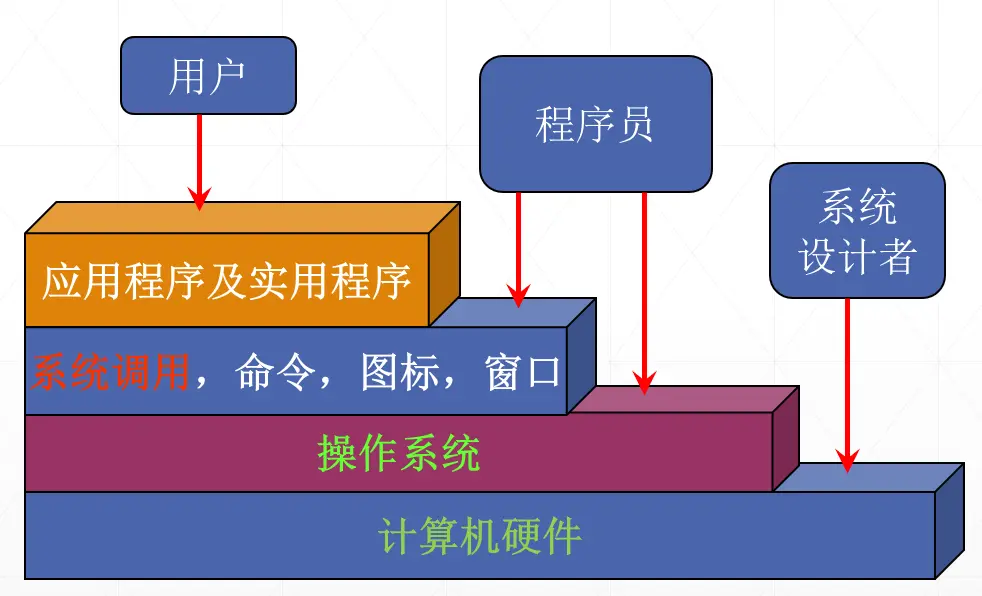
Orderly control over the allocation of the processor, memory, and other I/O devices among competing programs
- Processor management: allocating and controlling the processor;
- Memory management: mainly responsible for allocating and reclaiming memory;
- I/O device management: responsible for allocating and operating I/O devices;
- File management: responsible for file access, sharing, and protection.
- For multi-user systems, shared resources must be managed to avoid conflicts.
History of Operating Systems
The evolution of operating systems is closely tied to the evolution of computers; as computer hardware advanced, operating systems evolved along with it. For a detailed history, see the Zhihu article The History of Operating Systems
Related concepts: single-stream/multi-stream batch processing systems, concurrency & parallelism, human-computer interaction
Basic Characteristics of Operating Systems
Modern operating systems have four basic characteristics:
- Concurrency (the most important characteristic)
- Sharing
- Virtualization
- Asynchrony
Concurrency is the most important characteristic; all the others presuppose it
Concurrency
Key:
- Distinguish concurrency & parallelism
- Distinguish process & thread & program
Sharing
Sharing: resources in the system can be used jointly by multiple concurrently executing processes in memory.
- Exclusive Sharing: only one process can use the resource at a time. While one process is using the resource, other processes must wait. This is typically used for resources that cannot be shared by multiple processes at the same time, such as printers or tape drives.
- Time-Sharing: the resource switches between multiple processes, with each process holding the resource exclusively for a period of time. With fast switching, users feel as if they are using the resource simultaneously. This is typically used for resources that can be shared among processes, such as the CPU and memory.
- Concurrent Sharing: multiple processes can access the resource at the same time without waiting. This is typically used for resources that can be read by multiple processes simultaneously, such as files or databases.
- Virtual Sharing: each process has a virtual copy of the resource, so every process feels as if it owns the resource exclusively. This is typically used for resources that can be replicated, such as virtual memory or virtual machines.
Virtualization
Virtualization: using some technique to turn (map) one physical entity into several logical counterparts.
Time-division multiplexing
Virtual processors: implemented via time-sharing
Virtual devices: SPOOLing technology
Space-division multiplexing
Virtual disks: logical partitions
Virtual memory: implemented via virtual storage management
Asynchrony
Asynchrony: in a multiprogramming environment, programs (processes) execute asynchronously; when each program runs, in what order, and when it finishes are all indeterminate and unpredictable.
Main Functions of an Operating System
The main task of an operating system is to provide a good environment for running multiple programs, ensuring they run in an orderly and efficient manner, while maximizing the utilization of the system’s resources and making the system convenient for users.
An operating system should provide five categories of functionality:
- Processor management (CPU)
- Memory management
- Device management
- File management
- A user interface that makes the system convenient to use.
Processor Management
Allocate the processor to processes (threads) according to some algorithm, and manage and control them effectively
- Process control
Main functions: creating processes for jobs, terminating processes that have finished, and controlling the state transitions of processes during execution. - Process synchronization and mutual exclusion
The main task is to coordinate the execution of multiple processes (including threads).
Mutual exclusion: processes must access critical resources in a mutually exclusive way.
Synchronization: for processes cooperating on a common task, a synchronization mechanism coordinates their order of execution. (semaphore mechanism) - Interprocess communication
- Process scheduling
Memory Management
Provide a good environment for multiprogramming, make memory convenient to use, improve memory utilization, and logically expand memory.
Memory allocation
Two forms of memory allocation:- Static allocation: each job’s memory space is determined when the job is loaded. It cannot request additional memory at runtime, nor can the job “move” within memory.
- Dynamic allocation: each job’s memory space is determined when the job is loaded, but the job is allowed to request additional memory during execution to accommodate the dynamic growth of programs and data, and is also allowed to “move” within memory.
The main tasks of memory allocation are:
- Allocate memory space to each program so that each gets its proper place.
- Improve memory utilization and minimize unusable memory (fragmentation).
- Allow running programs to request additional memory to accommodate the dynamic growth of programs and data.
Memory protection
Ensure that each user program runs only within its own memory space, without interfering with others.
User programs must never be allowed to access the operating system’s programs and data, nor to jump into other non-shared user programs for execution.Address mapping
To ensure programs run correctly, memory management must provide address mapping, i.e., the ability to translate logical addresses in the address space into their corresponding physical addresses in memory. This should be done with hardware supportMemory expansion
Use virtual storage techniques to logically expand memory capacity
Device Management
Fulfill I/O requests issued by user processes; allocate the I/O devices they need; improve the utilization of the CPU and I/O devices; increase I/O speed; and make I/O devices convenient to use.
- Buffer management: effectively ease the speed mismatch between the CPU and I/O devices, improving CPU utilization.
- Device allocation: allocate the required devices according to I/O requests.
- Device handling: device handlers are also known as device drivers.
File Management
Main task: manage user files and system files for the convenience of users, and ensure file safety.
- Management of file storage space
- Directory management
- File read/write management and protection
The Interface Between the Operating System and Users
User interface: the set of all user commands implemented by the OS is commonly called the OS’s user interface, sometimes also called the command interface. It is further divided into three kinds: the online user interface, the offline user interface, and the graphical user interface.
Program interface: the set of all system calls implemented by the OS is called the program interface or Application Programming Interface (API). The program interface exists so that user programs can access system resources during execution; it is the only way for user programs to obtain services from the operating system.
Structural Design of Operating Systems
An operating system is a large piece of system software, and its structure has gone through four generations of change:
- First-generation operating systems were unstructured
- Second-generation operating systems adopted a modular structure
- The third generation used a layered structure
- Modern operating systems use a microkernel structure
Modular Structure (Module-Interface Approach)
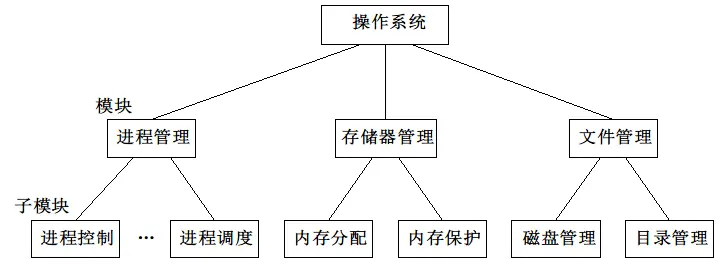
A system with a modular structure consists of several modules, each of which implements a set of basic concepts along with their associated basic attributes.
Relationships between modules
- The implementation of any module may freely reference the concepts and attributes provided by any other module.
Advantages
Improves the correctness, understandability, and maintainability of OS design.
Enhances the adaptability of the OS.
Speeds up the OS development process.
Disadvantages
Precisely describing how to divide modules and specify their interfaces is difficult.
When dividing modules by functionality, shared resources and exclusive resources are not distinguished.
Layered Structure
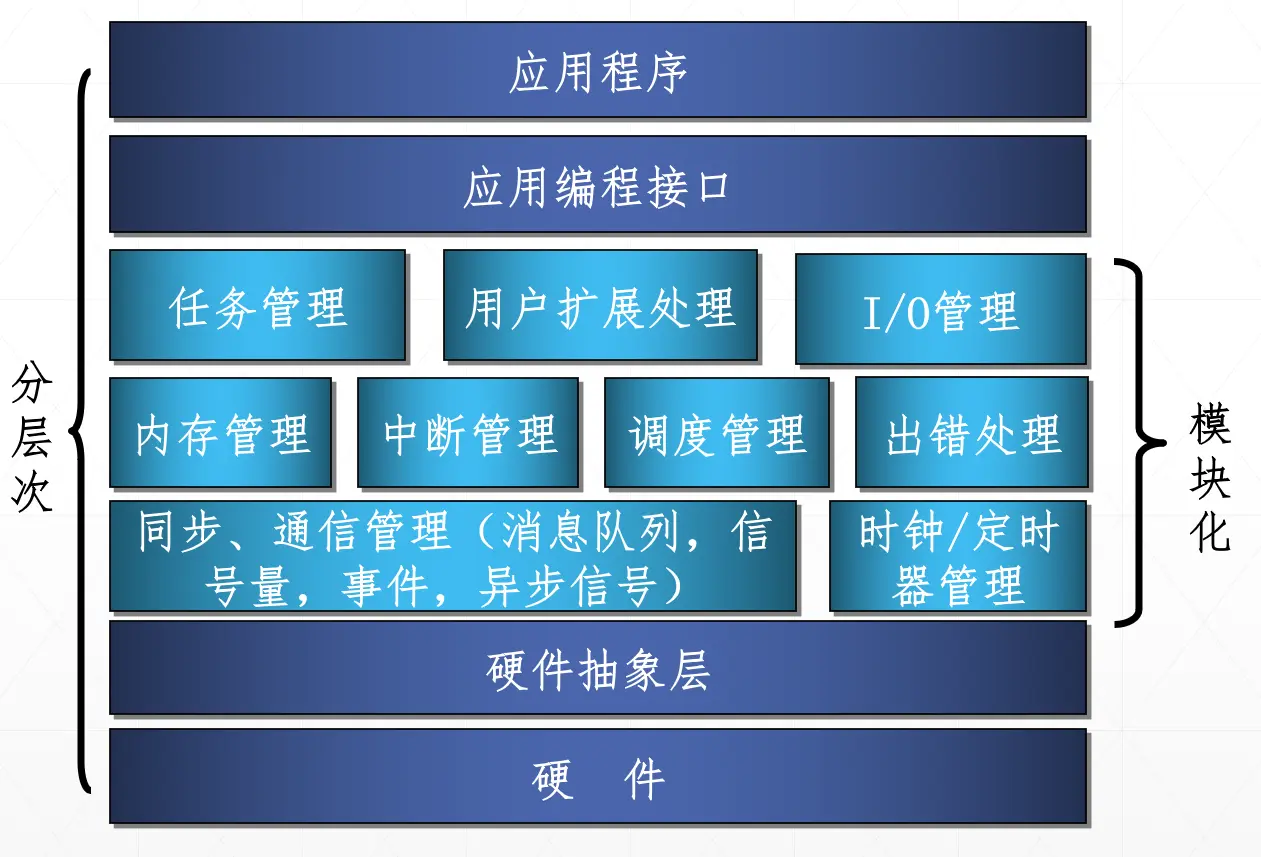
A layered system consists of several layers, each of which implements a set of basic concepts along with their associated basic attributes.
Relationships between layers
- The implementation of each layer does not depend on the concepts and attributes provided by the layers above it; it depends only on those provided by the layer directly below it;
- Each layer hides the existence of the layers below it from the layers above.
Factors to consider when arranging layers
- Program nesting: each OS function is usually implemented not by a single program but through several software layers, so when implementing an OS, the possible program nesting of each function should be considered.
- Execution frequency: place the most frequently active modules in the layer closest to the hardware
- Common modules: place common modules called by multiple resource managers in the lowest layer, so they are easy to invoke.
- User interfaces: the command interface, program interface, and graphical user interface. These interfaces should be placed in the topmost layer of the OS, provided directly to users.
Microkernel Technology
Microkernel technology refers to a carefully designed small kernel that implements the core functions of a modern OS. Unlike an ordinary OS (program), it is smaller and more refined; it not only runs in kernel mode but also stays resident in memory after boot, and it is never swapped out of memory due to memory pressure.
Almost all currently popular operating systems that support multiprocessors adopt a microkernel structure, such as Mach OS and Windows 2000
The functions a microkernel provides are usually the most basic ones, such as process management, low-level memory management, interrupt and trap handling, interprocess communication, and low-level I/O
Characteristics of microkernels
- A sufficiently small kernel.
- Based on the client/server model
- Applies the principle of separating mechanism from policy
- Uses object-oriented technology