---
title: Blog性能优化记录
date: 2024-09-27
excerpt: 记录网站维护过程中,采取的部分优化措施
tags: [Hexo, Icarus, Web, Blog, Pjax]
cover: https://assets.vluv.space/cover/FrontEnd/blog_performance.webp
updated: 2026-05-08 22:10:51
---
## 采取高效编码
采用 `webp` ,`webm`等格式进行编码,可以使用`cwebp`命令压缩图片。视频可以通过在线网站进行转换;
推荐的格式
- 图片 webp,avif
- 视频/动图 webm
- 字体 woff2
> **Best Practice**
> While MP4 has been around since 1999, WebM is a relatively new file format initially released in 2010. WebM videos are much smaller than MP4 videos, but not all browsers support WebM so it makes sense to generate both.
### 批量转换图片格式
下载`libwebp`库,使用`cwebp`命令;下面为个人自用的批量转换的 Python 脚本
> windows 自带截图和 qq 截图并不支持 webp 格式的截图;
> 最新版的 pixpin,snipaste 等第三方截图软件支持 webp 格式
```python
from pathlib import Path
import subprocess
import shutil
import argparse
covert_these_types = (".png", ".jpg", ".jpeg")
def convert_to_webp(input_dir: Path, output_dir: Path):
"""
将指定目录及其子目录中的文件转换为.webp格式。输出文件保存在指定的输出目录下,并保留原有目录结构。
"""
for file_path in input_dir.rglob("*"):
# 检查文件是否为需要转换的类型
if file_path.suffix.lower() in covert_these_types:
# 构建输出文件路径,/ 操作符在这里将 output_dir 和 relative_path 组合成一个新的路径对象
relative_path = file_path.relative_to(input_dir)
output_path = output_dir / relative_path.with_suffix(".webp")
output_path.parent.mkdir(parents=True, exist_ok=True)
# 使用cwebp命令进行转换
try:
subprocess.run(
["cwebp", str(file_path), "-o", str(output_path)], check=True
)
except subprocess.CalledProcessError as e:
print(f"Failed to convert {file_path}: {e}")
else:
output_path = output_dir / relative_path
shutil.move(file_path, output_dir)
def main():
# 创建命令行参数解析器
parser = argparse.ArgumentParser(
description="Convert PNG, JPG, and JPEG files to WEBP format."
)
parser.add_argument(
"input_dir", type=str, help="Input directory containing images to convert"
)
parser.add_argument(
"output_dir", type=str, help="Output directory to save converted images"
)
args = parser.parse_args()
input_dir = Path(args.input_dir)
output_dir = Path(args.output_dir)
convert_to_webp(input_dir, output_dir)
if __name__ == "__main__":
main()
```
```bash
[USAGE]
python ./cwebp.py ../source/img/unused/ ./output
```
web.dev 中有文章建议将 GIF 替换为视频格式以提升性能[Replace GIFs with video](https://web.dev/articles/codelab-replace-gifs-with-video?hl=en)
```shell
ffmpeg -i input.gif -c vp9 -b:v 0 -crf 41 output.webm
```
### 效果测试
下面是本网站图片压缩前后的体积对比:
```wikitext
╭───┬───────────────────┬──────┬───────────╮
│ # │ name │ type │ size │
├───┼───────────────────┼──────┼───────────┤
│ 0 │ gallery │ dir │ 66.2 MiB │
│ 1 │ gallery_origin │ dir │ 186.8 MiB │
│ 2 │ thumbnails │ dir │ 19.6 MiB │
│ 3 │ thumbnails_origin │ dir │ 88.0 MiB │
│ 4 │ unused │ dir │ 18.4 MiB │
╰───┴───────────────────┴──────┴───────────╯
```
- gallery 目录的体积缩小了约 64.57%
- 原始大小: `gallery_origin: 186.8 MiB;图片*54(jpg,png),视频*3(mp4)`
- 压缩后大小: `gallery: 66.2 MiB`
- 压缩体积: `186.8 MiB - 66.2 MiB = 120.6 MiB`
- thumbnails 目录的体积缩小了约 77.73%
- 原始大小: `thumbnails_origin: 88.0 MiB;图片×100(jpg,png)`
- 压缩后大小: `thumbnails: 19.6 MiB`
- 压缩量: `88.0 MiB - 19.6 MiB = 68.4 MiB`
## Minify HTML/CSS/JS
参考我的[[post-build|另一篇博客]],可以考虑使用 [wilsonzlin/minify-html](https://github.com/wilsonzlin/minify-html) 和 [ESBuild](https://esbuild.github.io/) 压缩HTML/CSS/JS资源
## 图片懒加载
`{shell} npm install hexo-native-lazy-load --save`
```yaml
lazy_load:
enable: true
onlypost: false
```
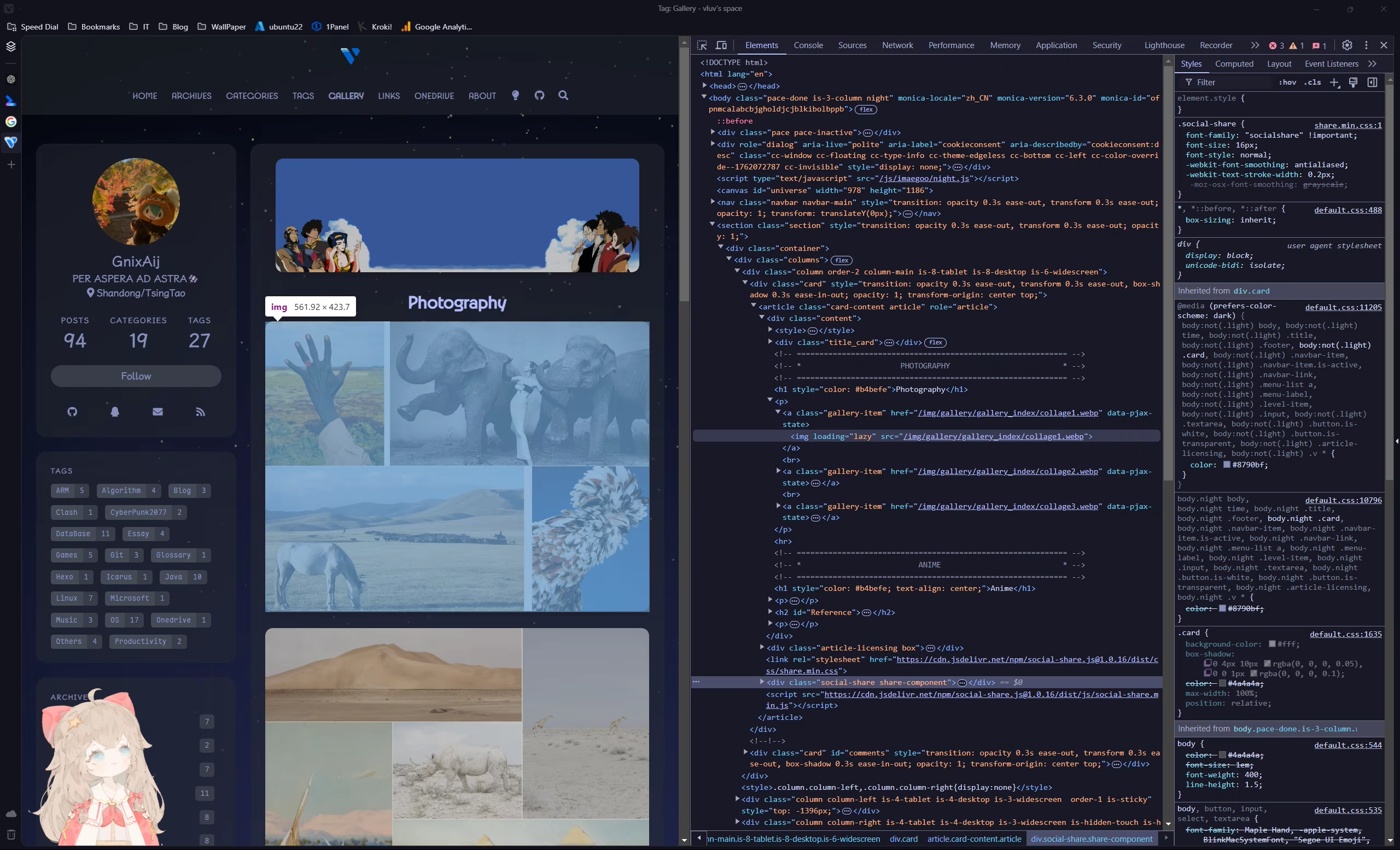
`{shell} hexo clean`,部署后在页面打开 devtools;可以看到 img 已添加`loading="lazy"`
## Instant Page
> instant.page uses just-in-time preloading — it preloads a page right before a user clicks on it.
根目录添加`scripts/instant-page.js`文件
```js scripts/instant-page.js
hexo.extend.injector.register(
"body_end",
'',
"default"
);
```
## Pjax
目前 Icarus 仅初步支持 Pjax,详见
## OSS + CDN
一种广泛采用的免费方案:github 作为图床,jsdelivr 作为 CDN;优点是免费,但国内访问效果一般,并且这违反了它们的服务条款,也是属于对公共资源的滥用。
Cloudflare 免费提供了一定额度的 R2 + CDN 服务,可以考虑使用;需要信用卡,下载 Paypal 绑定国内银联的信用卡即可。这也是本站目前使用的方案
## To be continued(?)
**Tools**
- [convert2.cn](https://convert2.cn)
- [Lighthouse](https://developer.chrome.com/docs/lighthouse/overview)
- [Hexo 注入器(Injector)](https://hexo.io/zh-cn/api/injector.html)
**更多优化方案**
- [Core Web Vitals](https://web.dev/explore/learn-core-web-vitals?hl=zh-cn)
- [Use WebP images](https://web.dev/articles/serve-images-webp)
- [Best practices for fonts](https://web.dev/articles/font-best-practices)
- [再快一点,再快一点 —— 优化博客白屏时间的实践](https://blog.skk.moe/post/improve-fcp-for-my-blog/)
- [记 hexo icarus 主题优化 Google PageSpeed Insights 分数](https://www.huihongcloud.com/2021/10/17/hexo/%E8%AE%B0hexo%20icarus%E4%B8%BB%E9%A2%98%E4%BC%98%E5%8C%96Google%20PageSpeed%20Insights%E5%88%86%E6%95%B0/#%E5%A4%84%E7%90%86font-awesome%E5%9B%BE%E6%A0%87%E7%9A%84%E5%8A%A0%E8%BD%BD)