---
title: Hexo 网站性能优化记录
date: 2025-10-12
tags:
- Blog
- Hexo
- Performance
- Image
- HTML
- CSS
- Font
- CDN
cover: https://assets.vluv.space/hexo_perf_optmize.avif
excerpt: 去年九月,记录优化Hexo Blog性能措施。最近针对当时未解决的部分性能问题,又进行了一系列的优化,记录下来作为前文的补充
---
| 问题范畴 | 描述 |
| ------------------ | ------------------------------------------------------------------------------------------------------------------------- |
| CDN | CloudFlare CDN在国内体验不佳 |
| 字体 | 部分字体转成WOFF2格式后,体积仍超过10MB |
| 图片 | 未使用响应式图片(无法根据设备分辨率传输适配尺寸的图片)
图片不支持渐进式加载
WebP 格式可进一步替换为更优的 AVIF 格式 |
| HTML/JS/CSS | 部分静态资源未做压缩处理 |
| 冗余CSS规则 | Hexo Icarus 主题依赖 Bulma CSS 框架,其中大量 CSS 代码未被实际调用,需针对性检测并删减。 |
| 第三方JavaScript | 博客依赖的第三方 JavaScript 资源(如通过 jsDeliver、gstatic 等 CDN 加载的文件),在国内网络环境下体验不佳 |
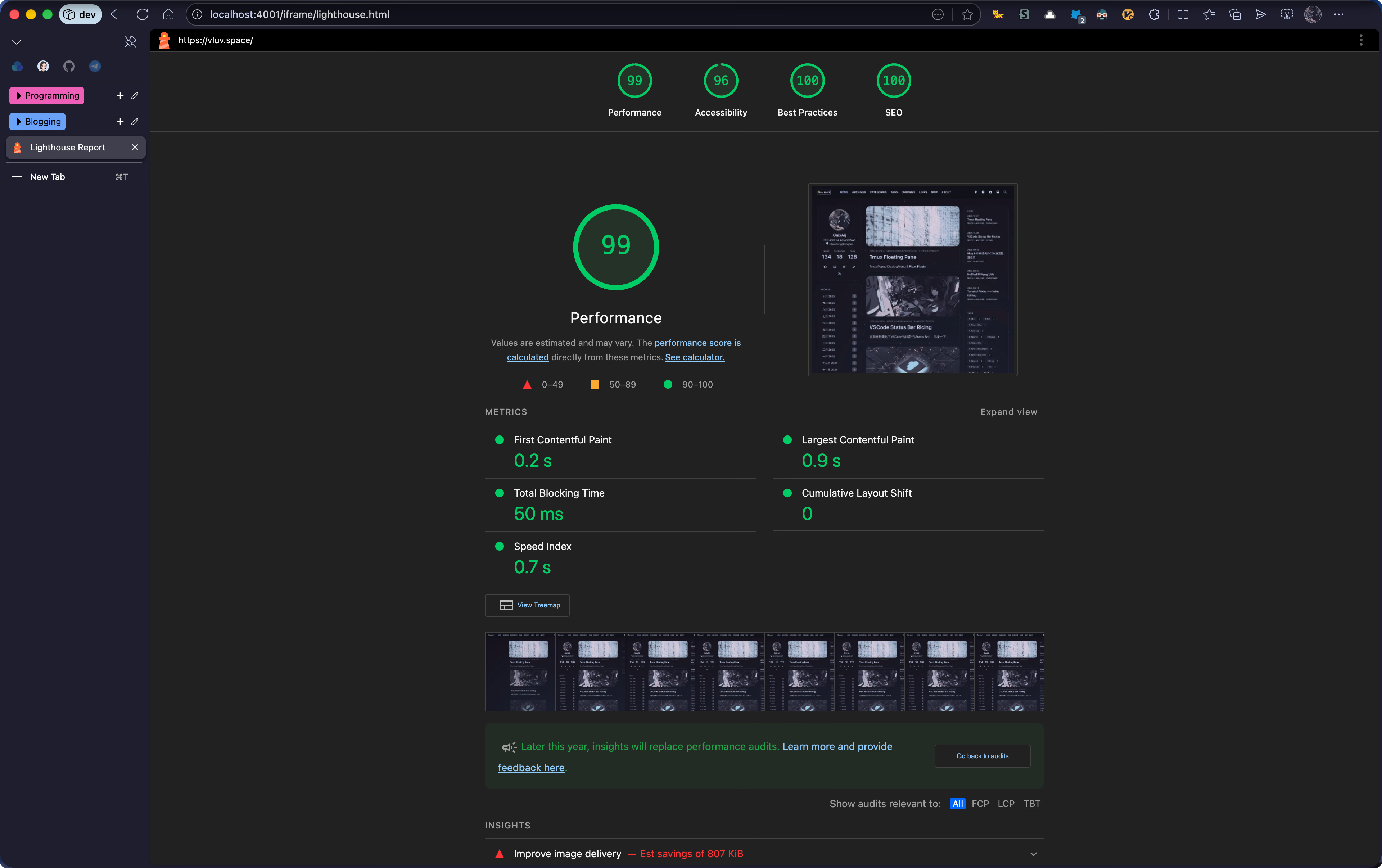
😄 效果还不错,下午测出一轮 `Performance=99` 的分数
### 优化工具
主要使用Chrome DevTools的部分功能:
- Network Pannel:分析网络请求,查看请求耗时
- Coverage:定位未被调用的CSS规则&JavaScirpt代码
- LightHouse: 生成性能评分报告,并提供针对性优化建议
## 具体优化方案
### CDN 相关优化
在[[cdn_traffic_splitting|之前的文章]] 中,个人使用DNS Pod实现CDN的分线路解析,实现国内请求走缤纷云,境外走EdgeOne全球加速 (不包含大陆)。以此优化国内用户的访问响应速度。具体线路配置如下:
| 线路 | CDN | 回源站 |
| ---- | ------------------------------------- | ----------------------------- |
| 境内 | 缤纷云 | Edgeone Page
(大陆加速区) |
| 境外 | EdgeOne CDN
(全球加速,不包含大陆) | CloudFlare Page |
但部分第三方的资源(例如mathjax, medium-zoom etc.)请求是走的jsDelivery的CDN,在国内速度不佳。如果能找到合适的国内CDN源,也可以直接换。
但博客依赖的第三方资源(如 mathjax、medium-zoom 等)仍通过 jsDelivr 加载,国内访问速度不佳。如果能找到合适的国内 CDN 源,可直接替换;考虑到个人使用的第三方资源数量较少,于是选择将这些资源直接打包到构建产物中,对于Icarus来说,可参考个人提交的修改[^1]来实现。后续资源请求即可统一走个人配置的缤纷云 CDN。
这块提升还是比较明显的,国内网络环境下的 curl 测速对比结果如下:
```shell cURL测速对比
开始测试 jsDelivr CDN (https://cdn.jsdelivr.net/npm/pjax@0.2.8/pjax.min.js)
------------------------------------------------
测试 1: 连接=0.209s, 开始传输=0.830s, 总时间=0.849s
测试 2: 连接=0.209s, 开始传输=0.828s, 总时间=0.836s
测试 3: 连接=1.197s, 开始传输=1.610s, 总时间=2.597s
测试 4: 连接=0.196s, 开始传输=0.607s, 总时间=1.553s
测试 5: 连接=0.197s, 开始传输=0.659s, 总时间=0.907s
------------------------------------------------
jsDelivr CDN 平均值:
平均连接时间: 0.401s
平均开始传输时间: 0.906s
平均总时间: 1.348s
------------------------------------------------
开始测试 vluv.space (https://vluv.space/js/host/pjax/0.2.8/pjax.min.js)
------------------------------------------------
测试 1: 连接=0.100s, 开始传输=0.152s, 总时间=0.155s
测试 2: 连接=0.025s, 开始传输=0.096s, 总时间=0.097s
测试 3: 连接=0.026s, 开始传输=0.088s, 总时间=0.088s
测试 4: 连接=0.028s, 开始传输=0.079s, 总时间=0.080s
测试 5: 连接=0.030s, 开始传输=0.095s, 总时间=0.096s
------------------------------------------------
vluv.space 平均值:
平均连接时间: 0.041s
平均开始传输时间: 0.102s
平均总时间: 0.103s
------------------------------------------------
```
### 字体资源优化
如果在CSS中使用了非内置字体,那么可以考虑字体传输的优化问题。
一方面是使用高效的存储格式 (woff2)。此外,中文字体体积普遍较大,很多页面用不到全部字符,于是可以对字体进行切片。具体来说,在 `{css} @font-face` 使用unicode-range[^2]引用字体切片,浏览器会分析当前页面文字的范围,选择需要的字体切片文件下载,减少冗余传输
制作切片可能比较繁琐,多数情况下直接引用Google Font的链接即可(可能影响国内体验)。对于中文字体,则可以使用 [ZeoSeven Fonts (ZSFT)](https://fonts.zeoseven.com/) 或[字图 CDN | 中文网字计划](https://chinese-font.netlify.app/zh-cn/cdn/)提供的公益服务。例如个人是这样引用Maple Mono NF CN作为代码字体的
```html
```
### Minify HTML/JS/CSS
> [!error] Deprecated
>
> hexo all minifier压缩速度慢,压缩CSS过程中如遇到现代语法会失败。因此该方案已弃用。目前采用方案见[[post-build]]
此前优化博客性能时,我曾尝试通过 Gulp 脚本实现资源压缩,但使用后发现该方案会导致 CSS 样式异常,最终弃用了。
最近发现 [chenzhutian/hexo-all-minifier](https://github.com/chenzhutian/hexo-all-minifier) 插件可以一站式解决压缩问题,它集成了以下子插件,可以压缩HTML,JS,CSS, 本地Image。
- [hexo-html-minifier](https://github.com/hexojs/hexo-html-minifier), which is based on [HTMLMinifier](https://github.com/kangax/html-minifier)
- [hexo-clean-css](https://github.com/hexojs/hexo-clean-css), which is based on [clean-css](https://github.com/jakubpawlowicz/clean-css)
- [hexo-uglify](https://github.com/hexojs/hexo-uglify), which is based on [UglifyJS](http://lisperator.net/uglifyjs/)
- [hexo-imagemin](https://github.com/vseventer/hexo-imagemin), which is based on [imagemin](https://github.com/imagemin/imagemin)
插件开箱即用,下载好后在 `_config.yml` 中启用插件即可
```yml _config.yml
all_minifier: true # [!code ++]
```
个人习惯将压缩静态文件的操作放在CI/CD Pipeline里执行,本地调试时可以将 `NODE_ENV` 环境变量设置为 `development` 以略过压缩
### Image Delivery
图片和视频是网页中的核心元素,通常是体积最大的资源。合理的图片和视频传输优化可以显著提升用户体验
#### 选择更优的文件格式:AVIF & WebP
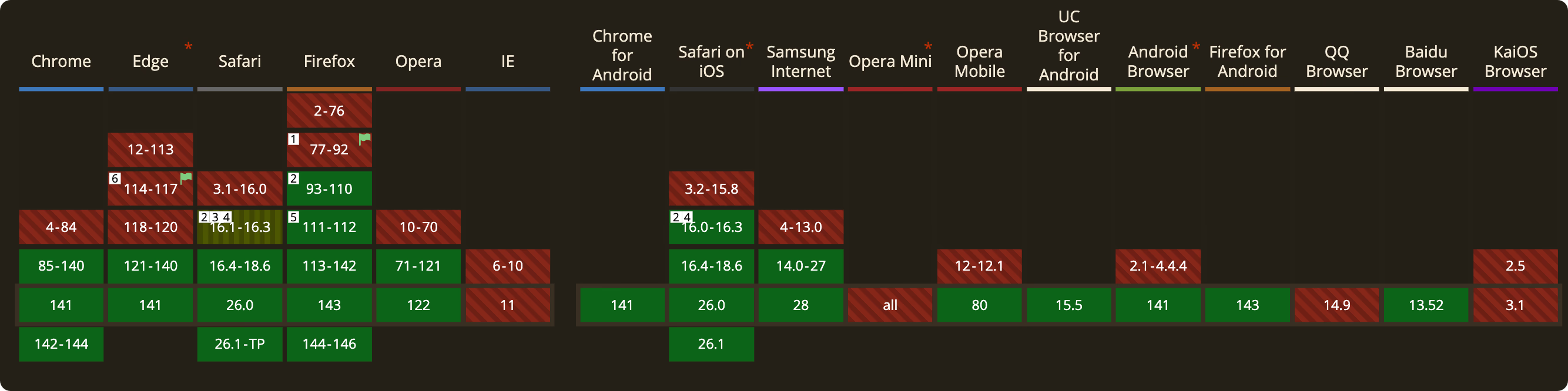
格式上的优化是很容易做的,推荐使用的格式包括Webp和AVIF[^3],可以在 [Can I use...](https://caniuse.com/) 网站上查看各浏览器是否支持该格式,除了QQ浏览器和IE,主流浏览器基本上都支持AVIF。
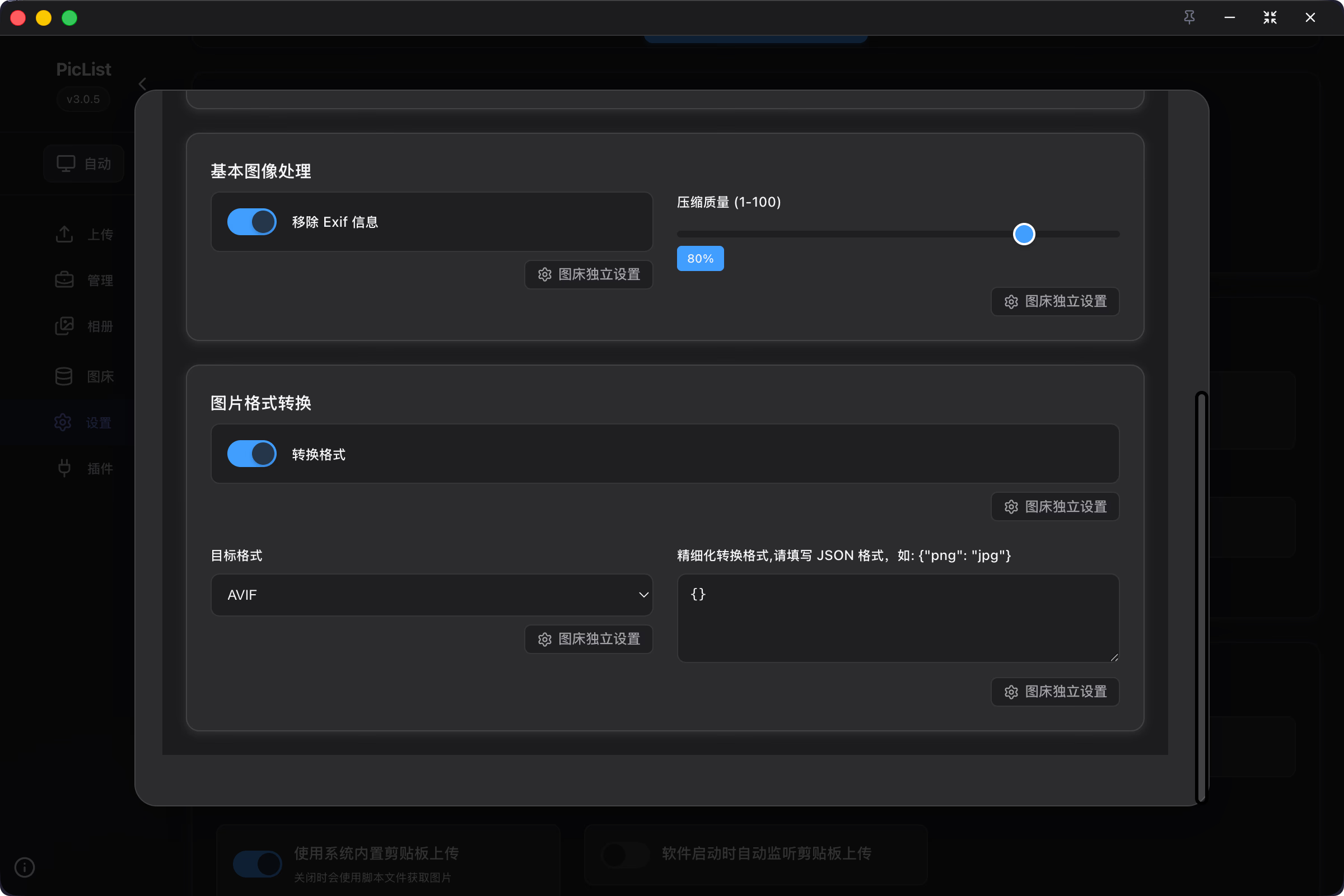
使用PicList的用户,可以在 `设置-图片预处理设置` 中设置将图片转换成AVIF格式后再上传。对于已上传的图片,可以编写脚本,使用ffmpeg批处理转换
对于视频资源,也可以采用更先进的编码格式来压缩体积。例如使用AV1,HEVC,VP9等编码格式,使用WebM等容器格式。
#### 提供响应式图片
假设图片分辨率是4K,但用户屏幕分辨率是1K。即使给用户发了原图,实际上也并没有作用,~~徒增功耗~~
提供响应式图片[^4]可以较好的优化这一点,浏览器可根据情况(屏幕分辨率,窗口大小,Device Pixel Ratio etc.),请求合适的资源,避免非必要的网络开销。
个人使用缤纷云S4 (S3 Compatible) 存储桶作为图床,Vibe Coding了一个Hexo插件,最终输出形如下面的 Image Element;
```html
 ```
如果使用的图床没有媒体处理能力,可以考虑使用 `sharp` 库,Vibe Coding一个js脚本来实现。
#### 图片渐进式加载
图片渐进式加载方案比较多,原理是先加载低清晰度的占位图,待原图加载完成后再替换占位图,避免页面加载过程中出现空白区域。个人博客是基于thumbhash[^5]实现的,效果如下,代码可参考 [Efterklang/Bitiful_Responsive_And_Progressive_Image](https://github.com/Efterklang/Bitiful_Responsive_And_Progressive_Image)
### Coverage
- 使用Chrome DevTools的Coverage功能,定位并删除冗余的CSS/JavaScript;
- 使用CSS Overview功能,分析CSS的使用情况,定位Non-simple selectors
如图,Coverage可以标记未使用的CSS/JavaScript,可以辅助我们定位冗余的代码。注意多测试几个页面,避免误删。
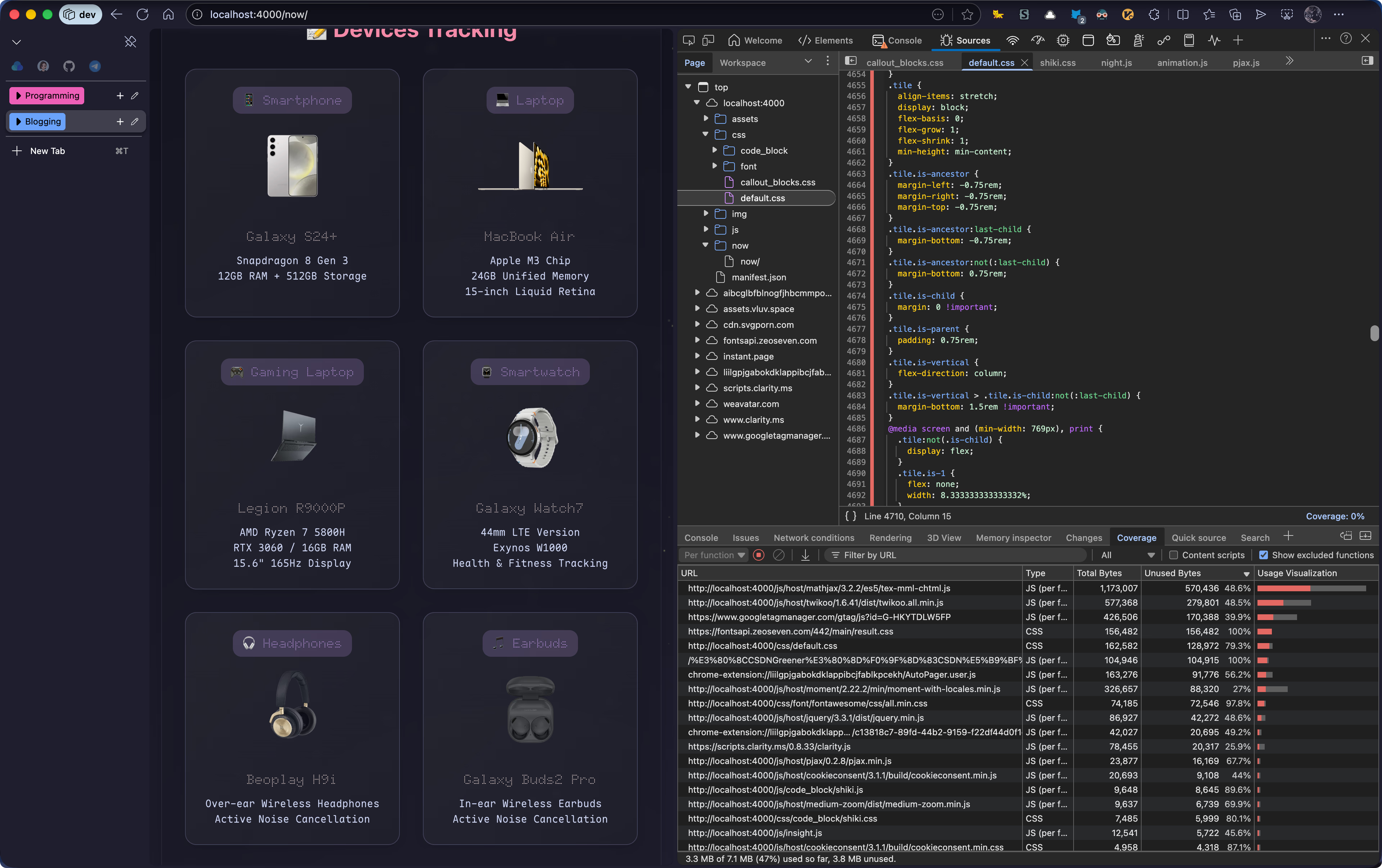
个人博客的CSS前后体积分别为 `260.8KB` 和 `18.1KB`
去掉未使用的CSS Rules后,浏览器解析CSS的时间也会减少。有能力的可以再拆分CSS文件,根据页面按需导入;同时换掉低效的CSS选择器,可以进一步提升页面性能
### JavaScript延迟加载
可以使用 `defer/async` 属性标记JavaScript脚本,防止下载脚本过程阻塞DOM解析。两者在执行script的期间有所差异,参考下图
对于Blog来说,统计访客的 `busuanz.js` 就推荐添加 `defer` 属性
```html
```
[^1]: [feat(cdn): cdn now support host · Efterklang/hexo-theme-icarus@f508116](https://github.com/Efterklang/hexo-theme-icarus/commit/f50811635981172a430396d4078ba605bcd5dd8f#diff-d780f04e2567fc97ba7b9c7c1dd57b539953f6842f2e1e085cf25b39e1afb86e)
[^2]: [unicode-range - CSS | MDN](https://developer.mozilla.org/en-US/docs/Web/CSS/%40font-face/unicode-range)
[^3]: AVIF(AV1 Image File) 格式由Alliance for Open Media(开放媒体联盟)于2019年推出
[^4]: 相关概念可参考[[responsive_image|响应式图片介绍]],实现步骤参考 [[lcp_optmization#Server Responsive Images|Server Responsive Image]]
[^5]: [ThumbHash: A very compact representation of an image placeholder](https://evanw.github.io/thumbhash/)
```
如果使用的图床没有媒体处理能力,可以考虑使用 `sharp` 库,Vibe Coding一个js脚本来实现。
#### 图片渐进式加载
图片渐进式加载方案比较多,原理是先加载低清晰度的占位图,待原图加载完成后再替换占位图,避免页面加载过程中出现空白区域。个人博客是基于thumbhash[^5]实现的,效果如下,代码可参考 [Efterklang/Bitiful_Responsive_And_Progressive_Image](https://github.com/Efterklang/Bitiful_Responsive_And_Progressive_Image)
### Coverage
- 使用Chrome DevTools的Coverage功能,定位并删除冗余的CSS/JavaScript;
- 使用CSS Overview功能,分析CSS的使用情况,定位Non-simple selectors
如图,Coverage可以标记未使用的CSS/JavaScript,可以辅助我们定位冗余的代码。注意多测试几个页面,避免误删。

个人博客的CSS前后体积分别为 `260.8KB` 和 `18.1KB`
去掉未使用的CSS Rules后,浏览器解析CSS的时间也会减少。有能力的可以再拆分CSS文件,根据页面按需导入;同时换掉低效的CSS选择器,可以进一步提升页面性能
### JavaScript延迟加载
可以使用 `defer/async` 属性标记JavaScript脚本,防止下载脚本过程阻塞DOM解析。两者在执行script的期间有所差异,参考下图
对于Blog来说,统计访客的 `busuanz.js` 就推荐添加 `defer` 属性
```html
```
[^1]: [feat(cdn): cdn now support host · Efterklang/hexo-theme-icarus@f508116](https://github.com/Efterklang/hexo-theme-icarus/commit/f50811635981172a430396d4078ba605bcd5dd8f#diff-d780f04e2567fc97ba7b9c7c1dd57b539953f6842f2e1e085cf25b39e1afb86e)
[^2]: [unicode-range - CSS | MDN](https://developer.mozilla.org/en-US/docs/Web/CSS/%40font-face/unicode-range)
[^3]: AVIF(AV1 Image File) 格式由Alliance for Open Media(开放媒体联盟)于2019年推出
[^4]: 相关概念可参考[[responsive_image|响应式图片介绍]],实现步骤参考 [[lcp_optmization#Server Responsive Images|Server Responsive Image]]
[^5]: [ThumbHash: A very compact representation of an image placeholder](https://evanw.github.io/thumbhash/)