

Blog性能优化记录
采取高效编码
采用 webp ,webm等格式进行编码,可以使用cwebp命令压缩图片。视频可以通过在线网站进行转换;
推荐的格式
- 图片 webp,avif
- 视频/动图 webm
- 字体 woff2
Best Practice
While MP4 has been around since 1999, WebM is a relatively new file format initially released in 2010. WebM videos are much smaller than MP4 videos, but not all browsers support WebM so it makes sense to generate both.
批量转换图片格式
下载libwebp库,使用cwebp命令;下面为个人自用的批量转换的 Python 脚本
windows 自带截图和 qq 截图并不支持 webp 格式的截图;
最新版的 pixpin,snipaste 等第三方截图软件支持 webp 格式
from pathlib import Pathimport subprocessimport shutilimport argparsecovert_these_types = (".png", ".jpg", ".jpeg")def convert_to_webp(input_dir: Path, output_dir: Path): """ 将指定目录及其子目录中的文件转换为.webp格式。输出文件保存在指定的输出目录下,并保留原有目录结构。 """ for file_path in input_dir.rglob("*"): # 检查文件是否为需要转换的类型 if file_path.suffix.lower() in covert_these_types: # 构建输出文件路径,/ 操作符在这里将 output_dir 和 relative_path 组合成一个新的路径对象 relative_path = file_path.relative_to(input_dir) output_path = output_dir / relative_path.with_suffix(".webp") output_path.parent.mkdir(parents=True, exist_ok=True) # 使用cwebp命令进行转换 try: subprocess.run( ["cwebp", str(file_path), "-o", str(output_path)], check=True ) except subprocess.CalledProcessError as e: print(f"Failed to convert {file_path}: {e}") else: output_path = output_dir / relative_path shutil.move(file_path, output_dir)def main(): # 创建命令行参数解析器 parser = argparse.ArgumentParser( description="Convert PNG, JPG, and JPEG files to WEBP format." ) parser.add_argument( "input_dir", type=str, help="Input directory containing images to convert" ) parser.add_argument( "output_dir", type=str, help="Output directory to save converted images" ) args = parser.parse_args() input_dir = Path(args.input_dir) output_dir = Path(args.output_dir) convert_to_webp(input_dir, output_dir)if __name__ == "__main__": main()[USAGE]python ./cwebp.py ../source/img/unused/ ./outputweb.dev 中有文章建议将 GIF 替换为视频格式以提升性能Replace GIFs with videoffmpeg -i input.gif -c vp9 -b:v 0 -crf 41 output.webm
效果测试
下面是本网站图片压缩前后的体积对比:╭───┬───────────────────┬──────┬───────────╮│ # │ name │ type │ size │├───┼───────────────────┼──────┼───────────┤│ 0 │ gallery │ dir │ 66.2 MiB ││ 1 │ gallery_origin │ dir │ 186.8 MiB ││ 2 │ thumbnails │ dir │ 19.6 MiB ││ 3 │ thumbnails_origin │ dir │ 88.0 MiB ││ 4 │ unused │ dir │ 18.4 MiB │╰───┴───────────────────┴──────┴───────────╯
- gallery 目录的体积缩小了约 64.57%
- 原始大小:
gallery_origin: 186.8 MiB;图片*54(jpg,png),视频*3(mp4) - 压缩后大小:
gallery: 66.2 MiB - 压缩体积:
186.8 MiB - 66.2 MiB = 120.6 MiB
- 原始大小:
- thumbnails 目录的体积缩小了约 77.73%
- 原始大小:
thumbnails_origin: 88.0 MiB;图片×100(jpg,png) - 压缩后大小:
thumbnails: 19.6 MiB - 压缩量:
88.0 MiB - 19.6 MiB = 68.4 MiB
- 原始大小:
Minify HTML/CSS/JS
参考我的另一篇博客,可以考虑使用 wilsonzlin/minify-html 和 ESBuild 压缩HTML/CSS/JS资源
图片懒加载
npm install hexo-native-lazy-load --savelazy_load: enable: true onlypost: false
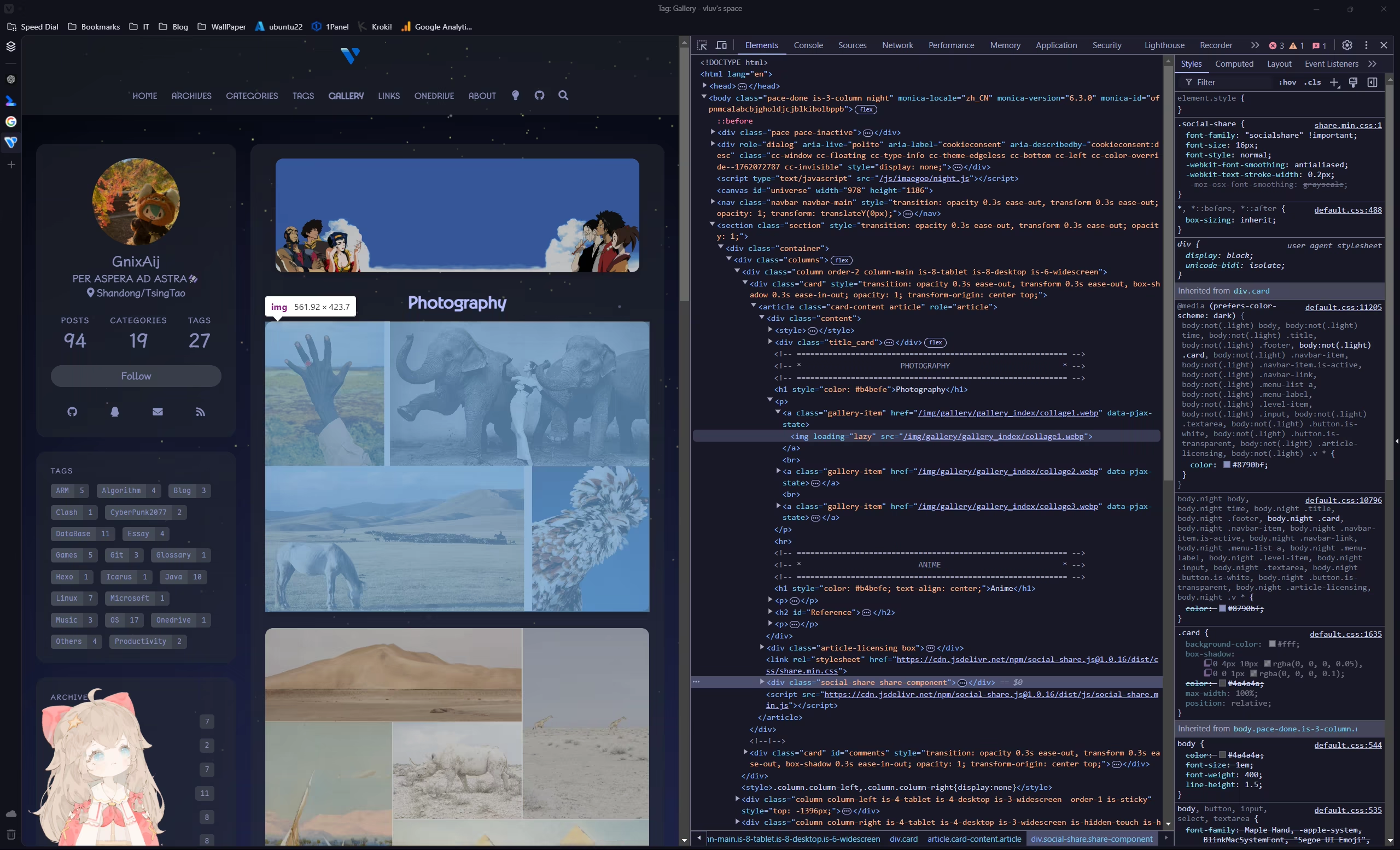
hexo clean,部署后在页面打开 devtools;可以看到 img 已添加loading="lazy"
Instant Page
instant.page uses just-in-time preloading — it preloads a page right before a user clicks on it.
根目录添加scripts/instant-page.js文件hexo.extend.injector.register( "body_end", '<script src="//instant.page/5.2.0" type="module" integrity="sha384-jnZyxPjiipYXnSU0ygqeac2q7CVYMbh84q0uHVRRxEtvFPiQYbXWUorga2aqZJ0z"></script>', "default");
Pjax
目前 Icarus 仅初步支持 Pjax,详见https://github.com/ppoffice/hexo-theme-icarus/pull/1287
OSS + CDN
一种广泛采用的免费方案:github 作为图床,jsdelivr 作为 CDN;优点是免费,但国内访问效果一般,并且这违反了它们的服务条款,也是属于对公共资源的滥用。
Cloudflare 免费提供了一定额度的 R2 + CDN 服务,可以考虑使用;需要信用卡,下载 Paypal 绑定国内银联的信用卡即可。这也是本站目前使用的方案
To be continued(?)
Tools
更多优化方案
Blog性能优化记录